
What Are AI Agents and How Can They Help Your Business
AI Agents Aren’t What You Think They Are
The rise of ai agents for business is changing the game for businesses of all sizes. Forget everything you’ve heard about AI agents. Most of what’s being pitched right now is just chatbots with better marketing. Real AI agents don’t just respond to questions, they complete entire workflows. They make decisions, take actions, and solve problems without you babysitting them every step of the way.
📋 Table of Contents
I’ve been testing AI agents at DeskTeam360 for the past 18 months, and the difference between what actually works and what gets hyped up in LinkedIn posts is massive. The good news? The technology that delivers real value is here, affordable, and probably simpler than you think.
Here’s what AI agents can actually do for your business right now, and how to implement them without getting burned by vendor promises that sound too good to be true.
What Makes an AI Agent Different from a Chatbot
A chatbot waits for you to ask it something, then responds. That’s reactive. An AI agent operates independently, monitoring for conditions, making decisions, and executing tasks based on defined goals. It’s proactive.
Here’s a concrete example from our operations. We have an AI agent that monitors our client communication channels. When a new support request comes in, it doesn’t just send an auto-reply. It reads the message, determines the urgency level, checks our team capacity, assigns it to the right person based on expertise and workload, updates our project management system, and sets follow-up reminders. All of that happens in under 30 seconds, with zero human intervention.
The key difference is autonomy. Chatbots require constant prompting. AI agents operate on their own initiative within defined parameters. They’re digital employees, not just digital assistants.
Most companies are still using AI tools that require manual input for every task. You upload a document, ask for a summary, get an answer, then figure out what to do with it yourself. AI agents flip that process. You give them a goal, they figure out how to achieve it, and they handle the execution.
The Three Types of AI Agents Your Business Needs
There are dozens of ways to categorize AI agents, but for practical business purposes, you’re looking at three categories that actually matter.
Task Automation Agents handle repetitive workflows. These are your digital interns who never get tired of doing the same thing 500 times. Data entry, email sorting, calendar scheduling, invoice processing, basic customer inquiries. The mundane stuff that eats up human productivity.
Decision Support Agents analyze information and recommend actions. They don’t make final decisions for you, but they process data faster than any human could and surface insights you’d otherwise miss. Lead scoring, risk assessment, performance analysis, content optimization recommendations.
Customer-Facing Agents interact directly with your clients or prospects. These need to be bulletproof because they represent your brand. Advanced customer support, sales qualification, appointment setting, account management for routine requests.
The companies that get this right start with task automation agents first. Lower risk, immediate ROI, and you learn how to manage AI systems before putting them in front of customers.
Free 5-Minute Video
See How DeskTeam360 Works in Under 5 Minutes
Watch the short video and see exactly how we handle design, development, and marketing implementation — so you don't have to.
Watch the Video →
The Business Case for AI Agents (Real Numbers)
Let’s skip the theoretical benefits and look at what’s happening in practice. Over the past year, we’ve tracked implementation results across 50+ businesses ranging from solo consultants to teams of 200+ people.
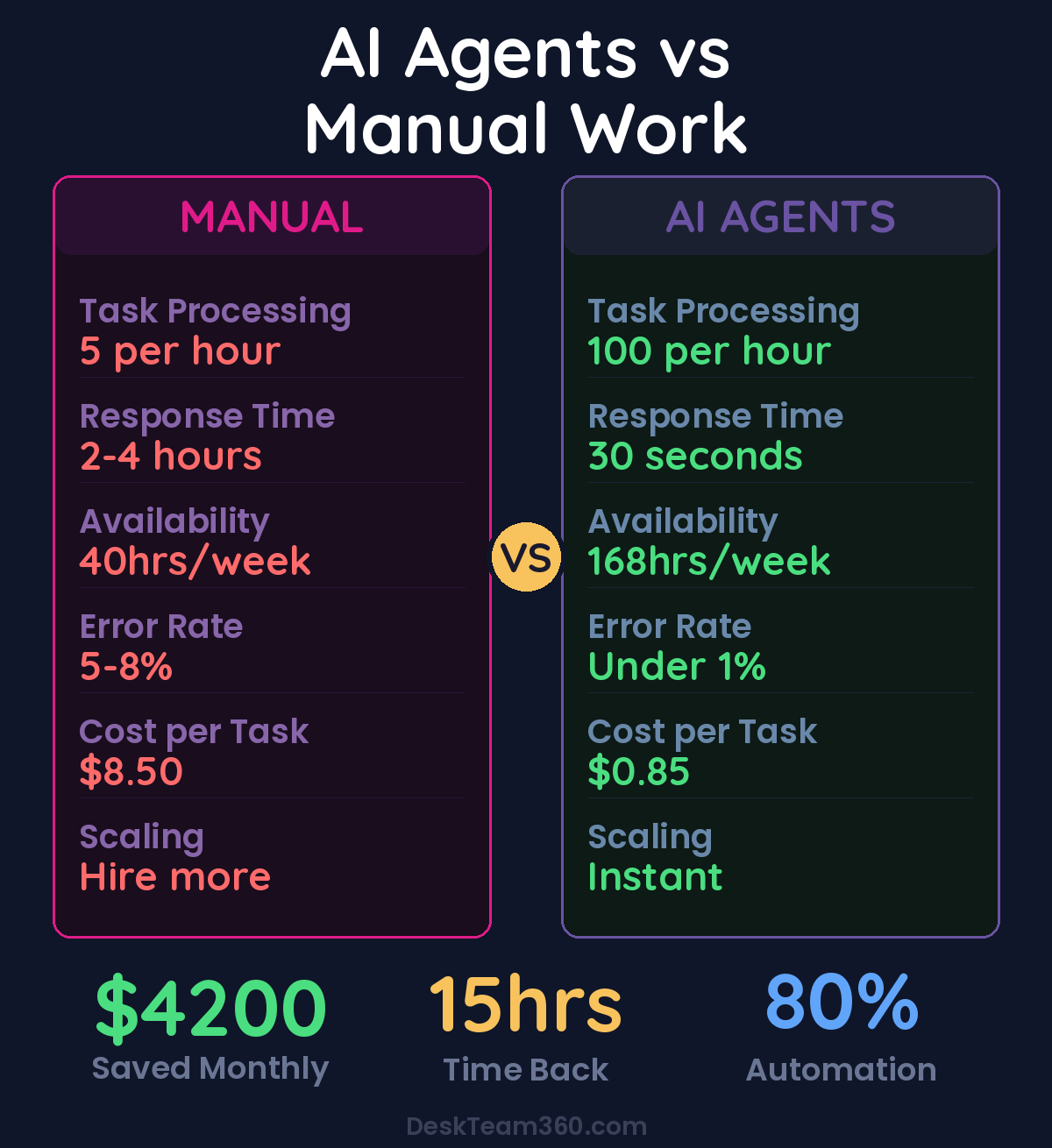
Those numbers aren’t projections or best-case scenarios. They’re median results from companies that implemented AI agents properly, with realistic expectations and proper change management.
The time savings are where the impact hits first. Our clients report getting back 8-15 hours per week on average, and that’s conservative math. When an AI agent can process 100 leads in the time it takes a human to handle 5, the productivity gains compound quickly.
The average business saves $4,200 per month within 90 days of implementing their first AI agent workflow. For most companies, that’s more than the annual cost of the entire system.
But the real value isn’t just cost reduction, it’s capacity expansion. When routine tasks run automatically, your team can focus on strategy, relationship building, and revenue-generating activities. That’s where the 40-60% revenue increases come from in the data above.
Five AI Agent Use Cases That Pay for Themselves
Theory is nice, but you need specifics. Here are the five AI agent implementations that consistently deliver ROI within the first quarter, with real examples from our client base.
Lead Qualification and Nurturing
Most businesses lose 30-50% of potential customers because they can’t respond fast enough or don’t have systems to nurture prospects who aren’t ready to buy immediately. An AI agent fixes both problems.
Here’s how it works: leads come in from your website, ads, or referrals. The AI agent immediately engages with them via email or chat, asks qualifying questions, scores them based on your criteria, and either routes hot prospects to sales or puts warm leads into appropriate nurture sequences. It can handle intake forms, schedule discovery calls, send personalized follow-ups, and even handle basic objections.
One of our e-commerce clients saw their conversion rate jump from 12% to 31% in six weeks. The AI wasn’t magic, it was just consistent and immediate in a way humans can’t match at scale.
Customer Support Automation
This goes beyond the FAQ chatbots that most companies are running. A proper customer support agent can access your CRM, check order status, process returns, update account information, and handle complex troubleshooting workflows.
The key insight is integration. Your support agent needs to actually solve problems, not just provide information. When a customer has a billing issue, the agent should be able to update payment methods, apply credits, and generate new invoices. When there’s a technical problem, it should access product documentation, run diagnostics, and escalate to the right specialist if needed.
Pro tip: Start by automating your top 10 support requests. Export your ticket data from the last 6 months, identify the most common issues, and build AI workflows to handle those specific scenarios. Don’t try to solve everything at once.
Content Creation and Optimization
This isn’t about replacing writers with AI, it’s about scaling content operations without scaling headcount. An AI content agent can research topics, generate initial drafts, optimize for SEO, create social media variations, and even update existing content based on performance data.
For businesses that depend on content marketing, this is transformational. Instead of publishing 4 blog posts per month, you can publish 20. Instead of creating one version of ad copy, you can test 50 variations. The volume enables experimentation that wouldn’t be possible with human-only workflows.
Our guide on AI content marketing strategy covers the complete implementation process if you want to go deeper on this one.
Financial Management and Reporting
Small business finances are usually a mess because the reporting and analysis work is tedious, time-consuming, and easy to put off. An AI agent can connect to your accounting software, credit card accounts, and bank feeds to generate weekly financial summaries, flag unusual expenses, track performance against budgets, and identify cash flow issues before they become problems.
This isn’t just about saving time on bookkeeping. Early warning systems for financial problems can save businesses from cash flow crises. Automated expense categorization and tax preparation reduce accounting fees. Regular performance reporting enables faster course corrections.
Sales Pipeline Management
The best salespeople are ruthlessly organized about follow-up and pipeline hygiene. Most salespeople are not the best salespeople. An AI sales agent can monitor your CRM for stalled deals, send timely follow-ups, update lead scores based on behavior, and ensure nothing falls through the cracks.
It can also handle the research and preparation work that slows down human reps. When a new lead comes in, the agent can research their company, identify decision makers, prepare talking points, and create personalized outreach sequences before the human touches the account.
How to Choose and Implement Your First AI Agent
The biggest mistake companies make is trying to automate everything at once. Start with one workflow, get it working perfectly, then expand. Here’s the step-by-step process that actually works.
Step 1: Audit Your Repetitive Tasks
Spend one week tracking how your team spends time. Not what they think they do, what they actually do. Use time tracking software, have people log activities in 30-minute blocks, or just ask them to note down every task as they do it. You’re looking for patterns.
The best candidates for automation are tasks that happen frequently, follow predictable steps, use digital information, and don’t require creative judgment. Data entry, email responses, scheduling, basic customer service, lead qualification, and reporting usually top the list.
Step 2: Calculate the ROI Potential
Pick three tasks that consume the most time and estimate the value of automating each one. How many hours per week does this take? What’s the hourly cost of the people doing it? How much would you save monthly if 80% of this work happened automatically? How much additional revenue could your team generate with those hours freed up?
For a deeper dive, check out our guide on how to create an ai employee for your business.
Don’t aim for 100% automation. Even 70-80% automation of a repetitive task creates massive value, and it’s much more realistic than trying to handle every edge case.
Step 3: Pick Your Platform
You’ve got three main options, and the right choice depends on your technical comfort and budget.
No-code platforms like Zapier Central, Microsoft Copilot Studio, or Google AI Studio let you build agents using visual workflows. Faster to implement, easier to modify, but less customization. Budget $200-800/month depending on complexity.
Low-code platforms like LangChain, Flowise, or n8n give you more control and integration options. Requires some technical knowledge but much more flexible. Budget $100-500/month plus development time.
Custom development using frameworks like CrewAI, AutoGen, or OpenAI’s Assistants API. Maximum flexibility and control, but requires developer expertise. Budget $2,000-10,000 for initial development plus ongoing maintenance.
Watch out: Don’t pick a platform based on feature demos. Ask for case studies from companies similar to yours. Test the integration capabilities with your existing tools. Most implementation failures happen because the chosen platform couldn’t connect to critical business systems.
Step 4: Start with a Pilot Project
Pick one workflow, implement it completely, and run it for 30 days before expanding. Measure everything: accuracy rates, time savings, error rates, user satisfaction. Document what works and what doesn’t.
Common pilot projects that work well: email lead qualification, basic customer support inquiries, calendar scheduling, expense report processing, or social media content creation. These are straightforward, low-risk, and show clear value when they work.
Integration Challenges (And How to Solve Them)
The technology isn’t the hard part anymore. The hard part is getting AI agents to work seamlessly with your existing business systems. Most failures happen here, in the unglamorous world of APIs and data synchronization.
Your AI agents need access to your CRM, email platform, project management tools, accounting software, and probably a dozen other systems. Each one has different authentication requirements, data formats, and rate limits. The integration complexity grows exponentially with each additional tool.
Here’s how to manage it: start by mapping all the systems your agent needs to connect with, then verify each one has usable API access (not all software does), then build and test one integration at a time. Don’t try to connect everything simultaneously.
For businesses using popular tools like HubSpot, Salesforce, QuickBooks, or Microsoft 365, most AI platforms have pre-built connectors. For custom software or niche tools, you’ll need custom integration work. Budget 40-60% of your implementation time for integration and testing.
Data quality is everything. AI agents are only as good as the data they work with. Clean up your CRM, standardize naming conventions, and establish data entry rules before implementing agents. Garbage in, garbage out still applies.
Security and Compliance Considerations
AI agents will have access to sensitive business and customer data. That creates security responsibilities you can’t ignore, especially if you handle regulated information like healthcare records, financial data, or personal information from EU customers.
Essential security measures include role-based access control (agents should only access data they need for their specific function), audit logging of all agent actions, encryption for data in transit and at rest, and regular security reviews of agent behavior.
For compliance-heavy industries, you’ll need additional safeguards. Healthcare businesses need HIPAA compliance, financial services need SOX controls, and companies with EU customers need GDPR protection. Make sure your chosen platform can meet these requirements before implementation.
The safest approach is to start with low-risk data and workflows, prove the security model works, then gradually expand access as you build confidence in the system.
For industry research and benchmarks, check out McKinsey’s State of AI report.
Managing the Human Side of AI Implementation
Technology adoption always fails if you ignore the people using it. Your team will have legitimate concerns about job security, learning new systems, and changing established workflows. Address these proactively or watch your implementation stall.
Frame AI agents as productivity amplifiers, not job replacements. Show people how automation frees them up for more interesting, valuable work. Involve team members in choosing which tasks to automate first. Train people on working with AI agents before deploying them.
Some resistance is inevitable. Focus on getting early wins with your most adaptable team members, then use those success stories to convince skeptics. People believe what they see working, not what they hear in training sessions.
Pro tip: Track and share the time savings data. When people see they’re getting 5 hours per week back for more strategic work, resistance typically melts away. Make the benefits tangible and personal.
Measuring Success and ROI
You need metrics that matter, not vanity numbers that make you feel good. Track three categories: efficiency gains, quality improvements, and business impact.
Efficiency metrics: time saved per workflow, tasks processed per hour, reduction in manual work, and cost per transaction. These show operational improvement.
Quality metrics: accuracy rates, error reduction, consistency scores, and customer satisfaction. These show whether automation is maintaining or improving standards.
Business impact: revenue per employee, profit margins, customer acquisition cost, and customer lifetime value. These show whether AI agents are moving business needles.
Set baseline measurements before implementation, then track monthly progress. The best AI agent implementations show improvement across all three categories within 90 days.
Understanding broader marketing ROI measurement principles helps you apply the same analytical thinking to AI investments.
What’s Coming Next in AI Agents
The current generation of AI agents is impressive, but it’s just the beginning. Multi-modal agents that understand images, videos, and voice are already in beta testing. Agents that can browse the web, interact with software interfaces, and handle complex multi-step workflows are rolling out now.
Within the next 18 months, expect AI agents that can attend meetings, take notes, and execute follow-up actions automatically. Agents that monitor business performance in real-time and proactively suggest optimizations. Agents that can handle complex customer service scenarios that currently require senior support staff.
The companies that start implementing AI agents now will have a massive competitive advantage when these advanced capabilities become mainstream. The learning curve for AI management isn’t trivial, better to climb it while the stakes are lower.
Getting Started with AI Agents
AI agents represent the first wave of truly autonomous business automation. They’re not replacing human judgment and creativity, they’re eliminating the routine work that prevents your team from focusing on strategy, relationships, and growth.
The technology is mature enough for production use. The platforms are user-friendly enough for non-technical teams. The ROI is compelling enough to justify the investment. What’s missing is the operational expertise to implement AI agents correctly, which is where most companies get stuck.
At DeskTeam360, we’ve been implementing AI agent systems for our clients across dozens of industries. We handle the platform selection, integration work, workflow design, and team training so you can focus on running your business while the agents handle the routine operations.
The question isn’t whether AI agents will transform business operations. They already are. The question is whether you’ll be ahead of the curve or playing catch-up with competitors who moved faster.
Free Template
The Ultimate Task Delegation Template
Stop guessing what to hand off. This template shows you exactly what to delegate, how to brief it, and how to QA the results.
Get the Free Template →