How to Create a Customer Onboarding Sequence That Reduces Churn
Let’s talk about customer onboarding sequence and why it matters for your business.
📋 Table of Contents
Why Customer Onboarding Failure Costs You Big Money
Here’s what kills me. A company spends $500, $1,000, sometimes $5,000+ to acquire a new customer. Then they blow it all in the first two weeks with a garbage onboarding experience.
I see this constantly, and it’s completely preventable.
Most customer churn happens within the first 90 days. But it’s not because the product sucks or the service is bad. It’s because the customer never figured out how to get value from what they bought. That’s an onboarding failure, not a product failure.
After 12+ years running agencies with 400+ clients served, I’ve learned that everything between “thanks for buying” and “wow, this is exactly what I needed” determines whether a customer stays for years or ghosts you before you even deliver real results.
The gap is predictable. The fix is systematic. Here’s exactly how to build a customer onboarding sequence that actually works.
What Customer Onboarding Actually Means
Let me clear something up. Customer onboarding isn’t a welcome email. It’s not a quick setup call. It’s a complete system that transforms someone who just gave you money into someone who knows how to get maximum value from your service.
A proper onboarding sequence includes welcome and confirmation communications, account or portal setup, expectation setting and documentation, training and education, first value delivery, check-ins and feedback loops, and transition to ongoing relationship management. It’s the bridge between “I just bought this” and “I love this and I’m telling everyone about it.”
Think about the last time you bought something complex. Maybe software, maybe a service, maybe even something physical that required setup. The companies that made you feel confident and supported in those first few days? Those are the ones you stuck with. The ones that left you confused and frustrated? You probably canceled or returned it.
That’s the power of great onboarding. And that’s the cost of terrible onboarding.
Free Template
The Ultimate Task Delegation Template
Stop guessing what to hand off. This template shows you exactly what to delegate, how to brief it, and how to QA the results.
Get the Free Template →
The Hidden Cost of Bad Onboarding
Bad onboarding doesn’t just create unhappy customers. It costs you money in ways most business owners never calculate.
Higher churn rates are the obvious one. Acquiring a new customer costs 5-7x more than retaining an existing one, so every customer who leaves in the first 30 days because they couldn’t figure out your system represents a massive loss on your customer acquisition investment.
If customer onboarding sequence is on your radar, this guide is for you. Let’s talk about customer onboarding sequence. Companies with structured onboarding see 23% higher retention after the first year compared to those that wing it.
Then there’s the support ticket explosion. Confused customers flood your support channels with questions that proper onboarding would have answered. More tickets mean higher support costs, slower response times, and frustrated team members who spend their days answering the same basic questions over and over.
Negative reviews follow confused customers like a bad smell. A customer who’s frustrated and confused in week one is far more likely to leave a negative review than someone who had a smooth start. And negative reviews kill future sales before they even begin.
Scope creep and misaligned expectations create ongoing friction. When you don’t set clear expectations upfront, customers expect things you never promised. This creates resentment on both sides and leads to difficult conversations that could have been prevented.
Finally, you lose referral opportunities. Happy customers refer their friends. Confused, frustrated customers don’t refer anyone. In fact, they might actively warn people away from your business.
The Welcome Email Sequence That Actually Works
The moment someone becomes a customer, an automated email sequence should kick in. This isn’t optional. It’s the foundation of everything that follows.
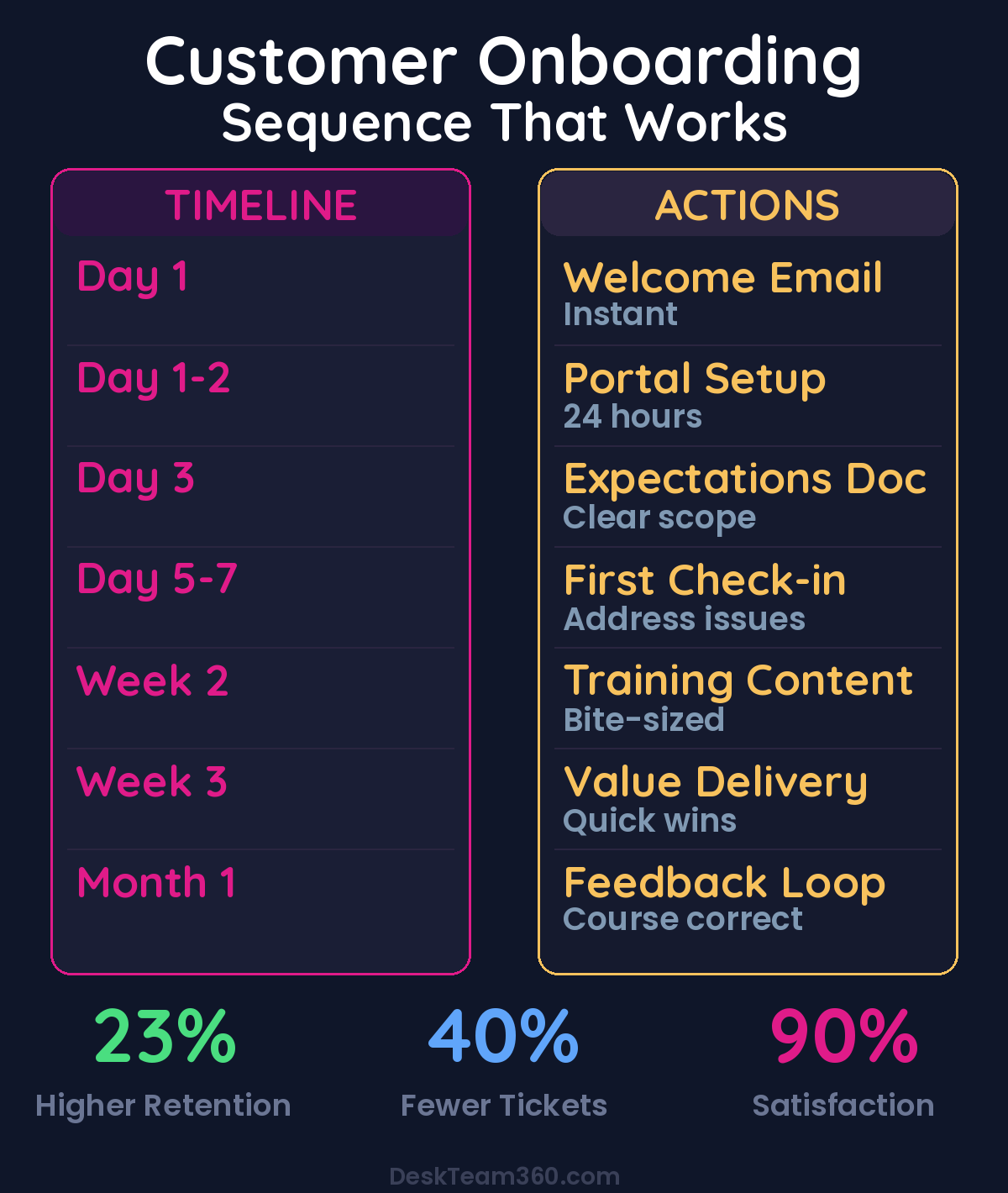
The first email goes out instantly. Confirm their purchase, thank them for their trust, tell them exactly what happens next and when, provide your support contact information, and set the tone for the entire relationship. The key here is clarity on next steps. Don’t make them wonder what happens now. Tell them explicitly: “Here’s what happens in the next 24-48 hours.”
The second email goes out within 24 hours with getting started instructions. Link to your client portal or dashboard, provide login credentials or setup instructions, walk them through any initial setup they need to complete on their end, and include a video walkthrough if possible. Keep it under 5 minutes.
Email three happens on day 2 or 3 and focuses on setting expectations. Outline your process and timeline for deliverables, explain how communication works, clarify what you need from them to deliver great results, and address common questions new clients ask.
Pro tip: Create an expectations document that proactively answers every question a new client might have. Scope of work, turnaround times, communication channels, revision policy, billing details, escalation process, and hours of operation. Write it once, update it as needed, and send it to every new customer. It eliminates 90% of client misunderstandings.
The fourth email is a check-in on day 5-7. Ask if they have any questions, confirm they’ve been able to access everything, share a helpful tip or resource relevant to their goals, and reiterate your commitment to their success.
Portal and Account Setup That Doesn’t Suck
If your business uses any kind of client portal, project management tool, or dashboard, getting the customer set up quickly is critical. Every day they can’t access their account is a day they’re not experiencing your value.
Make setup as frictionless as possible. Pre-configure what you can. Don’t make the customer fill out forms for information you already have from the signup process. Provide visual guides because screenshots and video walkthroughs beat text instructions every single time. Offer a setup call for higher-value services. A 15-minute live onboarding call can prevent weeks of confusion. And have a fallback. If they can’t figure out the tech, offer to do it for them. Remove barriers, don’t create them.
At DeskTeam360, we get new clients into our project management system immediately. They get a dedicated task board, clear instructions on how to submit requests, and a direct line to their account manager. We don’t leave new clients guessing about anything. Where to go, who to talk to, how things work.
The goal is for a new client to submit their first project request within 24-48 hours of signing up. That’s when value delivery starts, and that’s when they start feeling like the investment was worth it.
Training Content That People Actually Use
Depending on your product or service, customers may need training to get maximum value. Don’t assume they’ll figure it out on their own. Most won’t.
Video tutorials work best when they’re short. 2-5 minute videos covering specific tasks. Host them on a knowledge base or shared folder. Written guides with screenshots provide step-by-step instructions for common processes. FAQ documents should answer the 20 questions every new customer asks.
For enterprise or high-value clients, live onboarding sessions are worth the time investment. And if you understand how to run successful webinars, recordings of “getting started” sessions are excellent onboarding content.
Deliver training in bite-sized pieces. Don’t dump a 50-page manual on a new customer and expect them to read it. Drip the content over the first two weeks, tied to the actions they need to take at each stage.
We break this down further in how to scale a digital marketing agency: the complete growth playbook.
We cover this in more detail in how to create a marketing budget: a realistic framework for small businesses.
Day 1 covers how to log in and navigate the portal. Day 3 explains how to submit your first request. Day 5 teaches how to provide effective feedback. Day 7 shares tips for getting the most from the service. This gradual approach prevents overwhelm and ensures they’re learning what they need, when they need it.
First Value Delivery
Nothing solidifies a customer relationship faster than delivering value quickly. Whatever your product or service, the first successful outcome needs to happen as soon as possible.
For service businesses, complete and deliver the first project or task within the first week if at all possible. Even if it’s something small, that first delivery proves that the system works and their investment is paying off. At DeskTeam360, we aim to deliver the first completed task within a few business days of a client being onboarded. That quick win builds immediate confidence.
For SaaS products, define your “aha moment.” The specific action or outcome that makes users understand your product’s value. Then design your onboarding sequence to get users to that moment as fast as possible. For a project management tool, it might be completing their first project. For an email marketing platform, it might be sending their first campaign. Whatever it is, your onboarding should remove every obstacle between signup and that moment.
Check-Ins and Feedback Loops
Don’t go silent after the initial onboarding emails. Regular check-ins during the first 30, 60, and 90 days are critical for catching issues before they become reasons to cancel.
Week one is a quick check. Are they set up? Do they have questions? Is everything working? Week two focuses on the first delivery. How was it? Any feedback on quality or process? Month one is a comprehensive review. Are they seeing value? What could be improved? Any unmet expectations?
Month two covers usage review. Are they taking full advantage of the service? Are there features or services they’re not using? Month three is a relationship health check. Overall satisfaction, referral potential, upsell opportunity.
Ask specific questions, not generic ones. Don’t just ask “How’s everything going?” That’s too vague and people will default to “Fine.” Instead, ask “On a scale of 1-10, how easy has it been to submit requests?” or “What’s one thing we could do differently to make this better for you?” or “Is there anything you expected to be included that hasn’t been?” or “Would you recommend us to a colleague right now? Why or why not?”
This feedback is gold. It tells you exactly where your onboarding needs improvement and catches at-risk clients before they churn.
The Transition to Ongoing Management
The onboarding sequence has an endpoint. At some point, typically around 30-90 days, the customer transitions from “new client getting set up” to “established client in the normal workflow.”
This transition should be intentional, not accidental. Send a message acknowledging it: “You’re officially past the onboarding phase! Here’s a summary of what we’ve accomplished together, who your ongoing contacts are, and how to get the most out of our service going forward.”
This gives the customer a sense of accomplishment and clarity about what the relationship looks like from here on out.
Automation Tools That Make Onboarding Scalable
You don’t need to manage all of this manually. The right tools make onboarding scalable without losing the personal touch.
Email automation platforms like ActiveCampaign, Mailchimp, ConvertKit, or HubSpot handle drip email sequences automatically. Project management tools like Asana, Monday.com, ClickUp, or Basecamp manage task tracking and client collaboration. Knowledge bases built in Notion, Helpjuice, or Zendesk Guide provide self-service training content.
Loom creates quick tutorial videos, while Wistia or Vimeo host polished training content. CRMs like HubSpot, Salesforce, or Pipedrive track onboarding progress per client.
The key is connecting these tools so that onboarding tasks trigger automatically. When a new customer is added to your CRM, the email sequence starts, the portal account is created, and the onboarding checklist populates. All without someone manually initiating each step.
If you’re exploring marketing automation for your business, many of these same tools can power both your marketing and your customer onboarding.
Common Onboarding Mistakes That Kill Retention
Information overload on day one overwhelms new customers. Drip it gradually instead of dumping everything at once. No clear next action leaves customers confused. Every touchpoint should tell the customer exactly what to do next.
Generic, impersonal communications feel robotic. Use their name, reference their specific use case, make it feel personal. Assuming they’ll figure it out is a mistake. They won’t. Proactive guidance beats reactive support every time.
Not setting expectations creates problems later. Unstated expectations become unmet expectations. Document everything upfront. Ignoring the handoff from sales to delivery frustrates customers. If different team members handle sales vs delivery, the handoff must be seamless. Nothing frustrates a new client more than having to repeat everything they told the salesperson.
Watch out: No feedback mechanism means you can’t improve. If you’re not asking new clients how onboarding went, you have no way to make it better. Schedule feedback collection into your process.
Measuring Your Onboarding Success
Track these metrics to know if your onboarding is actually working: time to first value (how long between signup and first meaningful outcome), onboarding completion rate (what percentage of new customers complete all onboarding steps), support ticket volume from new customers (high volume suggests onboarding gaps), 30-day churn rate (if customers are leaving within the first month, onboarding is the problem), customer satisfaction score at 30 days (survey new clients specifically about their onboarding experience), and time to second purchase or upgrade (good onboarding accelerates expansion revenue).
Building effective sales funnels gets people in the door, but onboarding determines whether they stay and grow. Understanding how to measure marketing ROI includes tracking these onboarding metrics as part of your customer lifetime value calculation.
Build Your Onboarding Sequence Starting Today
Customer onboarding isn’t a nice-to-have. It’s the single biggest lever you have for reducing churn, increasing satisfaction, and growing lifetime value. And the best part? You build it once and it works for every new customer from that point forward.
Start with the welcome email sequence and expectations document. Those two elements alone will eliminate most onboarding confusion. Then layer in portal setup, training content, and check-in touchpoints. Automate what you can, personalize what you can’t, and continuously improve based on customer feedback.
The companies that nail onboarding see 23% higher retention rates, 40% lower support ticket volume, and significantly higher customer satisfaction scores. The investment in building a proper onboarding sequence pays for itself within the first quarter.
Free 5-Minute Video
See How DeskTeam360 Works in Under 5 Minutes
Watch the short video and see exactly how we handle design, development, and marketing implementation — so you don't have to.
Watch the Video →