How to Create a Google Business Profile: Complete Setup and Optimization Guide
Knowing how to create a google business profile can be the difference between growth and spinning your wheels.
📋 Table of Contents
Your Competitors Are Stealing Customers While You Sleep
It’s 2am on a Sunday. Someone’s kitchen faucet explodes and starts flooding their house. They grab their phone and search “emergency plumber near me.” Three businesses show up in that coveted map section at the top. Yours isn’t one of them.
By Monday morning, they’ve hired someone else and posted a five-star review for the plumber who saved their weekend. All because you don’t have a Google Business Profile, or worse, you set one up three years ago and never touched it again.
I’ve watched this exact scenario play out hundreds of times with the businesses I’ve worked with over the past 12 years. Local search isn’t optional anymore. When 46% of all Google searches have local intent, not showing up in those map results is like having a store with no sign on a busy street.
Here’s the truth: a properly optimized Google Business Profile will drive more leads than most $2,000/month ad campaigns. It’s free. It takes an hour to set up right. And it works while you sleep. Let me show you exactly how to dominate your local market.
The Google Business Profile Reality Check
Most business owners treat their Google Business Profile like that gym membership they bought in January. They set it up with good intentions, then completely ignore it. Six months later, they wonder why the phone isn’t ringing.
Meanwhile, their smart competitors are posting weekly updates, collecting five-star reviews, and answering customer questions directly in their profile. Guess who’s getting the calls?
Your Google Business Profile isn’t just a listing. It’s your digital storefront, review platform, and local SEO foundation rolled into one. When someone searches for what you do, this is often the first thing they see. Before your website. Before your social media. Before anything else.
Free 5-Minute Video
See How DeskTeam360 Works in Under 5 Minutes
Watch the short video and see exactly how we handle design, development, and marketing implementation — so you don't have to.
Watch the Video →
Setting Up Your Profile the Right Way
I’ve set up hundreds of these over the years, and there’s a right way and a dozen wrong ways. Let’s do it right the first time.
Head to business.google.com and sign in with a Google account. Not your personal Gmail, use a business email. You want this tied to your company, not your nephew’s summer internship. When that kid leaves for college, you don’t want him taking your Google access with him.
Search for your business name first. You might already have a profile that someone else created or Google auto-generated from web data. If it exists, claim it. If not, click “Add your business to Google” and let’s build it from scratch.
The business category selection is where most people screw up. Your primary category is the single most important ranking factor for local search. Don’t get cute and pick something generic like “Business Service” when “Emergency Plumbing Contractor” exists. Google needs to understand exactly what you do.
Pro tip: Your name, address, and phone number must be identical everywhere online. “123 Main St” and “123 Main Street” are different to Google. Pick one format and use it everywhere, your website, social media, business cards, everywhere. NAP consistency isn’t optional.
For location setup, if customers come to you, enter your full address. If you go to them, hide your address and specify service areas instead. Google’s rules are strict here. Use a virtual office or P.O. box and risk getting suspended.
Verification comes next, and it’s not optional. Most businesses get a postcard with a verification code. Takes 5-14 days but you need it. Some get phone or email verification if Google feels generous. Don’t try to rush this or fake it. Google’s verification team has seen every trick.
The Optimization Process That Actually Works
Setting up your profile gets you in the game. Optimizing it is how you win.
Complete profiles get seven times more clicks than incomplete ones. That’s not marketing fluff, that’s Google’s own data. Fill out every single field. Business description gets 750 characters, use them all. What do you do? Who do you serve? What makes you different from the three guys down the street doing the same thing?
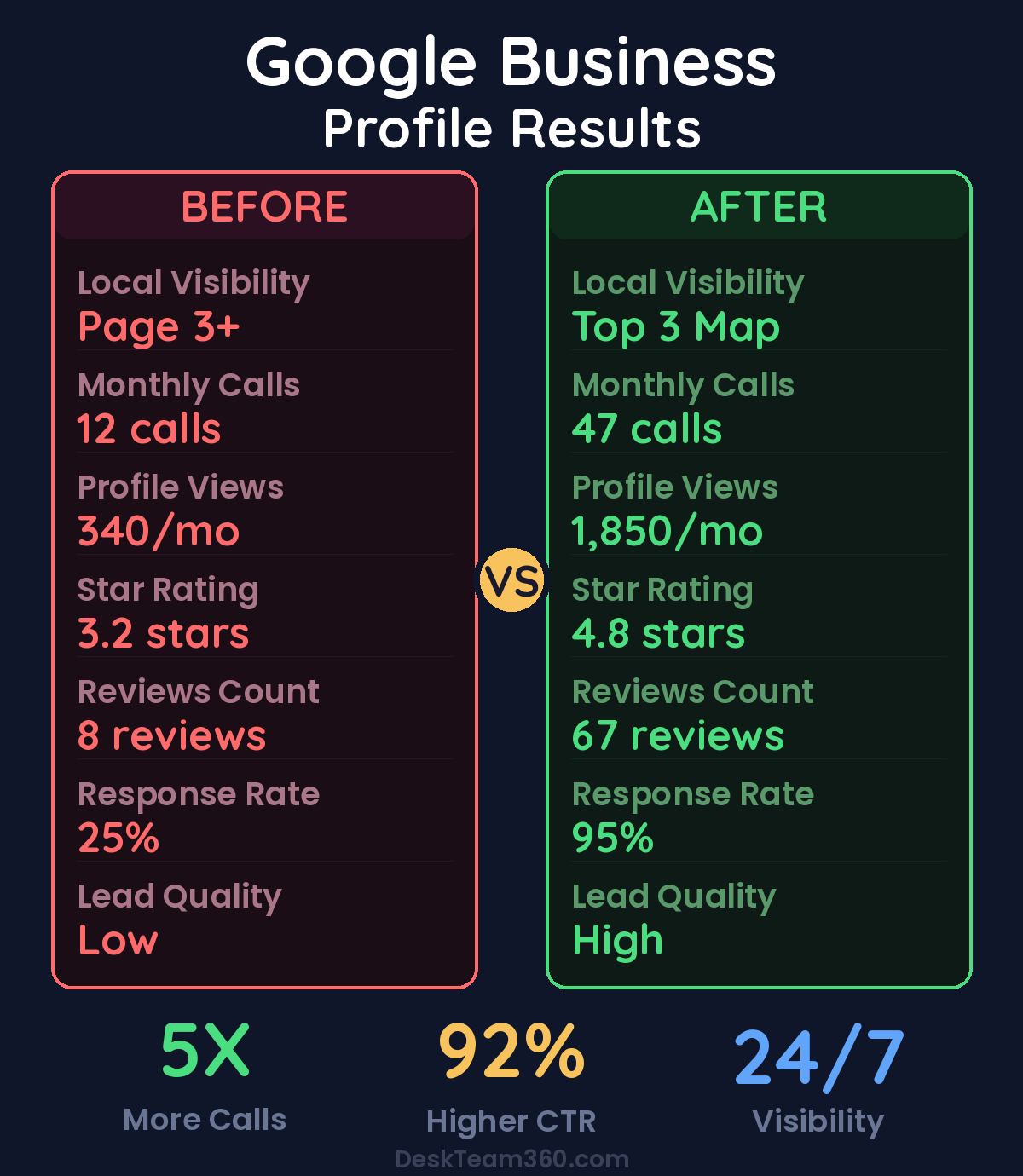
The services section is where money lives. List everything you do with descriptions and prices when possible. Don’t be vague. “Plumbing Services” tells me nothing. “Emergency Drain Cleaning – $150-$300” tells me everything I need to know to call you at 2am.
Attributes matter more than people realize. “24-hour service,” “free estimates,” “veteran-owned,” check everything that applies. Customers filter by these. If you offer free consultations but didn’t check that box, you just lost customers to the guy who did.
Hours need to be bulletproof. Regular hours, holiday hours, special event hours. Nothing destroys trust faster than driving to a business Google says is open that’s actually closed. I’ve seen customers leave one-star reviews for incorrect hours alone.
The Photo Strategy That Converts
Businesses with photos get 42% more direction requests and 35% more website clicks. Yet half the profiles I audit either have no photos or photos that look like they were taken with a flip phone in 2007.
Your cover photo is prime real estate. Make it count. Show your best work, your cleanest space, your happiest customer. This is the first thing people see. Don’t waste it on a blurry exterior shot from the parking lot.
Logo needs to be high-resolution and square format. This shows up in search results next to your business name. If it’s pixelated, customers assume everything else about your business is low-quality too.
Exterior shots help customers find you, but they need to be good. Multiple angles, good lighting, clear signage visible. If you’ve got a home-based service business, skip the exterior and focus on your work.
Stock photos are the kiss of death. Google can detect them algorithmically, and customers can spot them instantly. Every photo needs to be real, recent, and yours. If your current photos make your business look bad, it’s worth investing in proper photography.
Interior shots for businesses with physical locations need to show the space clean and inviting. Cluttered, dark, or messy photos drive customers away before they even call.
Action shots of your team working are gold. People buy from people. Show your staff doing what they do best. The electrician rewiring a panel, the designer presenting to a client, the chef plating a dish. This builds trust and credibility.
Upload new photos regularly. At least one or two per week. Google considers fresh content a ranking signal, and customers see an active business as a trustworthy business. Running a restaurant but posting the same five photos from 2019? Customers notice.
Posts: Your Secret Local SEO Weapon
Most business owners don’t know they can post updates directly to their Google Business Profile. These posts show up right in your listing and can drive serious engagement. I use them for every business I manage.
You can post general updates, events, special offers, and product highlights. Each post gets a call-to-action button and expires after seven days. The businesses that post consistently see higher engagement and better rankings.
Here’s my posting rotation: week one, share an educational tip related to your industry. Week two, highlight a specific service with photos. Week three, share a customer success story or positive review. Week four, promote a special offer or upcoming event. Repeat.
Every post needs a high-quality image and clear call-to-action. “Learn more,” “book now,” “call us,” whatever makes sense for that update. This is essentially free social media that shows up in Google search results. The ROI is insane when you actually use it.
Think of posts as mini-advertisements that cost nothing and appear when people search for your services. The businesses that post weekly get more visibility, more clicks, and more customers. The businesses that don’t post wonder why their competitors are busier.
Watch out: Posts expire after seven days, so consistency matters. Set up a calendar and stick to it. Random posting once a month isn’t helpful. Weekly posting for six months builds serious momentum.
Reviews: The Make-or-Break Factor
Eighty-eight percent of consumers trust online reviews as much as personal recommendations. Your review profile determines whether people call you or call your competitor. It’s that simple.
Getting reviews isn’t complicated, but it requires a system. Ask every happy customer, make it easy with a direct link, and follow up after every job. The businesses with 50+ five-star reviews get calls. The businesses with three reviews from 2019 don’t.
Create a direct review link from your Google Business Profile dashboard. Shorten it and put it everywhere. Email signatures, follow-up messages, business cards, your truck dashboard. Make leaving a review the easiest thing a satisfied customer can do.
Timing matters. Ask for reviews when customers are happiest, right after you’ve solved their problem or delivered great results. Wait three weeks and they’ve forgotten how thrilled they were.
Responding to reviews is non-negotiable. Every single one, positive and negative. Thank positive reviewers specifically for what they mentioned. For negative reviews, acknowledge the issue, apologize, offer to make it right, and take the conversation offline. How you handle negative reviews tells future customers everything about your character.
Businesses that respond to reviews get 30% more clicks than those that ignore them.
We break this down further in how to create email marketing templates that actually convert.
Never buy fake reviews, offer incentives for reviews, or ignore negative feedback. Google catches fake reviews eventually, and the penalty destroys your visibility. Build reviews the right way or don’t build them at all.
The Advanced Moves Most Businesses Miss
The Q&A section is completely underutilized. Anyone can ask questions on your profile, and anyone can answer them. Here’s the move: ask and answer your own most common questions. Use a different Google account to ask, then answer from your business account. This populates helpful information and prevents random people from giving incorrect answers.
Products and services sections can appear directly in search results. Add every service you offer with descriptions, photos, and prices. When someone searches “deck repair pricing,” your detailed service listing can show up before they even visit your website.
Google Business Profile Insights shows exactly how customers find and interact with your listing. Check it monthly. If direction requests are high but phone calls are low, maybe your phone number is hard to find. If website clicks are high but leads are low, your website needs work. The data tells you exactly where to focus.
Keep everything updated constantly. Hours change for holidays, services get added or removed, phone numbers change. An outdated profile is worse than no profile because it actively frustrates customers. Nothing kills a first impression faster than showing up to a business that’s closed when Google said it was open.
If you’re struggling with website conversion after driving traffic from your profile, our guide on improving website conversion rates can help turn those clicks into customers.
Common Mistakes That Kill Visibility
After managing hundreds of these profiles, I see the same mistakes constantly. Here’s how to avoid them.
Keyword stuffing your business name is a fast track to suspension. Your business name should be your actual business name. Not “Joe’s Plumbing | Best Emergency Plumber Phoenix | 24/7 Service.” Google will shut you down for this. Use your real name and put keywords in your description and services where they belong.
Virtual offices and P.O. boxes violate Google’s terms for most business types. If you get caught, your listing gets suspended. Service-area businesses should hide their address and list service areas instead.
Duplicate listings confuse Google and dilute your ranking power. If you’ve moved or changed names, old listings might still exist. Search for your business regularly and merge or remove duplicates. One strong listing beats three weak ones.
Ignoring negative reviews makes you look unprofessional and uncaring. Respond to everything, even if the customer is being unreasonable. Future customers read your responses and judge your business accordingly.
Pro tip: Check your listing monthly from a private browsing window. See it how customers see it. Is the information accurate? Are the photos current? Does everything look professional and trustworthy? If not, fix it immediately.
Beyond the Profile: Local SEO That Actually Matters
Your Google Business Profile is the foundation, but it works best as part of a complete local SEO strategy. Build citations in relevant directories like Yelp, Yellow Pages, Better Business Bureau, and industry-specific sites. Keep your name, address, and phone number consistent everywhere.
Get backlinks from local sources. Chamber of commerce, local news coverage, community organization websites, neighborhood blogs. Google wants to see that real local businesses and organizations recognize and trust you.
Create content that serves your local market. Blog about local events, write guides specific to your city, highlight neighborhood projects you’ve worked on. Show Google that you’re genuinely connected to your community, not just another national chain.
For broader digital marketing strategy beyond local search, our comparison of SEO versus PPC strategies can help you decide where to focus your marketing budget.
When to Get Professional Help
Setting up a Google Business Profile isn’t rocket science. Most business owners can handle the initial setup in an hour or two. But optimizing it, maintaining it, managing reviews, posting regularly, responding to customer questions, tracking performance, and integrating it with your broader marketing strategy? That’s where most businesses drop the ball.
You know it needs to be done. You know it drives leads. But it keeps falling to the bottom of your endless to-do list because there are always more urgent fires to put out. Three months later, your profile is stale, your competitors are ahead, and you’re wondering why the phone isn’t ringing.
The businesses that dominate local search don’t do it by accident. They treat their Google Business Profile like the lead-generating machine it is. They post consistently, respond to every review, update information regularly, and optimize based on performance data.
If you want help with the ongoing execution while you focus on running your business, that’s exactly what we do. We handle the marketing tasks that are simple in theory but time-consuming in practice. No contracts, no surprises, just consistent execution that keeps your profile optimized and your phone ringing.
For businesses looking to scale their entire marketing operation beyond just local search, our SEO service offerings cover the complete digital marketing spectrum.
Ready to Own Your Local Market?
Your Google Business Profile is free real estate on the world’s most powerful search platform. Every day you delay optimizing it is another day your competitors capture customers who should be calling you instead.
Set it up right, optimize every detail, and maintain it consistently. Or let us handle the execution while you focus on what you do best. Either way, get started today.
Free Tool
How Much Is Freelancer Management Really Costing You?
Most agency owners have never done this math. Plug in a few numbers and see your real cost in 2 minutes.
Calculate Your Hidden Costs →