How to Write Meta Descriptions That Get Clicks (With Examples)
Knowing how to write meta descriptions can be the difference between growth and spinning your wheels.
📋 Table of Contents
Why Most Meta Descriptions Are Worthless (And Yours Probably Are Too)
Let me guess. You spent weeks writing that blog post, hired a designer for your website, but when it came to meta descriptions, you either left them blank or wrote something like “Learn more about our services.” Am I right?
I’ve been running marketing teams for over 12 years, and this is the #1 mistake I see everywhere. Companies will blow $10K on a website redesign and completely ignore the 155-character snippet that determines whether anyone actually clicks on their content.
Your meta description isn’t a ranking factor. Google confirmed that years ago. But here’s what it IS: it’s the first piece of marketing copy most people see when they find you in search. It’s your elevator pitch, your movie trailer, your “swipe right” moment all rolled into 155 characters.
And most of them suck.
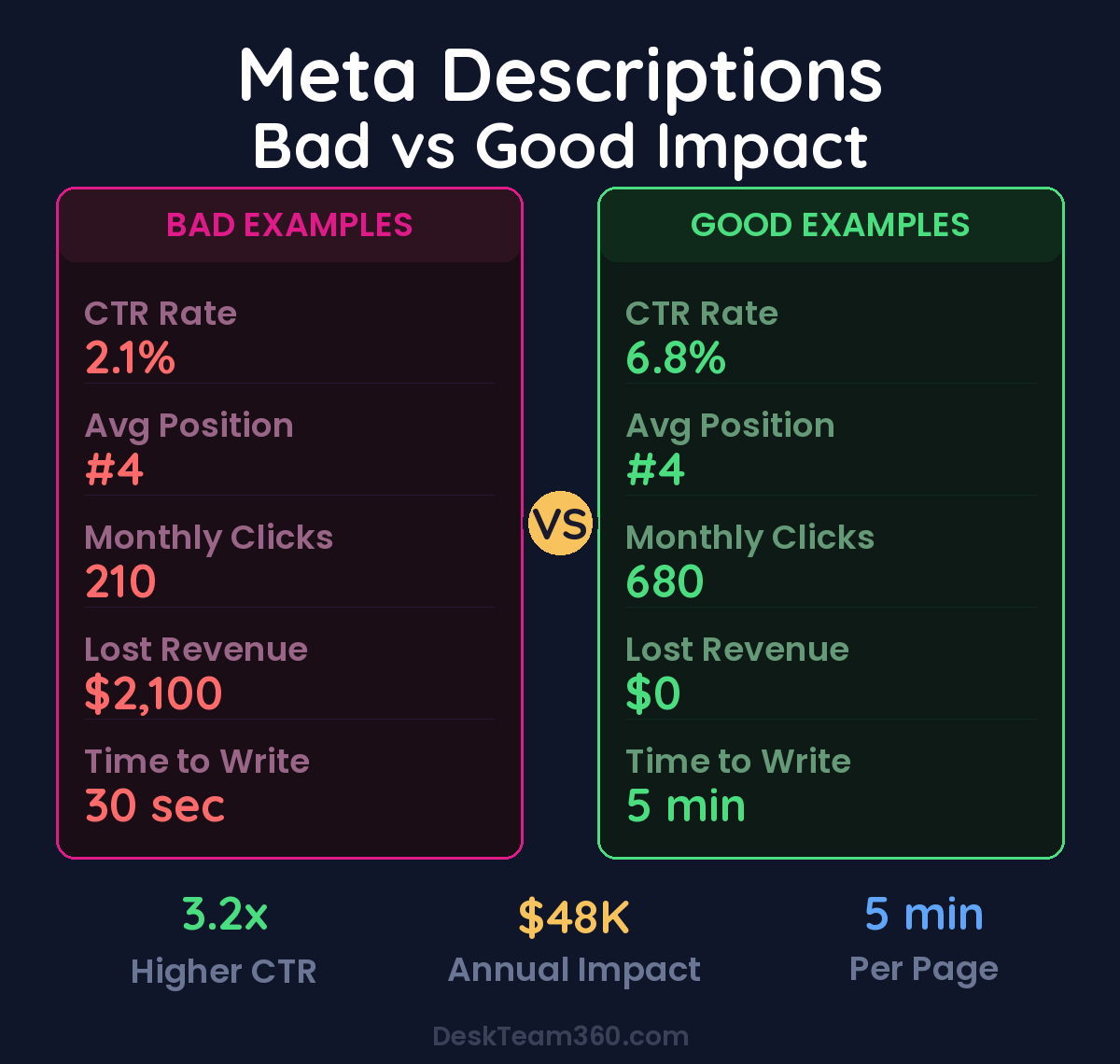
The difference between a good meta description and a garbage one isn’t subtle. A properly written meta description can double your click-through rate. I’ve seen it happen. A bad one makes your #3 ranking perform worse than someone else’s #7 ranking. That’s the power of good copy, and it’s exactly what we’re going to fix right now.
The 155-Character Formula That Actually Gets Clicks
Before I show you the formulas that work, let’s nail the basics. Most business owners get these fundamentals wrong, which kills their results before they even start.
The Sweet Spot for Length
Google displays 150-160 characters on desktop, around 120 on mobile. Go longer and Google cuts you off with those dreaded dot-dot-dots. Go too short and you’re wasting valuable real estate.
If how to write meta descriptions is on your radar, this guide is for you. Figuring out how to write meta descriptions doesn’t have to be complicated. Pro tip: Aim for 150-155 characters total, but front-load the important stuff in the first 120 characters. Mobile users make up 60%+ of most website traffic, so if they can’t see your value proposition, you’re toast.
Here’s what I mean by front-loading: your keyword, your main benefit, and your unique angle all need to happen in those first 120 characters. The last 30-35 characters can be your call-to-action or additional details.
Keywords That Actually Matter
When someone searches and your target keyword appears in your meta description, Google bolds it in the results. That visual emphasis draws the eye and screams relevance. But keyword stuffing is still stupid. Write for humans first. If your keyword fits naturally, include it. If you have to twist your copy into pretzel shapes to force it in, skip it.
Google rewrites about 40% of meta descriptions anyway when they think they can do better. And they’re often right when your description doesn’t match what people are actually searching for.
The Call-to-Action Element
Every meta description needs a reason to click. This isn’t Wikipedia. You’re not just informing, you’re selling. Your CTA doesn’t have to be “click here” (please don’t). It can be “discover why,” “see how,” “get your free,” or “compare pricing.” But it needs to exist.
Free Template
The Ultimate Task Delegation Template
Stop guessing what to hand off. This template shows you exactly what to delegate, how to brief it, and how to QA the results.
Get the Free Template →
Real Examples: Good vs. Garbage Meta Descriptions
Let me show you the difference between meta descriptions that convert and ones that waste everyone’s time.
Web Design Services Page
Garbage: “We offer professional web design services for businesses of all sizes. Our experienced team creates beautiful websites. Contact us today for more information.”
Why it’s terrible: Could describe literally any web design company on earth. No pricing, no timeline, no unique value. Reads like it was written by a bot in 2009.
Actually good: “Custom WordPress sites starting at $3,500, delivered in 6 weeks. Mobile-responsive, SEO-optimized, includes hosting. 50+ projects completed. See our portfolio.”
Why it works: Specific pricing, clear deliverable, timeline, technology stack, social proof, and a next step. The searcher knows exactly what they’re getting and what it costs.
Blog Post About Outsourcing
Garbage: “This article discusses the benefits of outsourcing marketing tasks to external providers. Read our comprehensive guide to learn more about outsourcing strategies.”
Why it’s terrible: Says nothing the title doesn’t already say. Zero personality. “Learn more” is the laziest CTA ever written.
Actually good: “Outsourcing marketing costs 60% less than hiring full-time. Here’s what to outsource first, what to keep in-house, and how to avoid vendors who disappear after taking your money.”
Why it works: Specific savings number, clear structure, personality, and addresses a real fear. If you’re researching outsourcing, our complete outsourcing guide covers everything you need to know.
Four Proven Formulas for High-Converting Meta Descriptions
After writing thousands of these across 400+ client websites, I’ve identified four formulas that consistently outperform everything else.
Formula 1: Problem + Solution + Proof
Structure: [What’s broken] + [How you fix it] + [Why they should trust you]
Example: “Tired of freelancers missing deadlines and going over budget? Our flat-rate design team delivers unlimited requests in 24-48 hours. 95% client retention rate.”
This works incredibly well for service pages where you’re targeting people actively looking for solutions. It acknowledges their pain, promises relief, and backs it up with proof.
Formula 2: Stat + Promise + Qualifier
Structure: [Compelling number] + [What they’ll get] + [Why it’s credible]
Example: “78% of consumers judge credibility by website design. Learn the 9 design mistakes killing your conversions, based on 200+ A/B tests we’ve run.”
Numbers grab attention in search results. They signal that your content is data-driven, not just opinion. The qualifier (based on real tests) adds credibility and separates you from generic advice posts.
Formula 3: Direct Answer + Context + Next Step
Structure: [Answer their question] + [Additional relevant info] + [Clear CTA]
Example: “A professional website costs $3,000-$15,000 depending on complexity and features. We break down pricing by industry and project type. Get your custom quote.”
This formula dominates for commercial intent keywords. People want specifics, especially pricing. Give them a range, explain the variables, then invite them to get personalized information. For more detailed pricing breakdowns, check our website cost guide.
Formula 4: Benefit + Method + Timeline
Structure: [What they’ll achieve] + [How you’ll do it] + [When they’ll see results]
Example: “Double your website’s conversion rate using proven UX principles and A/B testing. Most improvements implemented in 2-3 weeks. Start your optimization audit.”
Timeline is crucial for service-based businesses. People want to know when they’ll see results, not just what results they’ll get.
These formulas aren’t random. They’re built on 12 years of testing what actually works. Copy them, modify them for your industry, but don’t reinvent the wheel when these already convert.
Page-Type Strategy: Different Pages Need Different Approaches
Not every meta description should sound the same. The approach changes based on user intent and page type.
Homepage Meta Descriptions
Your homepage needs to communicate what you do, who it’s for, and why someone should choose you, all in 155 characters. Don’t try to list every service you offer. Focus on your core value proposition.
Example: “Unlimited graphic design and web development for agencies and consultants. Flat monthly rate, no contracts, 24-48 hour turnaround. Start today.”
Blog Post Meta Descriptions
Blog readers want to know what they’ll learn and why your post is worth reading over the nine other results on page one. Lead with value, skip the throat-clearing.
Avoid generic intros like “In this post, we’ll discuss…” That’s wasted space. Your meta description IS the marketing for your content. Treat it like one.
Service and Product Pages
Include specifics: pricing or pricing ranges, key features, social proof, delivery timelines, and a clear next step. Don’t be vague. Commercial searchers are comparison shopping, so give them specific reasons to choose you.
Local Business Pages
Include location, service area, and what makes you different from other local options. Local searchers want proximity and relevance.
Example: “Phoenix web design studio specializing in professional services. Custom WordPress sites from $2,500. Serving the Valley since 2015. Free consultation.”
The Five Meta Description Mistakes That Kill Click-Through Rates
I audit dozens of websites every year for our clients. These five mistakes show up on 90% of them.
Mistake 1: Copy-Pasting the Same Description Everywhere
Using identical meta descriptions across multiple pages confuses Google and searchers. Every page needs a unique description that accurately reflects that specific page’s content. If you have hundreds of pages, prioritize your highest-traffic pages first.
Mistake 2: Keyword Stuffing Like It’s 2008
“Best web design services, affordable web design, professional web design company, cheap web design Phoenix” reads like spam. Google may penalize you by rewriting it entirely, often poorly.
Mistake 3: Being Uselessly Vague
“We provide quality services to help your business succeed.” This could be any company in any industry. It tells searchers nothing useful and gives them zero reason to click your result over the nine others.
Watch out: If your meta description could describe 100 other companies, it’s too generic. Add specifics: what you do, how much it costs, how long it takes, what makes you different.
For more on this, check out our guide on how to write website copy that converts: a practical guide.
For a deeper dive, see our guide on how to create email marketing templates that actually convert.
Mistake 4: Not Writing One at All
Blank meta description fields let Google auto-generate descriptions by pulling random text from your page. Sometimes Google does okay. Often, it grabs a weird paragraph that makes no sense out of context. Don’t gamble with your first impression.
Mistake 5: Writing for SEO Tools Instead of Humans
Your meta description is marketing copy, not a technical SEO element. It’s an ad for your page. Write it like you’re convincing a real person to click, because that’s exactly what you’re doing.
Tools for Writing and Testing Meta Descriptions
You don’t need expensive software, but these free tools make optimization much faster.
The Mangools SERP Simulator shows exactly how your title and description will look in Google results. If you’re on WordPress, both Yoast and RankMath provide live SERP previews as you type, plus warnings about length issues.
For site-wide audits, Screaming Frog crawls your entire site and flags missing, duplicate, or overly long meta descriptions. Google Search Console shows your actual click-through rates, helping you identify pages that rank well but get few clicks (prime candidates for meta description optimization).
Pages ranking in positions 1-5 with CTRs below 3% need immediate attention. Your meta description is likely the culprit, not your content quality.
For industry research and benchmarks, check out Google Search Central.
AI tools like ChatGPT can generate decent first drafts, but don’t copy-paste them directly. AI descriptions tend to be generic and lack the specific details that make descriptions stand out. Use AI as a starting point, then add your specifics: numbers, pricing, timelines, and personality.
Optimization Priority: Which Pages to Fix First
If your site has hundreds of pages, don’t try to optimize everything at once. Here’s the logical priority order that maximizes impact:
Start with your homepage since it gets the most visibility and impressions. Then tackle your top 10 traffic pages using Google Analytics or Search Console data. Next, focus on your money pages like service pages, pricing pages, and contact pages where clicks directly lead to revenue. Finally, optimize blog posts already ranking on page one since they’re getting impressions but may be missing clicks.
Set a monthly rhythm: optimize 15-20 meta descriptions per month, track CTR changes in Search Console, and iterate based on results. Small improvements compound significantly over time.
For a comprehensive approach to optimizing your entire site, our website audit guide covers meta descriptions plus 15 other critical elements that impact traffic and conversions.
Measuring Success: How to Tell If Your Changes Worked
The only metric that matters here is click-through rate from search results. Here’s how to track it properly.
Go to Google Search Console, click Performance, filter by the specific page you updated, then compare CTR for the 28 days before your change versus 28 days after. Also check impressions. If impressions dropped but CTR increased, that’s still a win since you’re getting more qualified traffic.
Reasonable benchmarks: pages ranking in positions 1-5 should aim for 5-8% CTR minimum. Pages ranking #1 should target 8-12% CTR, though this varies by keyword and industry.
Don’t change your meta description and title simultaneously. You won’t know which change impacted CTR. Optimize one element, measure results, then tackle the other if needed.
Pro tip: Document your changes and results in a spreadsheet. After optimizing 50+ meta descriptions, you’ll start seeing patterns in what works for your industry and audience.
The Real Cost of Ignoring Meta Descriptions
Let’s do some quick math to show why this matters financially.
Say you rank #3 for a keyword with 10,000 monthly searches. Position #3 typically gets about 10% of clicks, so that’s 1,000 monthly visitors. If your meta description sucks and you’re only getting a 6% click-through rate, you’re seeing 600 visitors instead of 1,000. That’s 400 lost visitors every month.
If your website converts at 2% and your average customer value is $500, those 400 lost visitors represent 8 lost customers worth $4,000 in monthly revenue. That’s $48,000 annually from one underperforming meta description.
Multiply that across dozens of pages and keywords, and poor meta descriptions can easily cost six figures in lost revenue. The time investment to fix them? About 5-10 minutes per page.
Stop Leaving Money on the Table
Meta descriptions aren’t a direct ranking factor, but they absolutely impact your business’s bottom line. They’re the bridge between ranking well and actually getting traffic that converts.
Write them like marketing copy. Be specific with numbers, pricing, and timelines. Include a clear next step. Test different approaches and measure CTR changes in Search Console.
If you’d rather hand this optimization work off to experts, DeskTeam360’s team handles complete SEO optimization, including meta descriptions, title tags, and content updates. We’ve helped 400+ businesses maximize their search visibility without the headache of managing freelancers or building in-house teams.
Start with your highest-traffic pages, use the formulas I’ve shared here, and work through your site systematically. Your future self (and your bank account) will thank you.
Free 5-Minute Video
See How DeskTeam360 Works in Under 5 Minutes
Watch the short video and see exactly how we handle design, development, and marketing implementation — so you don't have to.
Watch the Video →