


What Is Retargeting and How Does It Work? Complete Guide
The Marketing Strategy That Turns Window Shoppers Into Buyers
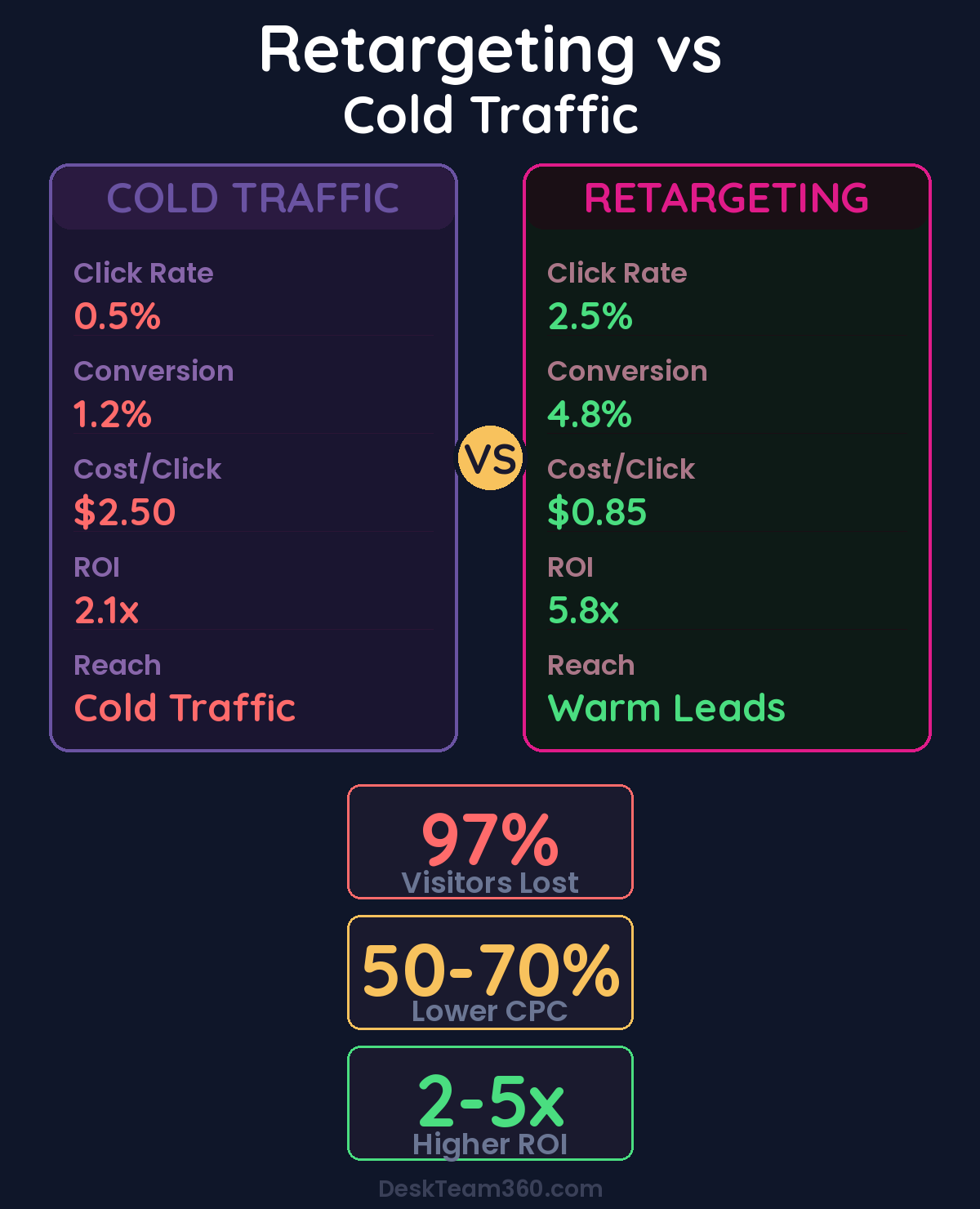
Let’s talk about what is retargeting. Here’s a stat that should keep you up at night: 97% of first-time website visitors leave without converting. Ninety-seven percent. That means for every 100 people who visit your website, only 2-3 actually fill out a form, make a purchase, or take any meaningful action.
📋 Table of Contents
The rest? They bounce. They get distracted. They meant to come back but forgot. They’re comparing you to three other options and haven’t decided yet.
I’ve watched this happen to hundreds of clients over 12+ years in this industry. A $5,000 marketing campaign drives 1,000 website visitors. Thirty of them convert. The other 970 disappear forever, taking their potential revenue with them.
Retargeting is how you get those 970 people back. It’s one of the most cost-effective digital marketing strategies that exists, and businesses who aren’t using it are leaving serious money on the table. I’m talking about 2-5x return on ad spend when done correctly.
Let me explain exactly how retargeting works, the different types that actually matter, and how to set it up without wasting your budget on the wrong audiences.
What Is Retargeting? The Simple Explanation
Retargeting (sometimes called remarketing) is advertising to people who already visited your website or interacted with your brand. Instead of showing ads to cold audiences who’ve never heard of you, you’re targeting warm prospects who’ve already expressed interest.
Think of it this way. Someone visits your website, browses your pricing page, and leaves. Over the next few days, they see your ads on Facebook, Instagram, news websites, and YouTube. Not random ads, ads specifically for your company, reminding them of what they were looking at. Eventually, they click back and convert.
That’s retargeting. And it works because you’re advertising to people who already know who you are. The click-through rates are 3-5x higher than cold ads. The conversion rates are 2-4x higher. The cost per acquisition is typically 50-70% lower.
Free 5-Minute Video
See How DeskTeam360 Works in Under 5 Minutes
Watch the short video and see exactly how we handle design, development, and marketing implementation — so you don't have to.
Watch the Video →
Pixel-Based Retargeting: How the Tracking Actually Works
The most common form of retargeting is pixel-based. Here’s the technical process in plain English, because understanding it matters for getting better results.
Step 1: Install a Tracking Pixel on Your Website
A “pixel” is a small piece of JavaScript code that you add to your website. Both Google and Meta (Facebook/Instagram) have their own pixels. When someone visits your site, the pixel drops an anonymous browser cookie that identifies that visitor.
Important clarification: the pixel doesn’t collect personal information like names or emails. It uses cookies to recognize browsers. So when that same browser shows up on Facebook or the Google Display Network, the ad platform says “hey, this person visited that website, let’s show them an ad.”
Step 2: Build Audience Segments Based on Behavior
This is where retargeting gets powerful. You don’t just retarget “everyone who visited your website.” You create specific audience segments based on what they actually did.
All website visitors in the last 30 days is your broadest retargeting audience. Pricing page visitors are high-intent prospects who were evaluating cost. Blog readers are interested but early in the funnel. Cart abandoners started checkout but didn’t finish. Product page visitors looked at specific products or services. And converters should be excluded entirely so you don’t waste budget showing “buy now” ads to people who already bought.
Pro tip: Your highest-converting retargeting audience will almost always be pricing page visitors who didn’t convert. They were literally one step away from buying. Hit them with testimonials, case studies, or a limited-time discount.
Step 3: Serve Different Ads to Each Segment
Each audience segment gets different ad creative and messaging. Someone who abandoned their cart gets a completely different ad than someone who just read a blog post about industry trends. The cart abandoner needs urgency and incentives. The blog reader needs more education and trust-building.
List-Based Retargeting: The Customer Data Approach
The second type of retargeting uses your existing contact lists, email addresses or phone numbers, instead of pixel data. You upload a list of customer or prospect emails to an ad platform. The platform matches those emails to user accounts and creates a custom audience. Then you serve ads specifically to those people.
List-based retargeting is ideal for re-engaging cold leads who haven’t opened your emails in months, upselling existing customers with ads for premium products or services, promoting events to your existing audience like webinars or product launches, and targeting specific segments like only enterprise leads or only e-commerce prospects.
The downside? Your list needs to be large enough, typically 1,000+ emails, and the match rate varies. Facebook usually matches 40-60% of email lists, while Google tends to be lower around 20-40%.
Where Retargeting Ads Actually Show Up
Retargeting ads appear across multiple platforms and placements. Understanding where your ads will show helps you create better creative and set appropriate expectations for performance.
Google Display Network Retargeting
Google’s Display Network reaches over 90% of internet users across 2 million+ websites. Your retargeting ads can appear on news sites, blogs, apps, and YouTube. These are typically banner ads in various sizes, and the quality varies wildly depending on the website.
Google Search Retargeting (RLSA)
Remarketing Lists for Search Ads lets you adjust your search ad bids for people who’ve previously visited your website. So when a past visitor searches for your keywords, you can bid more aggressively to make sure you show up at the top. This is incredibly effective because it combines high intent (they’re actively searching) with warm audience (they know your brand).
Facebook and Instagram Retargeting
Meta’s retargeting is arguably the most powerful because of the platform’s deep user data and highly visual ad formats. Your retargeting ads appear in the Facebook News Feed, Instagram Feed, Instagram Stories, Facebook Marketplace, and the Audience Network. The targeting precision is unmatched.
LinkedIn Retargeting
For B2B businesses, LinkedIn retargeting is incredibly effective. You can retarget website visitors with Sponsored Content, Message Ads, or Text Ads, reaching decision-makers in a professional context. It’s more expensive per click, but the quality of B2B leads is typically higher.
YouTube Retargeting
Video retargeting ads on YouTube are massively underutilized by most businesses. Pre-roll and mid-roll video ads shown to people who’ve visited your website have high engagement because video is naturally more attention-grabbing than static banners. And YouTube’s auction prices are still relatively low compared to Facebook.
How to Create Retargeting Ads That Actually Convert
Setting up retargeting is the easy part. Any marketing intern can install a pixel and create an audience. Creating ads that actually bring people back and get them to convert? That takes strategy.
Match the Message to the Funnel Stage
The biggest mistake in retargeting is using the same generic ad for everyone. Your messaging should match where the visitor was in their buying journey, not where you want them to be.
Top of funnel visitors like blog readers and homepage browsers should see educational content, lead magnets, or brand-building ads. These people are early in their research. Don’t hard-sell them, add value instead. Middle of funnel visitors like service page and product page browsers should see case studies, testimonials, or comparison content. These people are evaluating options. Help them see why you’re the best choice.
Bottom of funnel visitors like pricing page viewers and cart abandoners need direct messaging. Limited-time offers, free consultations, discount codes, or urgency-based messaging. These people were about to buy. Remove the last friction point, don’t add more education.
Campaigns that segment retargeting audiences by funnel stage see 65% higher conversion rates compared to one-size-fits-all approaches.
Use Dynamic Creative for E-Commerce
If you sell products online, dynamic retargeting ads automatically show users the specific products they viewed on your site. Someone looked at a blue running shoe? They see an ad for that exact shoe, not a generic ad about your shoe store. This personalization dramatically increases conversion rates, typically 2-3x higher than static ads.
Keep Creative Fresh to Prevent Ad Fatigue
Ad fatigue is real and it kills retargeting performance. If someone sees the same retargeting ad 30 times over two weeks, they stop noticing it. Or worse, they get annoyed and start associating your brand with being pestered. Rotate your creative every 2-3 weeks and have at least 3-4 ad variations running at any time.
For help producing high-volume ad variations without breaking your budget, our guide on outsourcing ad creative design covers how to scale creative production efficiently.
Frequency Caps: The Setting Most People Ignore
Frequency caps limit how many times a single person sees your retargeting ad within a given time period. This is critically important and almost universally ignored by beginners, which is why most retargeting campaigns either waste budget or annoy potential customers.
Why Frequency Caps Matter More Than You Think
Without frequency caps, your retargeting campaigns will show your ad to the same person dozens of times per day. That’s not marketing, that’s stalking. It wastes your budget showing the same person your ad 47 times instead of reaching 47 different people. And it actively damages your brand perception.
I’ve seen companies blow through their entire monthly ad budget in three days because they had no frequency caps and Meta decided to show their ad to the same 200 people all day long. Don’t let the algorithm make that decision for you.
Watch out: The default frequency setting on most platforms is “unlimited impressions.” That means if the algorithm thinks your ad will get clicks, it’ll show it to the same person 50 times in a row. Always set manual frequency caps before launching any retargeting campaign.
Recommended Frequency Cap Settings
Display ads should be capped at 3-5 impressions per user per day, 15-20 per week. Social media ads should be 1-2 impressions per user per day because social feeds are more personal, so lower frequency works better. Video ads should be 2-3 impressions per user per week because video ads are more intrusive, so keep frequency low.
These aren’t hard rules, test and adjust based on your audience and performance data. But starting with conservative caps and loosening if needed is always smarter than blasting people with unlimited impressions and having to recover from a damaged reputation.
Retargeting Audience Duration: How Long to Follow People
Your retargeting audience “window” determines how long someone stays in your retargeting pool after visiting your site. This should match your typical buying cycle, not your wishful thinking about how long people should take to buy.
E-commerce impulse purchases like clothing or small electronics should use 7-14 days. E-commerce considered purchases like furniture or electronics should use 14-30 days. B2B services should use 30-90 days. High-ticket services like enterprise software or real estate should use 60-180 days.
Don’t set a 180-day retargeting window for a $20 product. By day 15, that person either bought it elsewhere or doesn’t want it. You’re wasting impressions. On the flip side, don’t use a 7-day window for a $50,000 B2B contract. The sales cycle is way longer than that, and you’ll lose prospects just as they’re getting ready to evaluate seriously.
Setting Up Your First Retargeting Campaign Step by Step
Here’s the actual setup process for both Google and Facebook, because the interface changes constantly but the core steps stay the same.
Google Ads Retargeting Setup
Install the Google Ads tag (global site tag) on every page of your website. Create audience segments in Google Ads under Audience Manager, start with “All Website Visitors (30 days)” and “Pricing Page Visitors (30 days)”. Build a Display campaign and select your retargeting audience as the target. Upload ad creative in multiple sizes, 300×250, 728×90, and 160×600 at minimum because different websites use different banner sizes. Set frequency caps at 3 impressions per day, 15 per week. Exclude converters from your audience so you’re not wasting budget.
Facebook/Meta Retargeting Setup
Install the Meta Pixel on your website via Events Manager, and verify it’s firing correctly with the Pixel Helper browser extension. Create Custom Audiences based on website traffic, start with “All Website Visitors (30 days)” and “Viewed Specific Page” audiences for your key pages. Build a campaign with “Conversions” or “Traffic” as the objective depending on your goal. Select your Custom Audience as the target, not lookalike audiences, actual retargeting. Upload ad creative in square and vertical formats because they work best in mobile feeds. Set frequency controls at 1-2 impressions per day.
The setup is just the beginning. Most businesses install the pixels, create one audience, upload one ad, and wonder why their retargeting “doesn’t work.” The magic happens in the segmentation, creative rotation, and ongoing optimization, not the initial setup.
Common Retargeting Mistakes That Kill Performance
After watching hundreds of retargeting campaigns over the years, I’ve seen the same mistakes over and over. Here’s how to avoid the big ones.
Not excluding converters is the biggest waste. Showing “Buy Now” ads to someone who already bought is wasteful and annoying. Always create exclusion audiences for people who’ve converted. Using one audience for everything misses the entire point. A blog visitor and a pricing page visitor need completely different messaging. Segment by behavior and funnel stage.
For industry benchmarks and research, see Ahrefs Blog.
For industry research and benchmarks, check out Google Search Central.
For a deeper dive, see our guide on how to do keyword research for seo: step-by-step guide.
Ignoring frequency caps wastes budget and irritates your audience. Unlimited impression frequency means the same person sees your ad 40 times while 39 other prospects never see it once. Running only one ad variation guarantees creative fatigue. Rotate regularly or watch your performance drop off a cliff after two weeks.
And the classic mistake: setting and forgetting. Retargeting campaigns need regular optimization. Check performance weekly and adjust bids, creative, and audiences based on what the data is telling you.
What Kind of Budget Do You Actually Need?
The good news: retargeting is typically the most cost-efficient form of paid advertising because you’re targeting warm audiences. CPCs are 30-50% lower and conversion rates are 2-4x higher compared to cold prospecting campaigns.
For most small to mid-size businesses, $500-$2,000 per month is a solid starting budget for retargeting across Google and Facebook. That’s enough to maintain visibility with your website visitors without exhausting your audience pool too quickly.
If your monthly website traffic is under 5,000 unique visitors, start with $500-$750. If you’re getting 10,000-20,000 monthly visitors, $1,000-$1,500 works well. Above 20,000 monthly visitors, you can justify $2,000+ in retargeting spend because you have enough audience volume to support it.
For help creating the landing pages your retargeting ads send traffic to, check out our guide on outsourcing landing page design that converts visitors instead of confusing them.
Advanced Retargeting: Beyond the Basics
Once you’ve mastered basic retargeting, there are advanced strategies that can 2-3x your results.
Sequential retargeting shows different ads in a specific order. First ad focuses on problem awareness, second ad introduces your solution, third ad handles objections, fourth ad includes urgency or incentives. Cross-platform retargeting coordinates your messaging across Google, Facebook, and LinkedIn so prospects see consistent messaging regardless of where they browse.
Video view retargeting creates audiences based on how much of your video ads people watched. Someone who watched 75% of your 2-minute explainer video is much more qualified than someone who watched 5 seconds. Retarget them with different messaging.
Lookalike audiences based on your retargeting converters help you find new prospects who behave like people who actually buy from your retargeting campaigns, not just people who sign up for free trials.
If you’re running complex marketing campaigns that need this level of coordination, our guide on marketing team structure covers how to organize your team for advanced campaign management.
Start Retargeting Before Another Lead Slips Away
Every day you’re not retargeting, 97% of your website traffic is visiting once and disappearing forever. Every day you wait to implement this, you’re losing money that you can’t get back.
Install your pixels today, not next week. Set up your first audience segments for all visitors and high-intent pages. Create ads that match each stage of the buying journey, not generic “check us out” messaging. And set frequency caps so you’re persuading prospects, not pestering them.
The companies that implement retargeting correctly see 15-25% of their new customers come from retargeting campaigns. That’s recurring revenue that happens automatically once you set it up correctly.
If you need help with ad creative, landing page design, or any of the other moving pieces that make retargeting campaigns actually perform, check out DeskTeam360’s pricing plans. Our team handles the creative production and optimization work so you can focus on running your business while the leads come in.
Free Tool
How Much Is Freelancer Management Really Costing You?
Most agency owners have never done this math. Plug in a few numbers and see your real cost in 2 minutes.
Calculate Your Hidden Costs →