How to Create a Portfolio Website That Wins Clients
Knowing how to create a portfolio website can be the difference between growth and spinning your wheels.
📋 Table of Contents
Most Portfolio Websites Are Sales Killers
I review about 50 portfolio websites every month as part of client onboarding at DeskTeam360. Here’s what I see constantly: gorgeous work trapped inside terrible presentation. A photographer with stunning wedding shots buried under six navigation clicks. A designer whose rebrand work is world-class but their own website looks like it was thrown together in 2015. A developer with impressive app builds showcased in tiny thumbnails that tell no story.
Your portfolio isn’t just a digital filing cabinet for your work. It’s your most powerful sales tool, and most creative professionals are completely sabotaging it. I’ve watched talented designers lose $50K contracts because their portfolio site confused potential clients about what they actually do. Meanwhile, their less talented competitor with a crystal-clear portfolio website gets the work.
Let me show you exactly how to build a portfolio that wins clients instead of confusing them.
Platform Choice Matters More Than You Think
Before you touch design or content, you need to pick the right foundation. This isn’t just about features and pricing. It’s about what serves your actual business goals, not what looks cool in a demo.
WordPress gives you complete control and infinite customization options. It powers 40% of the web because it works, but it requires hosting, security updates, and ongoing maintenance. Most creative professionals either love this flexibility or hate the technical overhead. There’s no middle ground. If you want the control but not the technical work, our guide on outsourcing WordPress development covers how to get it built professionally without the headaches.
Squarespace delivers beautiful templates with zero technical knowledge required. Their portfolio-specific templates are genuinely excellent, and their mobile responsiveness is flawless out of the box. But you’re locked into their ecosystem forever. You can’t export your site, integrate complex tools, or customize beyond their template limitations. For photographers, artists, and visual creatives who prioritize aesthetics over flexibility, it’s hard to beat.
Webflow sits in the middle, giving you visual design control at the code level without actually writing code. It’s like Photoshop for websites. Web designers love it because their portfolio becomes a showcase of their design skills. The learning curve is steeper than Squarespace but less technical than WordPress. If you’re a designer and your portfolio doesn’t demonstrate your design abilities, you’ve missed the point entirely.
If how to create a portfolio website is on your radar, this guide is for you. Figuring out how to create a portfolio website doesn’t have to be complicated. Watch out: Platform-based portfolios like Behance and Dribbble are great for discovery but terrible as your primary business presence. You don’t own the platform, you can’t control the user experience, and you have zero SEO control. Use them to get discovered, not to close deals.
Free Tool
How Much Is Freelancer Management Really Costing You?
Most agency owners have never done this math. Plug in a few numbers and see your real cost in 2 minutes.
Calculate Your Hidden Costs →
The Five Sections That Convert Visitors to Clients
Every effective portfolio website has the same core sections. Skip any of these and your conversion rate tanks. I’ve tested this across hundreds of client sites.
Your homepage has three seconds to communicate who you are, what you do, and why someone should stick around. That means a headline that clearly states your specialty, not some creative wordplay that requires interpretation. “Brand identity designer for SaaS startups” beats “Creative visionary crafting digital experiences” every single time. Include a subheadline that adds context, showcase 4-5 of your best project thumbnails immediately, and provide a clear call-to-action that guides visitors deeper into your site.
Your portfolio section isn’t just a gallery. It’s a series of case studies that prove you understand business objectives, not just aesthetics. For each project, explain the client’s challenge in business terms, describe your strategic approach and creative process, showcase the deliverables with high-quality images, and document the results with metrics when possible. Clients don’t just want to see pretty work. They want proof that you can solve their problems and deliver measurable outcomes.
Your about page consistently ranks as the most visited page on portfolio sites because people hire people, not portfolios. Include a professional photo, not a cartoon avatar or stock image. Tell your background story in a way that builds credibility without sounding like a corporate bio. Mention years of experience, notable clients, or industry credentials that establish expertise. Most importantly, let your personality show through. Potential clients are trying to figure out what you’d be like to work with.
A services page removes guesswork about what you actually offer. List your specific services, briefly describe what’s included in each, and guide visitors toward your contact information. If you offer packages or pricing tiers, include them. Transparency builds trust and pre-qualifies leads. Nothing wastes more time than inquiries from people who can’t afford your services or need something you don’t provide.
Your contact page should make it ridiculously easy to reach you. Include a simple contact form with only essential fields, your email address, your general location or timezone, and expected response time. Every page on your site should have a visible path to get in touch through navigation, CTA buttons, or sticky headers. If someone has to hunt for your contact information, many won’t bother.
Design Principles That Build Trust
Portfolio websites are visual first, which means design mistakes destroy credibility faster than content mistakes. Your own website is a portfolio piece. If you’re a designer and your site looks inconsistent or outdated, that’s a massive red flag to potential clients.
White space is not wasted space. The biggest design mistake I see is cramming too much content onto every page. Your work needs room to breathe. Generous white space, clean layouts, and intentional negative space make your projects feel premium and give visitors’ eyes a clear path to follow. Cluttered portfolios make even excellent work look amateur.
Visual consistency across all pages is non-negotiable. Use a consistent color palette, typography system, and layout pattern throughout your site. If your homepage uses one font and your project pages use another, you look disorganized. If your color scheme changes between sections, you look unprofessional. Consistency demonstrates attention to detail, which clients interpret as professionalism.
Pro tip: Test your portfolio on mobile before launch. Over 60% of web traffic is mobile, and if your work doesn’t look stunning on a phone, you’re losing the majority of your potential audience. This means checking every project page, every image, and every interaction on multiple device sizes.
Image optimization isn’t optional for portfolio sites. You’re showcasing visual work, which means large files and slow load times by default. Compress all images without visible quality loss, use WebP format where browsers support it, implement lazy loading so images load as users scroll, and use a content delivery network to serve assets faster. A portfolio that takes 8 seconds to load will cost you clients. People won’t wait. For detailed guidance on this, check out our guide on optimizing images for your website.
SEO Strategy for Portfolio Websites
Most creative professionals completely ignore SEO on their portfolios, which is leaving money on the table. You’re not going to rank for “graphic designer” or “photographer” because those keywords are impossibly competitive. But you can absolutely rank for specific, location-based, or niche keywords that drive qualified traffic.
Target long-tail keywords that include your specialty and location. “Wedding photographer Portland Oregon” has less competition than “wedding photographer” and attracts people specifically looking for someone in your area. “Brand identity designer for SaaS startups” targets exactly the clients you want. “Architectural visualization artist Los Angeles” connects you with local real estate and development firms. These specific phrases convert better because the search intent is clearer.
Every project case study is an SEO opportunity if you structure it correctly. Use descriptive headings that include relevant keywords, write detailed alt text for every image that describes both the visual content and the business context, and include enough written content that search engines have something substantial to index. A project page with only images and no text won’t rank for anything.
Starting a blog on your portfolio site serves two purposes: driving organic traffic through informational keywords and positioning you as an industry expert. Write about your creative process, industry trends, tools you use, or lessons learned from specific projects. Even one well-written blog post per month can significantly increase your organic traffic over 12-24 months. If content planning feels overwhelming, our guide on creating a content calendar can help you develop a sustainable approach.
Seven Portfolio Mistakes That Kill Conversions
I’ve seen these same mistakes repeatedly, and they’re all completely avoidable with a little strategic thinking.
Showing too many projects dilutes impact. Quality beats quantity every time. Curate your 8-12 strongest pieces rather than showcasing everything you’ve ever created. Potential clients want to see your best work, not your complete catalog. If you include mediocre projects alongside excellent ones, people remember the mediocre ones.
Missing case study context is the fastest way to commoditize your work. Images without stories don’t sell strategic thinking. Explain the problem you solved, the process you used, and the outcome you delivered. Clients hire problem-solvers, not just executors. If your portfolio only shows final deliverables without context, you’re positioning yourself as a vendor, not a strategic partner.
Outdated work suggests you’re not busy. If your most recent project is from two years ago, it looks like you don’t have current clients. Keep your portfolio fresh with recent work, even if it’s a personal project or pro bono work for a cause you care about.
For industry benchmarks and research, see Smashing Magazine.
For industry research and benchmarks, check out Nielsen Norman Group.
Hidden contact information is surprisingly common and completely counterproductive. If someone is interested in your work but can’t easily figure out how to reach you, they’ll move on to someone else. Make your contact information visible and accessible from every page. This isn’t the place to be subtle or creative. Be obvious.
Auto-playing audio or video is a guaranteed way to make visitors close their browser tab immediately. It’s not 2006. Nobody wants unexpected sound when they’re browsing websites. If you have video content, let visitors choose to play it. Control should always be with the user, not the website.
Ignoring analytics means you’re flying blind. Install Google Analytics and actually review the data monthly. Which projects get the most attention? Where does traffic come from? Where do visitors drop off? This data tells you what resonates with your audience and what doesn’t. Use that insight to refine your portfolio strategy. Understanding how to measure ROI applies to portfolio performance just as much as marketing campaigns.
Poor mobile experience will eliminate 60% of your potential audience before they see your work. Test your portfolio on multiple devices and screen sizes. If navigation is clunky, images don’t load properly, or text is too small to read, you’re losing clients to competitors with better mobile experiences.
When to Outsource Your Portfolio Build
Here’s the creative professional’s paradox: the people who need portfolio websites most often have the hardest time designing their own. It’s the classic “cobbler’s children have no shoes” problem, amplified by perfectionism and proximity bias.
When you’re designing for yourself, objectivity goes out the window. You overthink every design decision, can’t decide what work to include, agonize over color palettes that don’t matter, and end up with something that doesn’t represent your abilities. I’ve watched world-class designers spend six months building a portfolio that could have been completed professionally in six weeks.
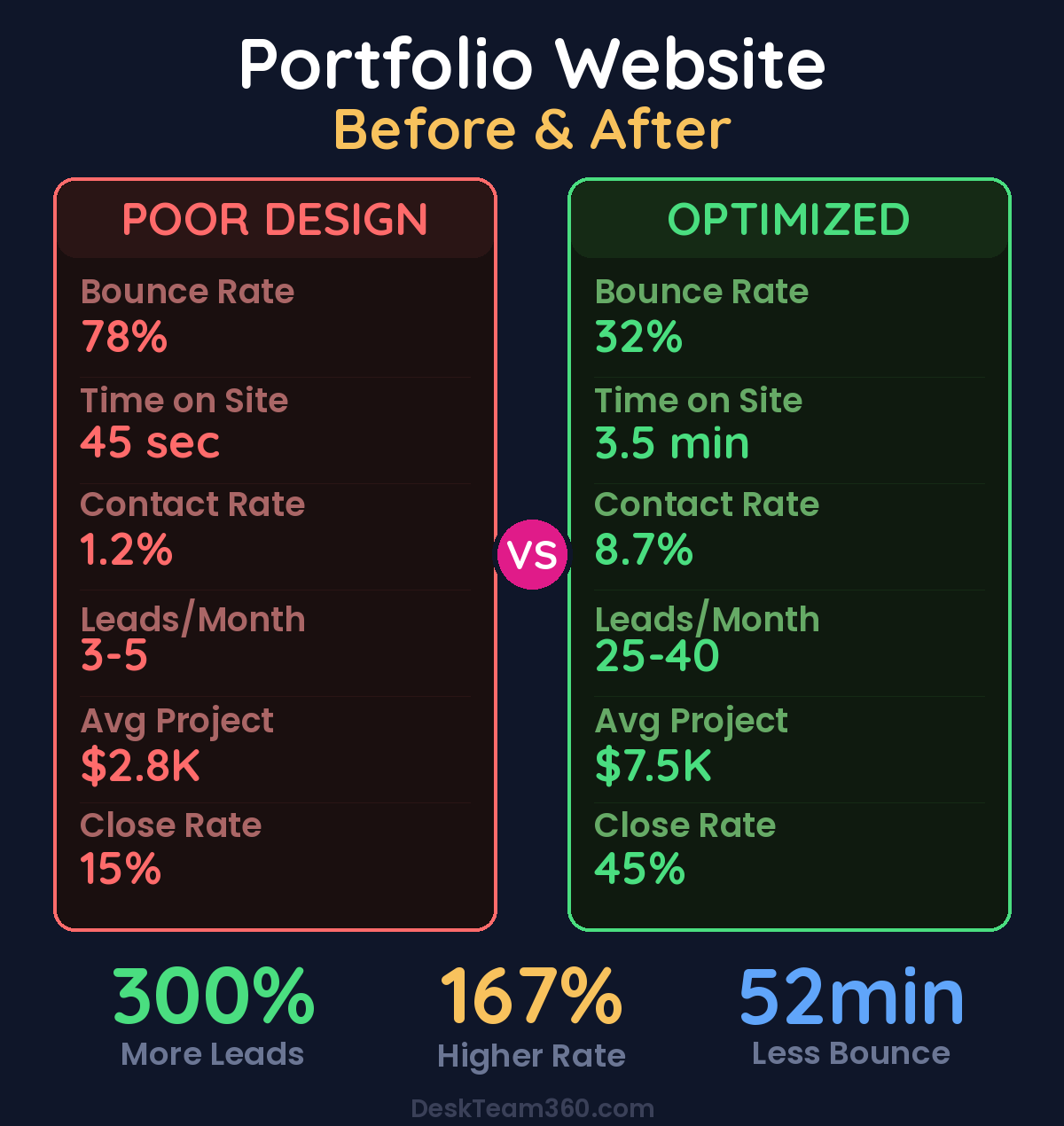
Creative professionals who outsource their portfolio builds launch 300% faster than those who attempt to build their own sites.
If this sounds familiar, consider handing the build to a professional team. You provide the strategy, brand guidelines, project assets, and content. They handle the design, development, optimization, and launch. You get a polished portfolio that actually represents your capabilities, finished in weeks instead of years.
The key is finding a team that understands creative businesses and has experience building portfolio sites specifically. General web design agencies often miss the nuances of showcasing creative work effectively. When evaluating portfolio development partners, look for examples of portfolio sites they’ve built, ask about their process for showcasing visual work, and verify they understand SEO for creative professionals.
Build a Portfolio That Drives Business
Your portfolio website isn’t just a showcase for your creativity. It’s a systematic sales tool designed to build trust, demonstrate expertise, and generate qualified inquiries. Every design choice, every piece of copy, and every case study should be engineered to convert visitors into clients.
Choose the right platform for your technical comfort level and business needs. Include the five essential sections that address client concerns and build confidence. Design with visual consistency and fast load times. Optimize for search engines with strategic keyword targeting. Avoid the common mistakes that kill conversions. And if building it yourself feels overwhelming, get professional help instead of letting perfectionism prevent you from launching.
The creative professionals who treat their portfolio as a strategic business tool instead of just an art gallery consistently win more clients, command higher rates, and build stronger businesses. The difference isn’t the quality of their work. It’s how effectively they present that work to the people who matter most: paying clients.
Free 5-Minute Video
See How DeskTeam360 Works in Under 5 Minutes
Watch the short video and see exactly how we handle design, development, and marketing implementation — so you don't have to.
Watch the Video →