

How to Build AI Workflows That Save 20+ Hours Per Week
The 20-Hour Problem Every Business Has
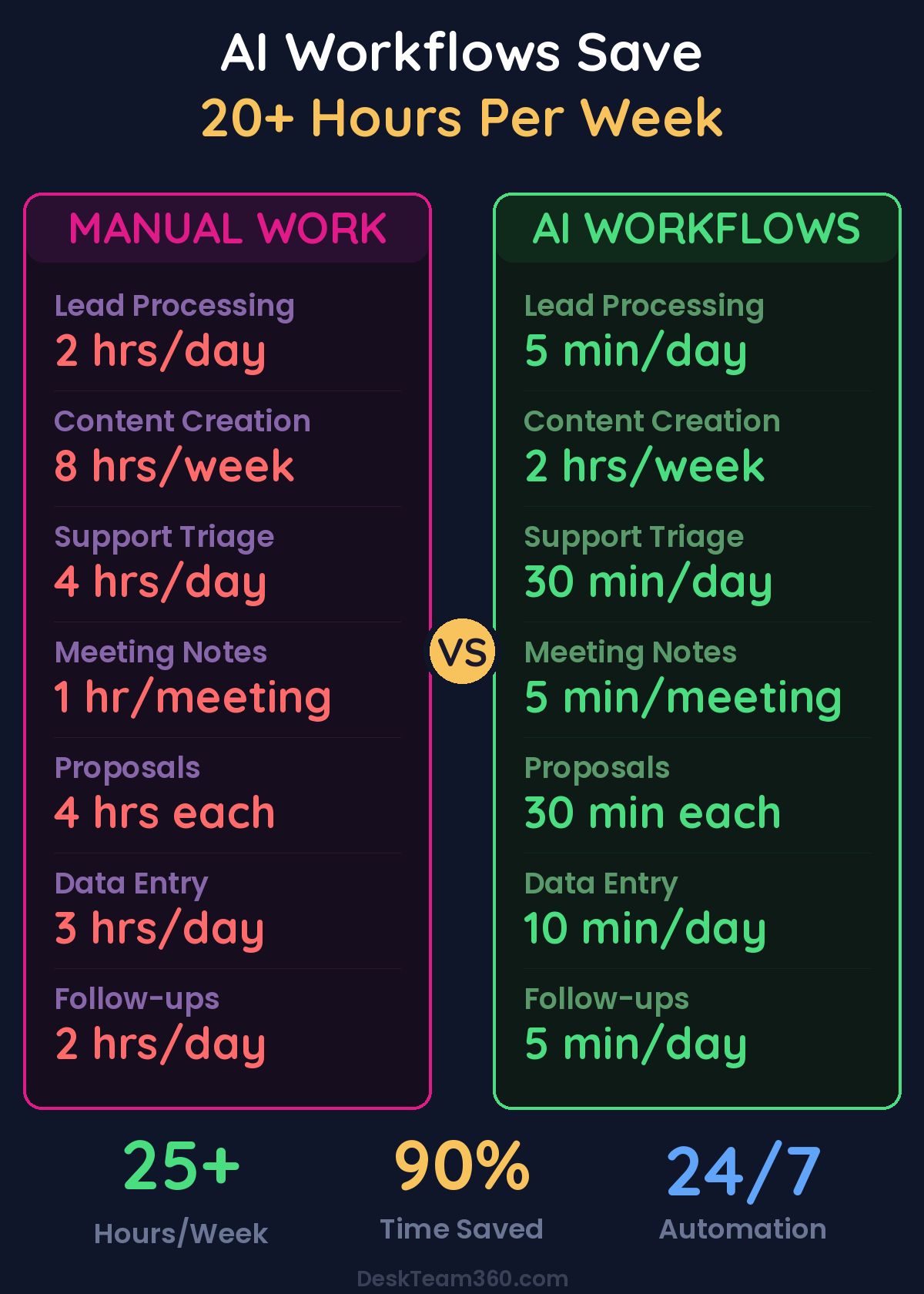
Let’s talk about ai workflows save time. I’ll make you a bet: right now, someone on your team is manually doing at least 20 hours of work per week that a well-built AI workflow could handle in minutes. I know this because I’ve audited dozens of operations, including my own, and the waste is always there, hiding in plain sight.
📋 Table of Contents
It’s the lead that comes in through a form and gets manually copied into the CRM. It’s the meeting notes that someone types up and emails to the team. It’s the weekly report that takes 3 hours to compile from 5 different dashboards. It’s the follow-up email that doesn’t get sent because someone forgot.
These aren’t big, dramatic inefficiencies. They’re small, repetitive tasks that add up to 20, 30, even 40 hours a week across your team. And in 2026, there’s no excuse for doing them manually anymore.
Let me show you exactly how to build AI workflows that reclaim that time and turn your business into an efficiency machine.
What Makes an AI Workflow Actually Worth Building
An AI workflow isn’t just automation with fancy branding. It’s a chain of automated steps where AI makes decisions, generates content, or processes information that would normally require human judgment. The key difference is that AI can handle the grey areas that basic automation can’t touch.
Basic automation says “when a form comes in, add it to a spreadsheet.” An AI workflow says “when a form comes in, analyze if they’re a good fit, enrich their data from LinkedIn, write a personalized response, score them as a lead, and if they score high enough, book a meeting on the sales calendar.” See the difference? The AI workflow handles judgment calls.
Free 5-Minute Video
See How DeskTeam360 Works in Under 5 Minutes
Watch the short video and see exactly how we handle design, development, and marketing implementation — so you don't have to.
Watch the Video →
Workflow 1: The Lead-to-Meeting Machine
This is the workflow I recommend every business build first because the revenue impact is immediate. We’re talking about transforming every lead that hits your website into either a qualified sales opportunity or a properly categorized nurture prospect within 60 seconds of submission.
How It Actually Works
When a new lead comes in through any channel, the system immediately pulls additional data about them from LinkedIn, their company website, and public databases. Then AI analyzes all that information to score the lead on a 1-10 scale based on criteria you define, things like company size, industry fit, budget signals, and urgency indicators.
Based on that score, the AI writes a personalized response and routes them accordingly. Score 8-10 gets a personal email, a meeting booked on your sales calendar, and an alert sent to your sales team in Slack. Score 5-7 goes into a nurture sequence with targeted content. Score 1-4 gets added to your general newsletter list with a polite response.
Every step gets logged in your CRM with the enriched data, lead score, and full activity history. No lead falls through the cracks. Your sales team only talks to qualified prospects. And you’ve eliminated the 5-8 hours per week someone was spending manually processing leads.
Pro tip: Start with your lead qualification criteria written out clearly before you build anything. If you can’t explain to AI what makes a good lead, your salespeople probably struggle with it too. This clarity improves more than just the workflow.
Workflow 2: The Content Production Line
Content marketing is essential but brutally time-consuming. This workflow turns your content operation into a well-oiled machine that pumps out consistent, on-brand content without burning out your team.
For a deeper dive, see our guide on how to outsource marketing tasks without getting burned (from 12 years and $1m in lessons).
Every Monday at 8am, AI analyzes your industry trends, competitor content, and keyword data to suggest five topics for the week. For approved topics, it generates detailed outlines with SEO keywords, heading structure, and key points to cover. Then it produces first drafts of blog posts, social posts, and email content based on those outlines.
Here’s the critical part though: human review stays in the process. AI is phenomenal at generating ideas and first drafts, but you still need a human editor to refine the voice, add personality, and catch anything that feels off-brand. After the editor approves content, AI automatically adapts it into platform-specific social posts and schedules everything across your channels.
The feedback loop is everything here. Performance metrics get automatically pulled weekly and fed back into the topic research step. Content that performs well influences future topic suggestions. Content that flops gets analyzed to understand why.
The result? You go from spending 6-10 hours a week on content creation to maybe 2 hours on editing and approval. Your content calendar stays full, your posting stays consistent, and your team can focus on strategy instead of execution. If you need help structuring your content approach before adding AI, our guide on creating content calendars covers the fundamentals.
Workflow 3: The Customer Support Triage System
If you’re getting more than 20 support tickets per day, this workflow will save your sanity and your team’s time. It’s especially powerful because it improves both efficiency and customer satisfaction simultaneously.
When a new support ticket arrives, AI immediately categorizes it as billing, technical, feature request, complaint, or general inquiry. It also assesses the customer’s emotional state from their language. Angry customers get escalated faster because nothing destroys relationships like letting frustrated people sit in a queue.
AI then searches your documentation for relevant solutions. If it’s a routine question with a clear answer, AI drafts a response and sends it. If it’s uncertain, AI drafts a response but flags it for human review before sending. If it detects high negative sentiment plus a complex issue, it immediately escalates to a senior support agent with full context.
Every interaction gets logged in your CRM with tags and resolution status. At the end of each week, AI generates a support trends report showing your top issues, common complaints, and resolution times. This intelligence helps you spot product problems before they become PR disasters.
Teams using this workflow see 85% of routine tickets resolved without human intervention and average response times under 3 minutes.
Workflow 4: Meeting Notes to Action Items Pipeline
Every meeting generates information that needs to be distributed and acted on. This workflow ensures nothing gets lost in the translation from discussion to execution, which is where most good ideas go to die.
When your meeting recording is available from Zoom, Google Meet, or Teams, AI transcribes the audio and generates a structured summary that includes decisions made, action items with owners, key discussion points, and any deadlines mentioned. Those action items automatically become tasks in your project management tool, assigned to the right people with due dates pulled from the conversation.
The summary gets posted to the relevant Slack channel and emailed to attendees. Then, 48 hours before any deadline, AI sends a reminder to the task owner. No more “I thought you were handling that” conversations three weeks later.
Related reading: How to Do Keyword Research for SEO: Step-by-Step Guide.
For a deeper dive, check out our guide on how to create an ai employee for your business.
This eliminates the 3-4 hours per week someone was spending typing up meeting notes and chasing action items. More importantly, it ensures that the decisions you make in meetings actually get implemented instead of forgotten. For more insights on optimizing team communication, check out our guide on improving team productivity.
Workflow 5: The Proposal Generation System
If your business sends proposals or quotes, this workflow is a game-changer that can save 3-5 hours per proposal while improving consistency and win rates.
When a sales rep marks a deal as “proposal needed” in your CRM, the system pulls all available deal information including prospect details, requirements discussed, scope notes, and pricing tier. AI then generates a customized proposal using your template, filled with prospect-specific details, relevant case studies, and appropriate scope and pricing.
The AI does a review check for completeness, pricing accuracy, and brand consistency before sending it to the sales rep for final approval. After approval, the proposal gets converted to PDF, sent to the prospect, and triggers a follow-up sequence. If the prospect views the proposal, AI alerts the sales rep so they can follow up while it’s top of mind.
Watch out: Don’t let AI handle pricing decisions without human oversight. AI is excellent at customizing language and selecting relevant case studies, but pricing strategy should always have a human brain involved in the final call.
Building Your Own AI Workflows: The Framework
Every successful workflow follows the same core pattern. Here’s the framework you can apply to automate any repetitive process in your business.
Start by mapping your current process completely. Write down every step as it exists today, including who does each step, how long it takes, what decisions are made, what information is needed, and what tools are used. This isn’t exciting work, but skipping it is why most automation projects fail.
Next, identify which steps are eligible for AI. Look for steps that involve reading and categorizing information, writing text based on templates or patterns, making decisions based on defined criteria, moving data between systems, or sending routine communications. These are your automation candidates. Steps requiring creativity, empathy, complex judgment, or relationship building should stay human.
When you redesign the process with AI handling eligible steps, always include error handling for when something goes wrong, human checkpoints where a person reviews and approves, logging that records everything for troubleshooting, and fallback paths for when the AI is uncertain.
Build the workflow in your automation platform and test it with real data until the output quality is consistently above 90%. Then launch with a human reviewing AI outputs for the first two weeks. Gradually increase autonomy as your confidence grows, and monitor performance metrics weekly to catch any drift in quality.
The Tools That Actually Work
Here’s my no-BS breakdown of the best tools for building AI workflows, based on building dozens of them over the past year.
For workflow orchestration, Make.com offers the best visual builder with a huge integration library at $9-$29 per month. It hits the sweet spot of powerful enough for complex workflows but simple enough that non-technical people can use it. If you have a technical team, n8n is the most flexible option with no per-operation costs, available free if you self-host or $20+ monthly for cloud hosting.
Related reading: How to Create an AI-Powered Customer Support System.
For AI models, OpenAI’s GPT-4o is still the best all-around choice for business tasks. It handles everything from lead scoring to content generation reliably. Anthropic’s Claude excels at long documents and careful reasoning, while Google’s Gemini integrates beautifully if you’re already using Google Workspace tools.
Your data and CRM foundation matters enormously. HubSpot provides the best free CRM with strong automation features built in. Airtable gives you a flexible database for custom workflows that don’t fit standard CRM patterns. And Clay offers powerful data enrichment and lead intelligence that makes your AI workflows much smarter about the decisions they make.
Common Mistakes That Waste Time Instead of Saving It
I’ve watched companies blow these implementations in predictable ways. The biggest mistake is over-engineering the first version. Your first workflow should be ugly and simple. Get it working, then optimize. Spending 40 hours perfecting a workflow that saves 3 hours per week means you don’t break even for 13 weeks. That’s not efficiency, it’s expensive perfectionism.
The second killer is ignoring error handling. AI makes mistakes. APIs go down. Data comes in weird formats. If your workflow doesn’t handle errors gracefully, it will break at the worst possible time and create more work than it saves. Always plan for failure modes.
Third, don’t automate a broken process. If your current process is inefficient or unclear, automating it just makes it bad faster. Fix the process first, then automate it. And never remove all human oversight too quickly. Keep humans in the loop for high-stakes outputs until you’ve built months of confidence in the system.
Measuring Real ROI
Track these metrics for every workflow you build: hours saved per week, error rate, speed improvement, revenue impact for sales-related workflows, and cost per execution. When you properly measure ROI, AI workflows almost always pay for themselves within the first month.
Here’s what the math typically looks like for a mid-size business. Before AI workflows, you might have three people spending 15 hours per week on routine tasks at an average cost of $25 per hour, totaling $1,875 weekly or $97,500 annually. After implementing five AI workflows with tool costs of roughly $200 per month, those same tasks take 5 hours per week at $625 weekly or $32,500 annually.
That’s $65,000 in annual labor savings for a $2,400 annual tool investment. The ROI is 2,600%, and that doesn’t even account for the improved consistency and 24/7 availability that AI workflows provide. For detailed guidance on measuring these improvements, our article on measuring marketing ROI applies to operational improvements too.
Start Building This Week
You don’t need a team of engineers or a six-figure budget. You need one well-designed workflow that saves your team 5+ hours per week. Build that, prove the value to yourself and your team, then build the next one. The businesses winning in 2026 aren’t the ones with the fanciest AI, they’re the ones that consistently eliminate routine work so their people can focus on what actually moves the needle.
At DeskTeam360, we’ve built and deployed dozens of AI workflows that power our daily operations and our clients’ businesses. We know what works, what breaks, and how to get maximum ROI from minimum investment. If you’d rather skip the learning curve and have experienced operators build these workflows for you, that’s exactly what we do.
We handle everything from process mapping to tool integration to ongoing optimization, so you can focus on running your business instead of debugging automation. Our workflows consistently save clients 20+ hours per week while improving quality and consistency across operations.
Free Template
The Ultimate Task Delegation Template
Stop guessing what to hand off. This template shows you exactly what to delegate, how to brief it, and how to QA the results.
Get the Free Template →