How to Create a FAQ Page That Actually Works (2025 Guide)
Knowing how to create a faq page can be the difference between growth and spinning your wheels.
📋 Table of Contents
Why Your Website Needs a FAQ Page (And Why Most Suck)
I’ve been building websites for businesses for over 12 years, and I can tell you something that might surprise you: a well-built FAQ page is one of the most undervalued assets on any website. Most businesses either skip it entirely or throw together some lazy list of questions nobody actually asks.
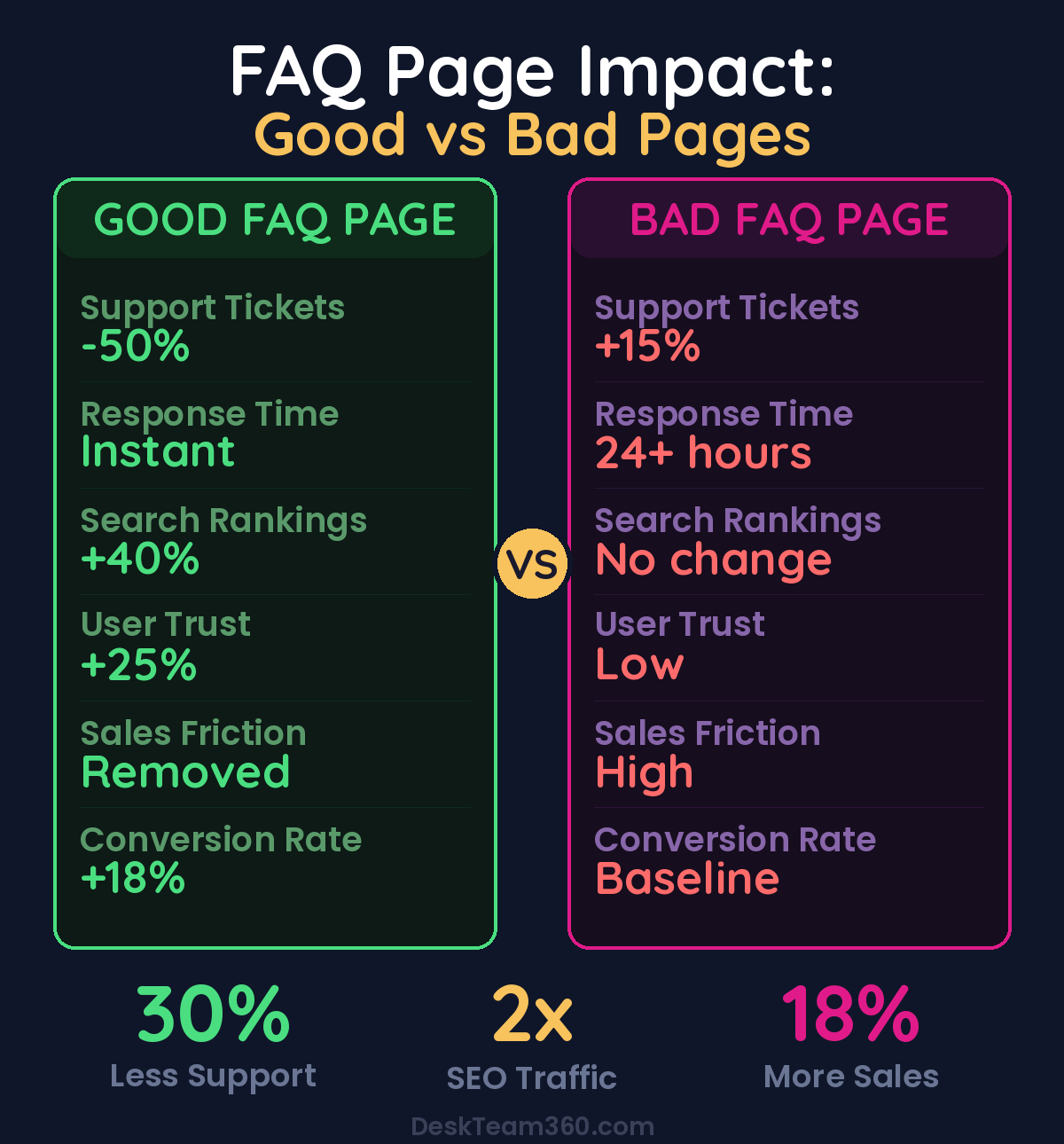
That’s leaving money on the table. A properly designed FAQ page does three things at once: it cuts your support ticket volume by 30-50%, it drives organic traffic through question-based SEO, and it addresses objections right when prospects are ready to buy.
I’m not talking about those generic “What do you do?” FAQ pages that read like they were written by a legal department. I’m talking about strategic content that actually solves problems for real people.
What Separates Great FAQ Pages From Garbage Ones
Here’s the difference. Bad FAQ pages are corporate afterthoughts stuffed with questions like “How can I contact you?” and “What makes you special?” They add zero value and waste everyone’s time.
Great FAQ pages answer the exact questions that are clogging up your inbox, burning through your support hours, and creating friction in your sales process. They’re organized like a reference guide, not a random brain dump.
The companies that get this right see measurable results. Support ticket volume drops. Sales cycles shorten. Search rankings improve for question-based keywords that actually convert. The companies that get it wrong wonder why they bothered building a FAQ page at all.
Free Tool
How Much Is Freelancer Management Really Costing You?
Most agency owners have never done this math. Plug in a few numbers and see your real cost in 2 minutes.
Calculate Your Hidden Costs →
Research the Questions That Actually Matter
Before you write a single word, you need real data about what your customers are asking. Don’t guess. Here’s where to look, and I mean actually look, not assume.
Your support tickets and emails from the last six months are pure gold. Export them, categorize them, and identify patterns. What questions show up week after week? Those are your FAQ foundation. If you’re drowning in support volume and need help getting organized, our guide on outsourcing your CRM setup covers exactly how to structure your data for insights like this.
Google’s “People Also Ask” boxes are literally showing you what questions people type into search engines. Search for your main keywords and pay attention to what shows up. Those questions have search volume behind them, which means FAQ answers can drive organic traffic.
AnswerThePublic and AlsoAsked are free tools that visualize question patterns around any topic. Type in your product category and you’ll get dozens of real questions people ask. Some will be irrelevant, but the relevant ones are content opportunities your competitors are probably missing.
Your sales team hears the same objections and concerns every single day. What are the top five things prospects ask before they buy? What hesitations come up in discovery calls? Those conversations are roadmaps for FAQ content that actually moves the needle.
Pro tip: If a question comes up more than once per week in support tickets, it belongs on your FAQ page. Don’t overthink it. Your customers are telling you exactly what content they need.
Related reading: How to Outsource Landing Page Design That Actually Converts.
Structure Your FAQ Page Like a Reference Guide
Once you’ve collected 25-40 questions (yes, that many), organize them into categories that match how your customers think, not how your company is organized internally.
Common structures that actually work include Getting Started for onboarding and setup questions, Pricing and Billing for cost and payment concerns, Product Details for features and limitations, Technical Support for troubleshooting and compatibility, and Account Management for changes and cancellations.
Don’t get creative with category names. “Billing” works better than “Investment Information.” Your customers aren’t trying to decode your marketing language when they’re looking for quick answers.
The goal is scanability. Someone should be able to land on your FAQ page and find their category in under five seconds. If they’re hunting around or scrolling through everything to find what they need, your structure is wrong.
Write Answers That Actually Help
This is where most FAQ pages fall apart completely. The questions are reasonable, but the answers are either too vague to be useful or so long that nobody reads them.
Each answer should be 2-4 sentences for straightforward questions and one short paragraph for complex ones. If you need more than 200 words to answer something, you probably need a dedicated blog post instead of a FAQ entry.
Write like you’re explaining something to a smart friend who doesn’t know your business yet. Drop the corporate speak. “Yes, we offer custom pricing for larger accounts” is clearer than “DeskTeam360 provides flexible investment structures aligned with enterprise requirements.”
Front-load the actual answer. Don’t bury the important information under context and disclaimers. If someone asks “Do you work with international clients?” start with “Yes” or “No,” then add the details.
Every FAQ answer should include a clear next step when relevant. Don’t just answer the question, guide people toward the action that makes sense. “Yes, we offer custom plans” should become “Yes, contact our team at [email] or visit our pricing page to discuss custom options.”
We break this down further in best website design for law firms: what actually converts clients.
When someone asks about pricing, don’t just reference your pricing page. Give them a specific link or tell them exactly where to find what they need. Friction kills conversions, even in FAQ sections.
Add Schema Markup for SEO That Actually Works
This is the technical piece that most businesses completely ignore, and it’s probably the highest-impact 30 minutes you can spend on your FAQ page.
FAQ schema markup is structured data that tells Google “this content is in question-and-answer format.” When Google recognizes the markup, it can display your FAQ entries directly in search results as rich snippets. Your search listing takes up more visual space, which typically doubles or triples click-through rates.
I’ve seen FAQ rich snippets turn page-two rankings into page-one traffic overnight. The questions people ask on Google often match the questions in your FAQ section perfectly. Schema markup helps Google make that connection.
You have three options for implementation. WordPress plugins like Yoast SEO Premium or Rank Math can generate the markup automatically if you’re on WordPress. Google’s Structured Data Markup Helper is a free tool where you highlight questions and answers on your page and it generates the JSON-LD code for you. Or if you’re comfortable with basic code, you can write JSON-LD FAQ schema manually.
Always validate your markup with Google’s Rich Results Test tool after implementation. Broken schema is worse than no schema because it can actually hurt your rankings.
Design for Humans, Not Developers
The design of your FAQ page determines whether people actually use it or bounce after five seconds looking for a contact form instead.
Accordion-style dropdowns are the standard for good reason. Users can see all the questions at once without being overwhelmed by walls of text. Click to expand the answer, click again to collapse. It’s intuitive and works perfectly on mobile devices.
If you have more than 20 questions, add a search function at the top of the page. People should be able to type a keyword and instantly filter to relevant questions. This is especially crucial for SaaS products and e-commerce stores with complex feature sets.
Mobile optimization isn’t optional. Over 60% of web traffic comes from mobile devices, and FAQ pages get heavy mobile usage because people often search for quick answers while they’re away from their computers. If your FAQ page doesn’t work on phones, you’re alienating the majority of your audience.
Visual elements can dramatically improve comprehension for certain types of questions. Screenshots work better than text descriptions for explaining interface features. Short videos can replace lengthy written instructions for complex processes. If you haven’t optimized your site for mobile users yet, our responsive web design guide covers everything you need to know.
FAQ pages with search functionality see 40% higher engagement and 25% longer time-on-page compared to those without search.
For industry benchmarks and research, see Nielsen Norman Group.
For industry research and benchmarks, check out Google’s web.dev.
For a deeper dive, see our guide on how to create a google business profile: complete setup and optimization guide.
Place Your FAQ Page Where People Expect It
Your FAQ page shouldn’t be buried in a submenu three clicks deep. Here’s where it needs to live for maximum impact.
Main navigation placement works best under a “Support” or “Help” dropdown. Footer links are expected by users who are specifically looking for FAQ content. Product and pricing pages should link directly to relevant FAQ sections, not just the main FAQ page. And your contact page should feature FAQ links prominently above your contact form to deflect routine questions.
You can also embed FAQ sections directly on high-traffic pages. Three to five relevant questions at the bottom of your pricing page can address objections right when people are making buying decisions. Service pages can include FAQ sections that address specific concerns about that particular service.
The goal is reducing friction wherever questions naturally arise. Don’t make people hunt for answers when you can anticipate their questions and provide them contextually.
Track Performance and Keep It Current
A FAQ page isn’t a one-time project. It’s an asset that needs regular maintenance to stay valuable.
Google Analytics should be tracking your FAQ page traffic, bounce rate, and time on page. If people are landing but leaving quickly, your content isn’t hitting the mark. High traffic with high engagement means you’ve built something useful.
Google Search Console shows you which search queries are driving traffic to your FAQ page. If you’re ranking for questions you haven’t explicitly answered, those are content opportunities. Add those questions to expand your organic reach.
Review your FAQ content quarterly minimum. Add new questions based on recent support patterns, remove outdated information, and update anything that references prices, features, or policies that may have changed. If you haven’t set up proper analytics tracking yet, here’s our comprehensive guide on setting up Google Analytics to measure what’s working.
Watch out: Nothing kills credibility faster than outdated information on a FAQ page. Wrong prices, discontinued features, or old contact information makes your entire company look unprofessional and out of touch.
Support ticket volume is the ultimate FAQ performance metric. If your FAQ page is working properly, you should see a measurable drop in routine support requests within 2-3 months of launch. If support volume stays the same, your FAQ either isn’t answering the right questions or isn’t easy to find.
Avoid the Mistakes That Kill FAQ Pages
I’ve built hundreds of websites over the past 12 years, and these are the FAQ mistakes I see repeatedly, even from companies that should know better.
Too few questions makes your FAQ page look like an afterthought. Five questions don’t constitute a comprehensive resource. Aim for 25-40 well-organized entries that actually cover your customer support landscape.
Writing questions nobody asks is pure waste. Don’t create “What makes you different?” entries unless customers literally ask that question. Use real support data, not assumptions about what customers might wonder about.
Skipping schema markup means leaving free SEO opportunities on the table. Rich snippets can double your organic click-through rates for question-based searches, and implementation takes less than an hour.
Poor mobile experience alienates the majority of your traffic. If your FAQ page doesn’t work smoothly on phones, you’re failing the majority of people who need quick answers while they’re on the go.
Missing internal links are missed opportunities to guide people deeper into your site. FAQ answers are perfect places to link to relevant service pages, detailed blog posts, and conversion pages like pricing and contact forms.
Treating FAQ pages as static content instead of living resources means they become outdated and useless over time. Products change, policies evolve, and new questions emerge. Your FAQ page should evolve with your business.
When Professional Help Makes Sense
Creating the content for a FAQ page is straightforward if you have the time and the data. But building a FAQ page that’s properly designed, mobile-responsive, search-optimized, and integrated seamlessly with your site’s design? That’s a full web development project.
The technical implementation includes accordion functionality, search capability, schema markup, mobile optimization, and integration with your existing site design. Most businesses either skip these elements entirely or implement them poorly because they lack the technical expertise.
At DeskTeam360, we handle FAQ page builds as part of our unlimited web design and development service. Our team researches your most common support questions, writes the content in your brand voice, designs the user interface, implements all the technical features, and tests everything across devices and browsers. You get a FAQ page that actually performs instead of one that just exists.
Build a FAQ Page That Actually Works
A strategically built FAQ page reduces support costs, drives organic traffic, builds customer confidence, and removes buying objections. It’s one of the highest-return investments you can make in your website, but only if you do it right.
Research real questions from real data, organize them logically, write clear answers that include next steps, implement schema markup for search visibility, and design the experience for usability across all devices. Most importantly, maintain it like the business asset it is, not like static content you can ignore.
The companies that get this right see measurable improvements in support efficiency, search rankings, and conversion rates. The companies that half-do it wonder why they bothered. For insights on measuring the impact of your website improvements, check out our guide on measuring marketing ROI to track your FAQ page performance properly.
Free 5-Minute Video
See How DeskTeam360 Works in Under 5 Minutes
Watch the short video and see exactly how we handle design, development, and marketing implementation — so you don't have to.
Watch the Video →