

Outsource Course Creation and Design: The Complete Production Guide
When you outsource course creation and design, you free up your team to focus on what moves the needle.
📋 Table of Contents
The Course Content Trap Every Creator Falls Into
You’ve got the perfect curriculum. You know exactly what you need to teach, and you’ve validated that people will pay for it. Hell, you might even have pre-orders already. But then reality hits.
Between the slide designs, workbook layouts, video editing, sales pages, membership portals, social graphics, and launch sequences, you’re drowning in production work that has nothing to do with actually teaching.
I see this constantly. Brilliant course creators spending 80% of their time wrestling with design software instead of creating content. They burn out before they launch, or they launch something that looks like it was built in 2003 and wonder why nobody takes it seriously.
After helping hundreds of course creators at DeskTeam360 go from idea to six-figure launch, the pattern is crystal clear. The ones who succeed outsource the production work. The ones who struggle try to do everything themselves.
The Course Production Reality Check
Most people have no clue how much work goes into launching a professional course. They think it’s “record some videos and throw them on Teachable.” That mindset kills more course businesses than bad ideas do.
Here’s what you actually need for a proper launch: professional slide presentations that don’t look like default PowerPoint templates, workbooks and worksheets designed so students actually want to use them, quiz and assessment layouts that feel premium, sales pages optimized for conversion with proper visual hierarchy, membership portal customization so it matches your brand, video editing with branded intros, outros, and professional polish, social media graphics for your entire launch campaign, email templates that convert browsers into buyers, and ad creative that you can split-test at scale.
That’s 20+ distinct production tasks. If you’re trying to DIY all of this, you’re not running a course business. You’re running a design agency that occasionally teaches something.
Free 5-Minute Video
See How DeskTeam360 Works in Under 5 Minutes
Watch the short video and see exactly how we handle design, development, and marketing implementation — so you don't have to.
Watch the Video →
What to Outsource and What to Keep
I get asked this constantly, so let me break it down based on what I’ve seen work across hundreds of launches.
Always Hand This Off
Slide deck design should never be on your plate. You outline the content, write the talking points, and hand it to a designer who makes it visually compelling. Professional slides with consistent branding, custom graphics, and clean layouts make your course feel premium, which justifies premium pricing.
Video editing is another no-brainer unless you genuinely enjoy spending 3 hours cutting up 20 minutes of raw footage. A good editor cuts your videos down, adds branded intros and outros, cleans up audio issues, inserts graphics and callouts, and makes you look polished. What takes you half a day takes a professional 45 minutes.
Sales page design and copy can make or break your entire launch. I’ve seen identical course content with different sales pages perform with 2x to 5x conversion rate differences. The layout, testimonial placement, visual flow, trust signals, and guarantee positioning all matter enormously. Our guide on creating landing pages that convert covers the psychology behind this.
Workbook and PDF design determines whether students actually use your materials. Nobody fills out a workbook that looks like a Word document with default fonts. But a beautifully designed, branded workbook becomes a reference tool they keep forever.
Never Outsource These
Course content and curriculum creation is your expertise. Nobody can teach your frameworks better than you. The actual lesson content, methodologies, and unique insights that’s your intellectual property and your competitive advantage.
Video recording should stay with you in the early stages. Students buy courses because of you, your personality, your energy. Record the raw footage yourself. You can use your phone or a basic webcam setup, just make sure the audio is clean.
Email copy first drafts need to sound like you. Your launch emails should feel personal, not like they came from a copywriter. Write the first draft in your voice, then have someone clean up the formatting and design.
Community management during launch requires your authentic presence. Responding to student questions and building relationships in your course community isn’t something you delegate when you’re starting out.
Pro tip: The $50K rule applies here. Before you’ve made your first $50K in course revenue, be selective about what you outsource. After $50K, everything I mentioned in the “always hand off” category should be off your plate entirely.
Platform Choice Affects Your Production Needs
Your course platform decision impacts how much customization you can do and what you need to outsource.
Kajabi gives you the most control. It’s all-in-one with courses, email, website, and community features. You can customize almost everything, but that also means more design work. Best for serious course creators planning to scale past six figures.
Teachable is beginner-friendly with limited customization options. Good for getting started quickly, but you’re stuck with their templates. Thinkific falls somewhere in the middle with more design flexibility than Teachable but less complexity than Kajabi.
Skool takes a community-first approach. Great for cohort-based courses and engagement, but limited course delivery features. WordPress with LearnDash gives you maximum control but requires ongoing development work.
Whatever platform you choose, a designer can customize the branding, create lesson thumbnails, and make it feel cohesive with your main website. The platform shouldn’t dictate your brand experience.
The Launch Timeline That Actually Works
Most course creators underestimate how long production takes and end up rushing everything at the last minute. Here’s a realistic timeline that accounts for revision rounds and unexpected delays.
8-12 Weeks Before Launch
Finalize your course outline and content structure. This is foundation work that everything else builds on. Brief your design team on brand guidelines, visual style, and target audience. If you don’t have brand guidelines yet, creating them first will save you endless revision rounds later.
Order your slide deck template design based on your finalized outline. Start wireframing your sales page with all the content, testimonials, and guarantee details figured out.
6-8 Weeks Before Launch
Record all your course videos while your content is fresh in your mind. Write the full text for workbooks, worksheets, and downloadable resources. Send your raw video footage for editing and request your workbook designs based on the written content.
Finalize and design your sales page. This is critical path work, everything else in your funnel depends on it being done well.
4-6 Weeks Before Launch
Design your webinar or masterclass slides for pre-launch content. Create your social media graphics for the entire launch campaign. Design email templates for your launch sequence. Order multiple ad creative variations for split-testing. Create your lead magnet to build your email list before launch.
The revision buffer is everything. Plan for 1-2 weeks of revision time at each stage. Nothing gets approved on the first round, and rushing revisions leads to mistakes that hurt conversion rates.
2-4 Weeks Before Launch
Upload everything to your course platform and test the entire student experience. Set up your membership portal with custom branding and navigation. Test your enrollment flow, video playback, download links, and payment processing.
Launch your pre-launch content and webinar to start building momentum and collecting emails.
Launch Week
Deploy your launch emails, social content, and ad campaigns. Monitor performance data and have backup creative ready. Be prepared to create additional ad variations based on early performance data.
How to Brief Your Design Team
Bad briefs lead to endless revisions and mediocre results. Good briefs get you exactly what you want on the first or second round.
Include all brand assets like logo files, color codes, font specifications, and any existing brand guidelines. If you don’t have these documented, creating a brand style guide first will save you time and money.
Provide 3-5 examples of course materials, websites, or designs you admire. “Make it feel like Ramit Sethi’s course portal” is infinitely more useful than “make it look professional.” Visual references eliminate guesswork.
Organize all your content in a clear document structure. Include all text, images, and materials with clear labels about what goes where. Don’t make your designer hunt for content or guess at your intentions.
Include technical specifications like slide dimensions, image sizes for your course platform, email template widths, and any platform-specific requirements. Getting dimensions wrong means starting over.
Set clear timelines and priorities. What needs to be finished first? What are the hard deadlines? Are there any dependencies or launch dates that can’t move?
Watch out: Vague feedback kills project timelines. “Make it more professional” doesn’t help anyone. “The headline font needs to be bigger and the button should be more prominent” gets you results quickly.
For more on this, check out our guide on ai marketing tools: the complete guide for 2026.
For a deeper dive, see our guide on deskteam360 vs 55knots: full-service production vs premium design studio.
The Economics of DIY vs Outsourcing
Let’s talk real numbers because this is where most people make bad decisions based on incomplete math.
Going the freelance route typically costs $2,000-5,000 for sales page design, $1,500-3,000 for complete slide deck design, $500-1,500 per workbook, $50-150 per lesson for video editing, and $50-100 per social graphic. A full course launch easily hits $10,000-20,000 in production costs.
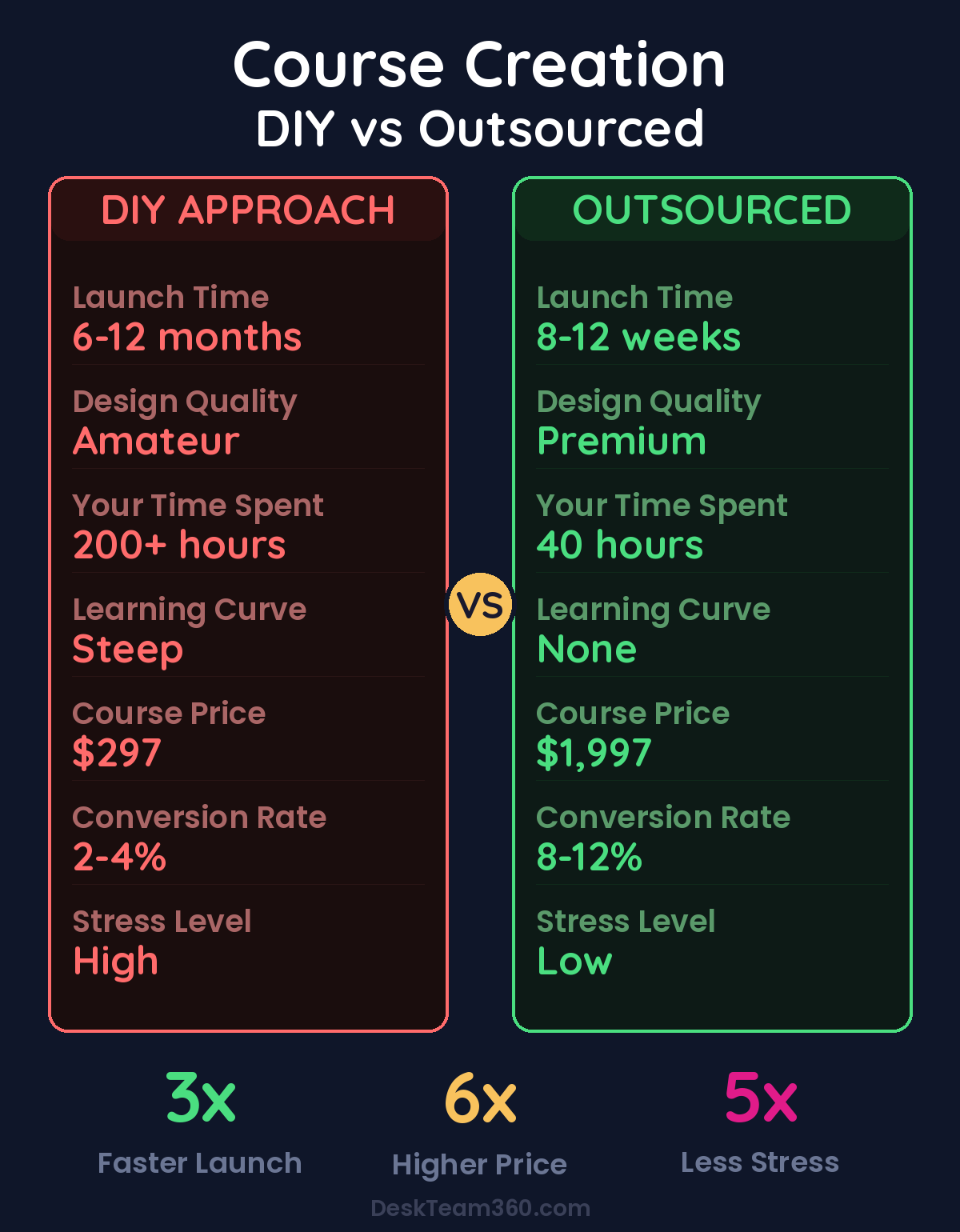
But that’s just money. The time cost is where DIY really kills you. Learning design software, wrestling with templates, googling “how to make this look professional” that’s 40-60 hours of work you could spend creating content or marketing your course.
A subscription design service changes the math entirely. Flat monthly rate, unlimited requests, same team for consistency. If you’re launching even one course per year, the subscription model saves money and delivers better results.
The companies that understand the benefits of outsourcing their production work scale faster because they’re not stuck being the bottleneck in every creative decision.
Stop Being the Bottleneck in Your Own Business
The most successful course creators I work with have figured out one critical thing. Their expertise is in teaching their subject matter, not in designing PowerPoint slides or editing videos or writing sales page copy.
You didn’t spend years becoming an expert in your field so you could spend 40 hours learning Canva. Your time is worth more than that. Your students deserve better than amateur-looking materials. And your business will grow faster when you stop trying to do everything yourself.
Focus on what only you can do: creating great content and teaching it well. Let a team handle everything else. The math works, the results are better, and you’ll actually enjoy building your course business instead of burning out on production work.
Our approach at DeskTeam360 covers the complete course production stack. Slide decks, workbooks, sales pages, video editing, social graphics, email templates, ad creative, and platform customization. All for a flat monthly rate with no per-project pricing or long-term contracts.
Course creators using our full production service launch 3x faster and see 40% higher conversion rates compared to DIY launches.
For more on this, check out our guide on what is white label marketing? the complete guide for agencies.
Ready to Launch Like the Pros
Course creation should be about teaching, not about wrestling with design software. When you outsource the production work, you get professional results without the learning curve, faster timelines without the stress, and better conversion rates without the guesswork.
We’ve handled course launches for everyone from first-time creators to established educators doing their 10th course. The process works whether you’re validating your first idea or scaling an existing course business.
Free Template
The Ultimate Task Delegation Template
Stop guessing what to hand off. This template shows you exactly what to delegate, how to brief it, and how to QA the results.
Get the Free Template →