

How to Create an AI-Powered Customer Support System
Why Traditional Customer Support Is Broken
The rise of ai customer support system is changing the game for businesses of all sizes. It’s 11pm on a Saturday. A customer has an urgent issue. They email your support address and get that soul-crushing auto-reply: “We’ll respond within 24-48 business hours.” By Monday morning, they’ve already signed up with your competitor.
📋 Table of Contents
I see this play out constantly. And it’s completely preventable.
I’m not talking about those garbage chatbots from 2019 that answered every question with “I’m sorry, I didn’t understand that.” Those deserved to die. I’m talking about genuinely intelligent systems that resolve most customer issues in under three minutes, around the clock, every single day.
We’ve implemented these at DeskTeam360, and the results aren’t subtle. Resolution times dropped by 65%. Customer satisfaction went up. Support costs went down. Here’s exactly how to build one for your business, no fluff, just the playbook.
The Five Layers of an AI Support System
A proper AI support system isn’t one thing, it’s five layers working together. Skip any of them and the whole system underperforms. I’ve seen companies dump $20K into an AI chatbot and wonder why it sucks. It’s almost always because they skipped a layer.
Layer 1: The Knowledge Base
This is the foundation, and it’s where most companies cut corners. Your AI can only answer questions it has information about. Feed it garbage, get garbage back.
Here’s what your knowledge base actually needs: every FAQ answered in clear language, product documentation with real step-by-step instructions, troubleshooting guides for your most common issues, pricing and plan details, company policies (returns, refunds, SLAs), and process docs for routine requests like password resets and billing updates.
Pro tip: Export your last 6 months of support tickets, categorize them by topic, and identify the top 50 questions. Those 50 will cover 80%+ of everything customers ask. Write comprehensive answers for each one. This takes 2-3 days of focused work, don’t skip it.
Layer 2: The AI Engine
This is the brain. Modern AI support uses something called Retrieval-Augmented Generation (RAG), and understanding it matters because it’s the difference between an AI that’s helpful and one that makes things up.
Here’s how it works in practice: a customer asks a question, the system searches your knowledge base for relevant information, the AI uses that information to generate a response, and that response gets delivered to the customer. The key word is “your”, RAG grounds the AI in your data, your policies, your processes. Without it, the AI hallucinates. With it, you get accurate, company-specific answers.
Layer 3: The Integration Layer
An AI that can only talk but can’t do anything is just a fancy FAQ page. The real power comes when your AI can actually take action, look up customer accounts in your CRM, check payment status in your billing system, reset passwords, create support tickets, and escalate to the right human when it needs to.
Layer 4: The Routing and Escalation Engine
Not every issue should be handled by AI, and knowing where to draw that line is critical. Your system needs confidence scoring (if it’s not sure, it escalates to a human), sentiment detection (angry customers get routed to experienced agents faster), and VIP routing (your top revenue clients can bypass AI entirely).
Related reading: How to Scale a Digital Marketing Agency: The Complete Growth Playbook.
The companies that get this wrong are the ones trapping frustrated customers in AI loops with no way out. Always, always, provide a clear path to a human. “Talk to a person” should work at any point in the conversation.
Layer 5: The Analytics and Learning Loop
Your AI should get smarter every week. Track what percentage of conversations it resolves without help. Identify what questions it keeps failing on and add those answers to the knowledge base. Monitor satisfaction scores. When humans correct AI responses, feed those corrections back into the system.
The feedback loop is everything. The companies that treat AI support as “set it and forget it” end up with a system that’s just as frustrating as no AI at all. Monthly reviews to update documentation and refine behavior aren’t optional, they’re the whole point.
Free 5-Minute Video
See How DeskTeam360 Works in Under 5 Minutes
Watch the short video and see exactly how we handle design, development, and marketing implementation — so you don't have to.
Watch the Video →
Implementation: Step by Step
Enough theory. Here’s the actual playbook.
Step 1: Audit Your Current Support
Before you build anything, understand what you’re working with. How many tickets per week? What are the top 10 categories? What percentage could be resolved with information alone, no human judgment needed? What’s your average resolution time and cost per ticket?
For most businesses, 60-80% of tickets are routine questions with straightforward answers. That’s your AI opportunity, and it’s probably bigger than you think.
Step 2: Build Your Knowledge Base
Follow the process from Layer 1. Start with the top 50 questions. Write answers like you’re explaining to a smart friend who just doesn’t know your product yet. Clear, direct language beats corporate jargon every time. If you need help structuring customer-facing content, our guide on creating FAQ pages covers the fundamentals.
Step 3: Choose Your Platform
There are five real options worth considering right now, and each one fits a different situation.
Intercom Fin is the best overall, starts at $0.99 per AI resolution, has the best accuracy and analytics, but the cost adds up at high volume. Zendesk AI makes sense if you’re already in the Zendesk ecosystem ($55+/agent/month). Freshdesk Freddy AI is the best value at $15+/agent/month, solid for straightforward support needs. Tidio Lyro is the budget pick at $29-59/month, great for small businesses. And if you want full control, a custom build with Make.com + OpenAI runs $100-500/month but requires technical chops to maintain.
Watch out: Don’t pick a platform based on the sales demo. Every AI support tool looks incredible in a controlled demo with pre-loaded data. Ask for case studies from businesses your size, in your industry, handling your ticket volume. That’s where the truth lives.
Step 4: Configure Your AI Agent
Once you’ve picked a platform, the configuration is where most companies rush and pay for it later. Upload your entire knowledge base. Define the agent’s personality and tone, should it match your brand voice, or play it safe with professional neutral? Set hard boundaries on what topics it should never discuss and what actions it should never take. Connect it to your CRM, billing system, and product APIs. And set clear escalation rules with confidence thresholds.
We covered this in detail in our post about how to create a portfolio website that wins clients.
Related reading: How to Outsource Marketing Tasks Without Getting Burned (From 12 Years and $1M in Lessons).
Step 5: Test With 100 Real Scenarios
Before going live, test the top 50 FAQ questions, throw edge cases at it (vague questions, multi-part requests, angry language), verify escalation triggers work correctly, and confirm integration actions actually function. Have team members role-play your most difficult customers. Document every failure and fix it. The goal is 90%+ accuracy before anyone outside your team sees it.
Step 6: Launch in Phases, Not All at Once
Week one and two should be shadow mode, AI processes everything but doesn’t respond directly. Human agents see AI-suggested responses and approve, edit, or reject them. Week three and four, move to assisted mode where AI handles simple, high-confidence tickets autonomously and everything else gets a human review. Week five onward, full deployment with weekly performance reviews.
Companies that launch in phases see 40% fewer customer complaints about AI interactions compared to those that flip the switch overnight.
Escalation Rules That Actually Work
This is where the rubber meets the road. Bad escalation rules are the #1 reason AI support implementations fail, either the AI tries to handle everything (and botches complex issues) or it escalates everything (defeating the whole purpose).
Here’s what I’ve seen work across dozens of implementations: if AI confidence drops below 70%, flag it for human review before responding. If a customer mentions “cancel” or “refund,” route to a retention specialist immediately, don’t let the AI try to save the account. Angry sentiment detected? Escalate to a senior agent within five minutes. VIP customers (top 10% by revenue) get immediate human assignment. Security or legal topics never touch AI. And if there’s been three or more messages without resolution, auto-escalate.
The Metrics That Actually Matter
After launch, you’re tracking three categories weekly.
Resolution metrics: What percentage of tickets does AI resolve without humans (target 50-70%)? How fast is first response (target under 60 seconds)? What’s the average resolution time for AI-handled tickets (target under 5 minutes)?
Quality metrics: Post-interaction satisfaction scores (target 85%+ positive), accuracy rate of AI responses (target 90%+), and escalation rate (target 20-40%, lower isn’t always better, it might mean the AI is over-confident).
Business impact: Cost per ticket (should drop significantly), agent productivity (should increase as AI absorbs routine volume), and customer retention (should improve or stay neutral). Understanding how to measure ROI applies to support systems too.
Five Pitfalls That Kill AI Support Implementations
I’ve watched companies blow these in predictable ways. Here’s how to avoid each one.
Launching without enough knowledge base content. If the information doesn’t exist, the AI either makes it up or escalates everything. Neither is acceptable. Put in the upfront documentation work.
Making it impossible to reach a human. Nothing destroys customer trust faster than being trapped in an AI loop. The “talk to a person” escape hatch isn’t optional, it’s a requirement.
For industry benchmarks and research, see Google AI Research.
For industry research and benchmarks, check out McKinsey’s State of AI report.
For more on this, check out our guide on how to create a google business profile: complete setup and optimization guide.
Set-and-forget mentality. Products change, policies change, customers change. Your knowledge base needs monthly reviews and updates. Schedule them or they won’t happen.
No quality monitoring. Review a random sample of AI conversations every week. Are responses accurate? Helpful? On-brand? Catching quality drift early prevents it from compounding into a real problem.
The Real Cost Savings
Let’s do the math for a typical small-to-mid-size business, because this is where the business case gets really compelling.
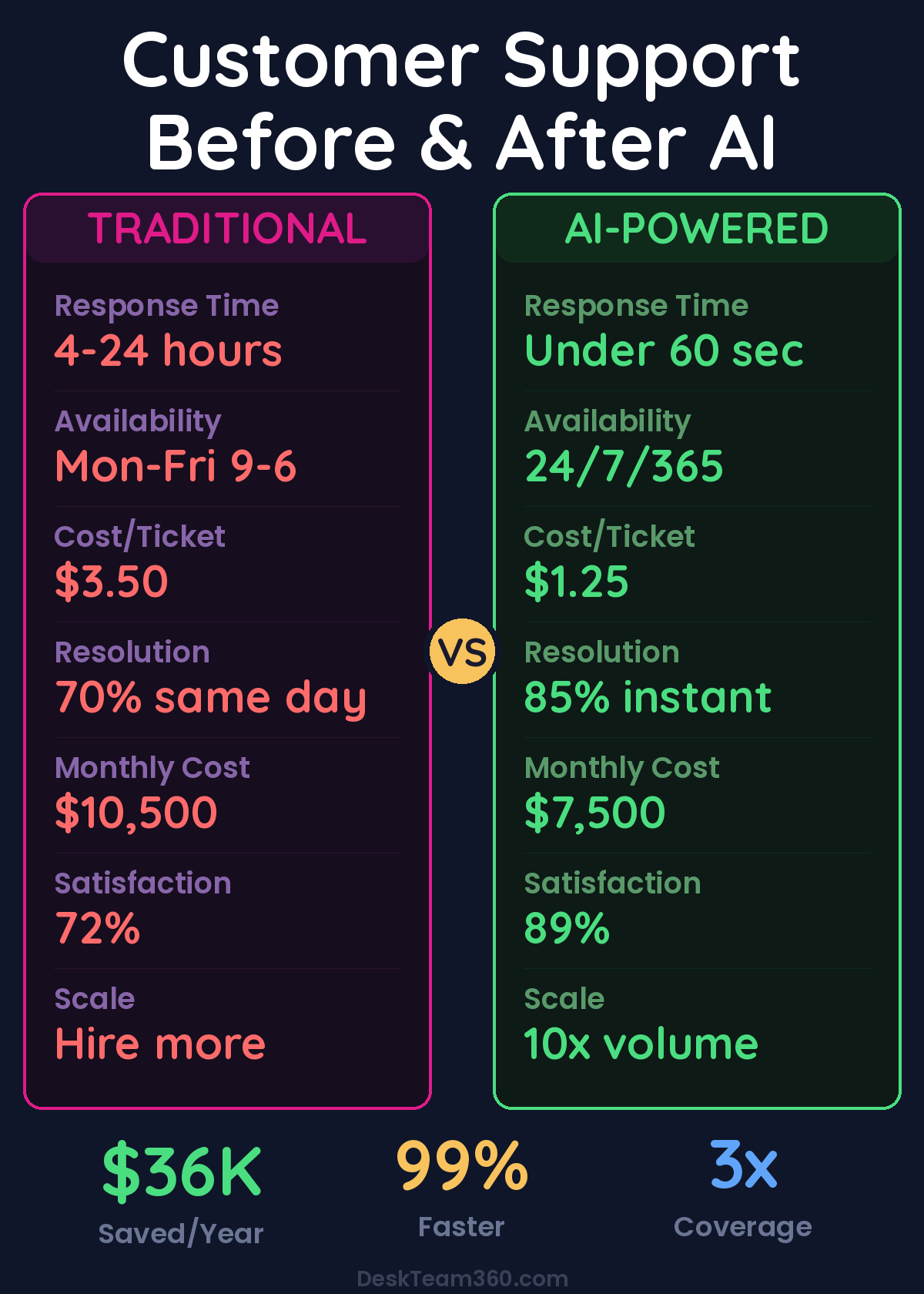
Before AI: three support agents at $3,500/month each ($10,500 total), coverage limited to weekdays 9-6, handling about 150 tickets a day at roughly $3.50 per ticket. After AI: one AI system at ~$500/month plus two agents for complex issues ($7,000), 24/7/365 coverage, handling 200+ tickets a day at about $1.25 per ticket.
$36,000 in annual savings. Plus 24/7 coverage, faster response times, and higher customer satisfaction. The ROI pays for itself in the first quarter.
Factor in reduced bounce rates from instant support availability on your website, and the total impact is even bigger.
What’s Coming Next
AI support is evolving fast. Voice AI agents that handle phone calls with natural-sounding voices are already in early deployment. Proactive support, where AI identifies issues before customers report them, is becoming table stakes. Multi-modal support that understands screenshots and screen shares is here. And predictive resolution that fixes problems before the customer even notices? That’s the next 12-18 months.
Build Your AI Support System Today
AI customer support isn’t a future luxury, it’s a present necessity. Your customers expect fast, accurate, 24/7 support. Your competitors are already doing it. The technology is mature, affordable, and proven.
At DeskTeam360, we’ve built AI support systems internally and helped our clients do the same, from knowledge base creation to platform configuration to ongoing optimization. We handle the implementation so you can focus on running your business.
See our plans and get started →
Free Tool
How Much Is Freelancer Management Really Costing You?
Most agency owners have never done this math. Plug in a few numbers and see your real cost in 2 minutes.
Calculate Your Hidden Costs →