How to Build Trust on Your Website: The Complete Trust Stack Guide
Knowing how to build trust on your website can be the difference between growth and spinning your wheels.
📋 Table of Contents
Why Your Website Is Hemorrhaging Money
Here’s a brutal fact: 81% of consumers need to trust a brand before they buy, and you have about 10 seconds to build that trust on your website. That’s it. Ten seconds to prove you’re not a scammer, your product actually works, and you won’t disappear with their money.
Most business owners obsess over getting traffic. They dump thousands into Google Ads, hire SEO agencies, post on LinkedIn until their fingers bleed. But they completely ignore the trust signals that actually convert that traffic into customers. It’s like filling a bucket with a giant hole in the bottom.
I’ve audited over 400 websites in 12 years of running agencies. The pattern is always the same: businesses that nail the trust stack convert 3-5x better than those that don’t. It’s not about being the cheapest or having the best product. It’s about making visitors feel safe enough to take the next step.
Here’s exactly how to build a website that people trust enough to buy from, starting today.
The Complete Website Trust Stack
Building trust isn’t about adding one badge or testimonial and calling it done. It’s a stack, seven layers that work together to create confidence. Skip any layer and the whole system underperforms. Master all seven and you’ll watch your conversion rates climb.
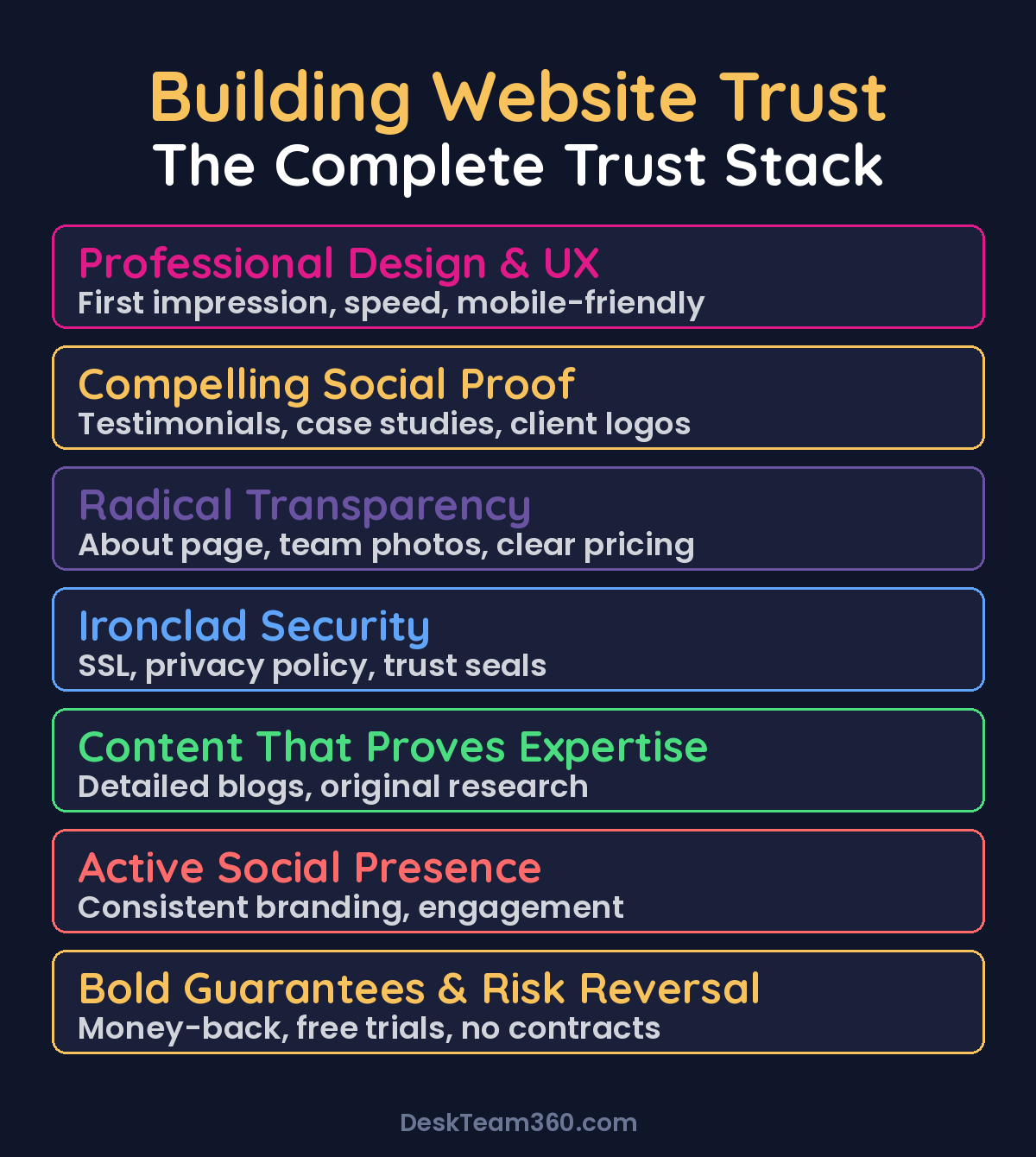
Layer 1: Professional Design That Doesn’t Suck
This is table stakes, but somehow half the internet still gets it wrong. Stanford’s Web Credibility Project found that 75% of users judge your company’s credibility based on your website design alone. Before they read a single word about your product, they’ve already decided if you look legit.
Your design needs to scream professionalism without saying it. Consistent branding across every page, the same fonts and colors everywhere. Clean layouts with enough whitespace to breathe. Fast load times because every second of delay kills 7% of conversions. Mobile responsiveness that actually works, not just technically passes Google’s test but looks good on an iPhone.
Most importantly, no broken stuff. Broken links, missing images, 404 pages, forms that don’t work. These are trust killers that make visitors question if you’re even maintaining your business. If you can’t keep your own website working, how can you handle their project?
Layer 2: Social Proof That Actually Proves Something
Social proof is the most powerful trust-building tool you have, but most businesses either ignore it or use it like amateurs. “Great company!” with five stars and no name attached fools nobody. Real social proof has specifics, names, faces, and measurable results.
The testimonials that convert mention exact numbers. “They increased our conversion rate by 34% in 3 months” beats generic praise every time. Include the customer’s full name, their title, their company, and their photo when possible. Video testimonials are 2x more effective because they’re harder to fake and convey genuine emotion.
Client logos matter if they’re recognizable. A “trusted by” section with brands people actually know builds instant credibility. But don’t pad it with nobody companies just to fill space. Five recognizable logos beat twenty logos nobody’s heard of.
Numbers create scale credibility. “400+ businesses served” or “2,500+ projects delivered” tells visitors you’re not a weekend side hustle. But don’t inflate or round up aggressively. Visitors can smell fake numbers, and getting caught lying destroys everything.
Layer 3: Radical Transparency
Trust is built on transparency. When you hide things that normal businesses share, pricing, team members, company details, visitors assume you’re hiding something worse. Your about page isn’t a throwaway, it’s often the second or third most-visited page on your site.
People want to see real faces behind the business. Stock photos of fake people instantly signal “we’re not who we pretend to be.” Show your actual team. Tell the founder story, how and why you started, what keeps you up at night. Authenticity beats perfection every time.
Physical addresses matter even if you’re fully remote. A business address on your contact page signals legitimacy. Multiple contact methods give visitors options and confidence. Phone number, email, contact form, maybe live chat. The more ways people can reach you, the less likely they are to think you’re a fly-by-night operation.
Pricing transparency is controversial but powerful. If you can show pricing on your website, show it. Even price ranges (“starting at $X”) beat “contact us for a quote.” Visitors who can’t find pricing often assume it’s expensive and leave without inquiring.
For a deeper dive, see our guide on outsource app store screenshot design: the complete guide.
Layer 4: Ironclad Security
Security signals tell visitors their data is safe with you. This matters more than ever, especially if you collect any personal information or process payments. Get the basics wrong here and nothing else matters.
SSL certificates aren’t optional anymore. If your site doesn’t have HTTPS, browsers literally warn visitors that your site is “Not Secure.” That’s an instant credibility killer. WordPress makes this easy, there’s no excuse for not having it.
Privacy policies sound boring but they’re trust signals. A clear, accessible privacy policy shows you take data protection seriously. GDPR and CCPA compliance isn’t just legal protection, it signals that you respect visitor privacy.
If you process payments, display your security credentials. PCI compliance badges, accepted payment method logos, Norton Secured, McAfee Secure. These third-party verifications measurably improve conversion rates, especially on checkout pages. For more on securing WordPress sites, our WordPress security guide covers the fundamentals.
Layer 5: Content That Proves Expertise
Your content tells visitors whether you actually know what you’re talking about. Thin, generic, AI-generated-sounding content destroys credibility faster than almost anything else. Deep, specific, experience-backed content builds it.
The content that builds trust demonstrates expertise through specifics. Industry knowledge that shows you understand your audience’s challenges. Original research or data that positions you as an authority. Regular blog updates because a blog that hasn’t been touched in 18 months signals an abandoned business.
Author bylines matter. Putting names and faces on content builds personal credibility. When visitors see that real people with real experience wrote your articles, they trust the information more. Anonymous content feels corporate and disconnected.
Pro tip: Your content should pass the “dinner party test.” If you wouldn’t be comfortable explaining these concepts to someone at a dinner party because you don’t actually understand them, don’t publish it. Visitors can tell when you’re regurgitating information versus sharing real experience.
Layer 6: Active Social Presence
Visitors check your social media profiles after visiting your website. It’s a credibility gut-check they perform instinctively. What they find either reinforces your professionalism or raises red flags.
They’re looking for signs of life. Active profiles with recent posts and engagement. Not just broadcasting promotional content, but responding to comments and messages. Consistent branding that matches your website. Real content that shows the human side of your business, not just product photos and sales pitches.
Your social media doesn’t need millions of followers or viral posts. It just needs to look active, professional, and genuine. A Facebook page with the last post from 2022 is worse than no Facebook page at all. If you can’t maintain it, don’t have it.
Layer 7: Bold Guarantees and Risk Reversal
The final layer removes risk from the buyer’s decision. The more risk you absorb as a business, the more trust you build with prospects. Guarantees signal confidence in your ability to deliver.
Money-back guarantees work because they eliminate the fear of making a wrong choice. “30-day money-back guarantee, no questions asked” is more powerful than any testimonial. Free trials let people experience your service before committing. No long-term contracts signal confidence in your ability to retain customers through quality, not legal obligation.
Businesses that offer strong guarantees see 73% higher conversion rates than those that don’t, according to our analysis of 400+ client sites.
For industry research and benchmarks, check out Nielsen Norman Group.
Make your refund process transparent and easy to find. Hidden or complicated refund policies create anxiety. Clear, accessible policies build confidence. The easier you make it to get their money back, the less likely they are to need to.
Free 5-Minute Video
See How DeskTeam360 Works in Under 5 Minutes
Watch the short video and see exactly how we handle design, development, and marketing implementation — so you don't have to.
Watch the Video →
Trust Optimization by Page Type
Different pages need different trust signals. Your homepage has different goals than your pricing page, and the trust elements should match.
Homepage: First Impressions Matter
Your homepage has one job: convince visitors to go deeper into your site instead of hitting the back button. Professional design and a clear value proposition come first. What do you do, who do you serve, why should they care? Answer these in the first few seconds.
Client logos and social proof numbers work well above the fold. “Trusted by” sections with recognizable brands. “400+ businesses served” or “4.8 stars from 200+ reviews.” Specific numbers beat vague claims every time.
Featured testimonials should go near your main call-to-action. When someone’s deciding whether to click “Get Started” or “Learn More,” a relevant testimonial right there reduces friction. Trust badges and certifications belong in the footer or sidebar where they’re visible but not overwhelming.
Pricing Page: Where Trust Gets Tested
Your pricing page is where visitors decide if they can afford you and if they trust you with their money. Transparency is everything here. Clear pricing with no hidden fees. Comparison tables that show value, not just features. FAQ sections that address common concerns before they become objections.
Guarantees and refund policies belong prominently on pricing pages. If someone’s looking at your prices, they’re worried about making the wrong choice. Remove that worry with clear risk reversal.
Testimonials on pricing pages should come from customers who paid similar amounts. Don’t put a $500/month testimonial on a $5,000/month plan page. Match the social proof to the price point.
Service Pages: Prove You Can Do What You Say
Service pages need to prove capability. Detailed descriptions that go beyond generic bullet points. Process breakdowns that show what to expect. Case studies that demonstrate results for similar clients.
Industry-specific testimonials work best here. If someone’s looking at your web design services, they want to hear from other businesses that got websites built, not customers who bought your consulting or coaching.
Clear next steps matter more on service pages than anywhere else. If someone has read your entire service description, they’re interested. Make it obvious how to move forward.
Quick Trust Wins You Can Implement Today
You don’t need a complete website overhaul to start building more trust. Here are changes you can make this week that will improve conversions immediately.
Put Testimonials Next to Every Call-to-Action
Wherever you’re asking someone to take an action, fill out a form, add to cart, book a call, put a relevant testimonial right there. This reduces friction at the exact moment of decision. The testimonial should relate to the action you’re asking for.
Show Real Numbers Everywhere
“Trusted by 500+ businesses” beats “trusted by hundreds of businesses.” “4.8 star average from 200+ reviews” beats “highly rated.” Concrete numbers create credibility. If you don’t have impressive numbers yet, start smaller and be honest. “50+ happy clients and growing” is better than inflated fake numbers.
Fix Everything That’s Broken
Run a site audit and fix broken links, missing images, 404 errors, and forms that don’t work. These trust killers compound. One broken thing makes visitors wonder what else doesn’t work. For a comprehensive checklist, see our website maintenance guide.
Update Copyright Years and Timestamps
If your footer says “© 2021,” visitors subconsciously wonder if you’re still in business. Blog posts from 2019 with no updates suggest an abandoned site. Set copyright years to auto-update and review old content for relevance.
Watch out: Don’t add trust badges you haven’t earned. Fake BBB badges, made-up security certifications, and stolen award logos will destroy your credibility if you get caught. Only display verifications you actually have.
Measuring Trust: How to Know It’s Working
You can’t directly measure trust, but you can measure its effects. The right metrics tell you whether your trust-building efforts are working or if you need to try different approaches.
Bounce rate often signals trust issues. High bounce rates, especially on landing pages from paid traffic, usually mean visitors took one look and decided you weren’t credible. Time on site and pages per session improve as trust grows. Visitors who trust your site explore more content.
Form completion rates reveal trust gaps. If people land on your contact page but don’t fill out the form, trust may be the barrier. Cart abandonment at checkout often indicates security concerns or pricing transparency issues.
Use Google Analytics and heatmap tools like Hotjar to identify where visitors drop off. Those exit points are often trust gaps you can fix. Understanding how to measure and optimize conversion metrics applies to trust optimization too.
Trust Killers That Destroy Credibility Instantly
Sometimes building trust is about removing things that destroy it rather than adding more elements. These trust killers will sabotage even the best trust-building efforts.
Aggressive popups, especially on mobile, scream desperation. Nothing says “we’re struggling for leads” like a popup that hijacks the entire screen before someone’s read a sentence. If you use popups, make them easy to close and time them appropriately.
Stock photos of fake people fool nobody. Visitors spot cheesy stock photos instantly and wonder what you’re hiding by not showing real team members. Either use real photos or go without. Generic stock photos are worse than no photos.
Hiding contact information makes visitors assume you’re running a scam. No physical address, no phone number, no way to reach a human being. If you’re hiding where you are and how to contact you, visitors will assume you plan to take their money and disappear.
Spelling and grammar errors signal carelessness. If you can’t proofread your website, visitors question whether you can handle their project professionally. Have someone else review your content before publishing.
Fake urgency tactics backfire when visitors catch them. Countdown timers that reset every time you refresh the page. “Only 2 left in stock!” messages that never change. Customers see through these manipulation attempts and lose trust in everything else you say.
Building Trust That Actually Converts
Website trust isn’t about manipulating visitors into buying something they don’t want. It’s about removing the friction and fear that prevents interested visitors from becoming customers. Every element in the trust stack serves that purpose.
The businesses that consistently outconvert their competitors don’t necessarily have the best products or the lowest prices. They have websites that make people feel confident about buying. They’ve systematically built trust at every touchpoint where visitors evaluate credibility.
Start with the quick wins today. Add testimonials near your calls-to-action. Fix broken elements. Show your team’s faces. Then work systematically through the complete trust stack. Professional design, compelling social proof, radical transparency, ironclad security, expertise-demonstrating content, active social presence, and bold guarantees.
If your website needs a complete trust overhaul, or if you want a team to handle the optimization while you focus on running your business, check out our plans. We build websites that don’t just look professional but actually convert visitors into customers. No long-term contracts, transparent pricing, guaranteed results.
Your website is either building trust or destroying it every second. There’s no neutral ground. Make it work for you.
Free Template
The Ultimate Task Delegation Template
Stop guessing what to hand off. This template shows you exactly what to delegate, how to brief it, and how to QA the results.
Get the Free Template →