


What Is a CDN and Does Your Website Need One?
Your Website Is Probably Too Slow (And You Don’t Even Know It)
Let’s talk about what is a cdn. A potential customer clicks on your website. Three seconds pass. Four. Five. Click. They’re gone, and they’re never coming back.
📋 Table of Contents
I see this happening thousands of times a day across our client sites. You think your website loads fast because it loads fast for you, sitting in the same city as your web server. But what about the customer in Tokyo? Or Sydney? Or São Paulo? They’re getting a completely different experience, and it’s probably costing you sales.
The fix isn’t a faster server or better code. It’s a Content Delivery Network, and if you’re not using one, you’re leaving money on the table every single day.
What Is a CDN (Without the Technical Jargon)
A Content Delivery Network is basically a network of servers spread across the globe that store copies of your website’s files. Instead of every visitor downloading everything from your main server in, say, Dallas, they get served from whichever CDN server is closest to them.
Think of it like this: you own a pizza shop in Dallas. Without a CDN, every customer worldwide has to drive to Dallas to pick up their pizza. With a CDN, you have pizza shops in 200+ cities, and customers go to whichever one is closest. Same pizza, delivered fresh and fast, no matter where they live.
The technical term for this is “edge caching,” but what matters is the result: your website loads faster for everyone, everywhere, all the time.
Pro tip: Test your site speed from different locations using tools like GTmetrix or Pingdom. Pick testing servers in Asia, Europe, and South America. You might be shocked at how slow your “fast” site actually is for global visitors.
Free 5-Minute Video
See How DeskTeam360 Works in Under 5 Minutes
Watch the short video and see exactly how we handle design, development, and marketing implementation — so you don't have to.
Watch the Video →
The Real Performance Impact
Let’s talk numbers, because this isn’t theoretical. At DeskTeam360, we track site performance obsessively for our 400+ clients served. The results are consistent and dramatic.
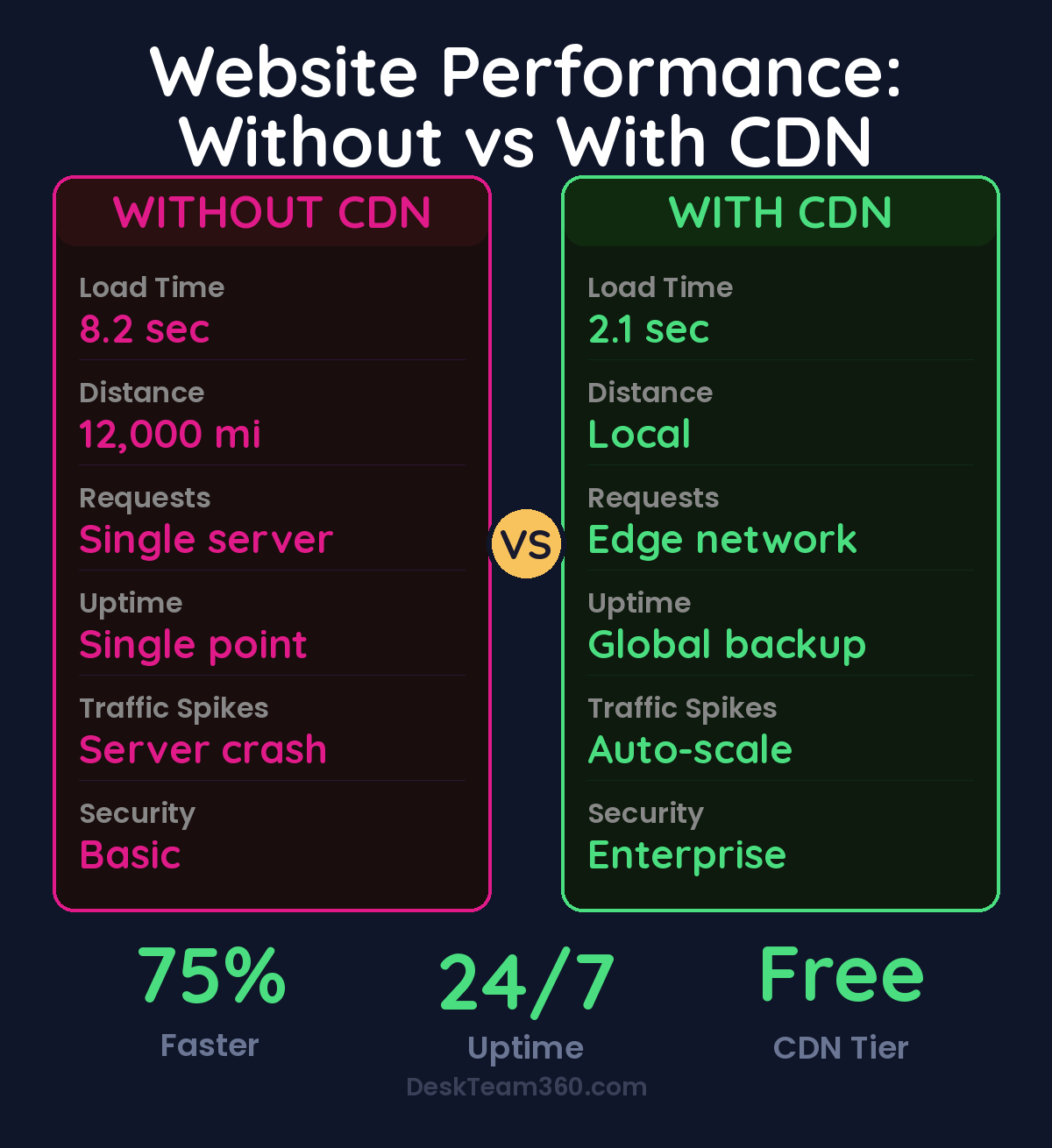
Without a CDN: average load time of 4-8 seconds for international visitors, bounce rates hitting 60-80% for slow-loading pages, conversion rates that tank when load times exceed 3 seconds. With a CDN: load times drop to 1-3 seconds globally, bounce rates cut in half, and conversion improvements of 15-40% are normal.
Amazon famously calculated that every 100ms of latency costs them 1% in sales. For a company doing millions in revenue, that’s serious money. For smaller businesses, the impact is actually bigger because you can’t afford to lose any customers to preventable technical issues.
Sites using CDNs see 75% faster load times and convert visitors at rates 25-40% higher than sites without them.
Beyond Speed: The Hidden Benefits
Faster loading is the obvious benefit, but there are four others that matter just as much.
Reliability and uptime. Your main server goes down? Your CDN keeps serving cached content, so your site stays up. We’ve seen clients avoid complete outages during server maintenance because their CDN kept the site functional.
Reduced server load. When the CDN handles 70-90% of requests, your main server can focus on dynamic content and database operations instead of serving the same CSS and image files thousands of times per day. This means fewer crashes during traffic spikes and lower hosting costs.
Security improvements. Modern CDNs include DDoS protection, SSL/TLS encryption, and bot filtering. They absorb malicious traffic before it ever reaches your server. It’s like having a bouncer for your website.
For a deeper dive, see our guide on how much does it cost to hire a marketing agency? (real breakdown).
SEO benefits. Google includes site speed as a ranking factor, especially for mobile searches. Faster sites rank higher, period. If you’re competing for organic traffic, a CDN isn’t optional anymore, it’s required infrastructure.
Who Actually Needs a CDN
The short answer: almost everyone. The longer answer depends on your specific situation.
You definitely need a CDN if: your website gets traffic from multiple countries, you’re running an e-commerce store (every lost sale hurts), you have image-heavy content, your current hosting is basic shared hosting, or you’re serious about SEO and organic rankings.
You might not need a CDN if: your audience is 100% local and always will be, your site is purely informational with minimal media, or you’re already using a hosting platform that includes CDN functionality (like Shopify or Squarespace).
Here’s the reality check. Even if your business is local, your customers aren’t always local when they visit your site. They’re traveling, working from different locations, or accessing your site from mobile networks with varying performance. A CDN helps everyone, not just international visitors.
For context around improving user experience across different scenarios, our guide on reducing website bounce rate shows how technical optimizations tie directly to business results.
Choosing the Right CDN
There are five major players worth considering, and they’re not all created equal.
Cloudflare is the most popular choice for good reason. Their free plan covers most small businesses, they have excellent security features, and their dashboard is actually user-friendly. The paid plans start at $25/month and add serious enterprise features.
AWS CloudFront integrates perfectly if you’re already using AWS services. It’s pay-per-use pricing, which can be great or expensive depending on your traffic. Expect $10-100+ per month for most sites.
KeyCDN is the budget-friendly option with straightforward pricing and solid performance. $4-40/month covers most use cases. No bells and whistles, but it does the core job well.
MaxCDN (now StackPath) offers good performance and competitive pricing. Plans start around $10/month. Their customer support is excellent if you need hand-holding during setup.
Fastly is the premium option, used by major sites like GitHub and Pinterest. It’s overkill for most small businesses, but if you need advanced features and have the budget, they deliver.
Watch out: Some hosting companies claim to include “CDN” in their packages, but it’s often just basic caching, not true global distribution. Read the fine print and test the actual performance improvement before committing.
Setting Up Your First CDN
The implementation process is simpler than most people think, but there are ways to mess it up. Here’s the step-by-step that actually works.
We break this down further in e-commerce website cost: real breakdown from shopify to custom builds.
Step 1: Choose your CDN provider. For most businesses, Cloudflare’s free plan is the right starting point. You can always upgrade later if needed.
Step 2: Point your domain to the CDN. This usually means changing your DNS nameservers. Your CDN provider gives you exact instructions, but the change takes 24-48 hours to fully propagate.
Step 3: Configure caching rules. Static files (images, CSS, JavaScript) should cache for days or weeks. Dynamic content (blog posts, product pages) might cache for hours. Don’t cache user-specific content like shopping carts or login areas.
Step 4: Test everything. Check that your site loads properly, forms still work, and nothing broke during the transition. Test from multiple locations and devices.
Step 5: Monitor performance. Use tools like Google PageSpeed Insights or GTmetrix to verify the speed improvements. Most CDNs also provide their own analytics showing cache hit rates and bandwidth savings.
This process typically takes 2-4 hours for a standard website, including the learning curve. The technical complexity is similar to setting up Google Analytics, manageable for most business owners or their technical team members.
The Cost Reality
Let’s break down what a CDN actually costs versus what it saves you.
For a typical small business website (under 50GB of monthly bandwidth), you’re looking at $0-25/month for a quality CDN. Medium-traffic sites (100-500GB) run $25-100/month. High-traffic operations can hit $200-500/month, but at that point, the business case is obvious.
Compare that to what slow loading costs you. A 2-second delay in page load time increases bounce rates by 32%. A 3-second delay pushes it to 57%. If you’re doing $10K/month in online revenue and lose just 10% to page speed issues, you’re leaving $12,000/year on the table. That CDN pays for itself in the first month.
Factor in the reduced hosting costs (your server handles fewer requests) and improved SEO rankings (Google loves fast sites), and the ROI becomes even more compelling. Understanding this type of investment analysis is crucial, similar to how we approach measuring marketing ROI across different channels.
Common Mistakes That Waste Money
I’ve seen businesses blow their CDN implementation in predictable ways. Here’s how to avoid each pitfall.
Over-caching dynamic content. Caching your product inventory page for 24 hours sounds efficient until customers try to buy something that’s actually out of stock. Cache static assets aggressively, cache dynamic content conservatively.
Ignoring mobile performance. Your desktop site might load fast, but mobile networks are unpredictable. Test your CDN performance specifically on mobile devices and slower connections. The difference is often dramatic.
For more on this, check out our guide on why you should outsource website updates (and stop doing it yourself).
For industry research and benchmarks, check out WordPress Developer Resources.
Forgetting about SSL certificates. A CDN with broken HTTPS is worse than no CDN. Make sure your SSL certificates are properly configured and auto-renewing. Most modern CDNs handle this automatically, but verify it during setup.
Not monitoring cache hit rates. If only 30% of requests are served from cache, your CDN isn’t working properly. Target 70-90% cache hit rates for optimal performance and cost savings.
Assuming one size fits all. Different content types need different caching strategies. Images can cache for months, CSS files for weeks, HTML pages for hours. Configure each type appropriately instead of using blanket settings.
When NOT to Use a CDN
There are legitimate scenarios where a CDN doesn’t make sense, though they’re rare.
If your website is purely internal (employee portal, intranet), serves only local customers who never travel, or you’re already on a platform like Shopify that includes CDN functionality, you might skip the extra complexity. Some highly dynamic applications with constantly changing content also see minimal CDN benefit.
For most businesses, though, the question isn’t whether you need a CDN, it’s which one fits your budget and technical requirements. The performance and user experience benefits almost always justify the cost.
When evaluating website infrastructure improvements like CDNs, it helps to understand broader optimization strategies. Our guide on creating effective FAQ pages covers another crucial element of user experience that compounds with technical improvements.
What’s Coming Next in CDN Technology
CDN technology isn’t standing still. Edge computing is pushing processing power closer to users, not just content delivery. Serverless functions at the edge mean you can run application logic in 200+ locations worldwide. AI-powered optimization automatically adjusts caching strategies based on real user behavior patterns.
Real-time personalization at the edge is already happening. Instead of serving the same cached page to everyone, CDNs can deliver customized content while maintaining blazing fast speeds. We’re also seeing better integration with headless CMS platforms and JAMstack architectures.
The bottom line: CDNs are becoming smarter, faster, and more affordable every year. The companies that adopt them early get a competitive advantage that compounds over time.
Speed Up Your Site Today
Your website’s performance directly impacts your bottom line. Every second of load time matters. Every visitor who bounces because your site is too slow is potential revenue walking away.
A CDN isn’t a nice-to-have feature anymore. It’s basic infrastructure, like having a phone number or business cards. Your competitors are using them. Your customers expect the fast, reliable experience they provide.
At DeskTeam360, we handle CDN implementation as part of our comprehensive website optimization services. We choose the right provider, configure the caching rules, monitor the performance, and ensure everything works seamlessly so you can focus on running your business instead of debugging technical issues.
If you want to explore how website performance optimization fits into your broader digital marketing strategy, understanding conversion rate optimization provides valuable context for measuring the real business impact of technical improvements.
Free Template
The Ultimate Task Delegation Template
Stop guessing what to hand off. This template shows you exactly what to delegate, how to brief it, and how to QA the results.
Get the Free Template →