


ADA Website Compliance: What It Is and Do You Need It?
Why 4,600 Lawsuits Should Scare You Into Action
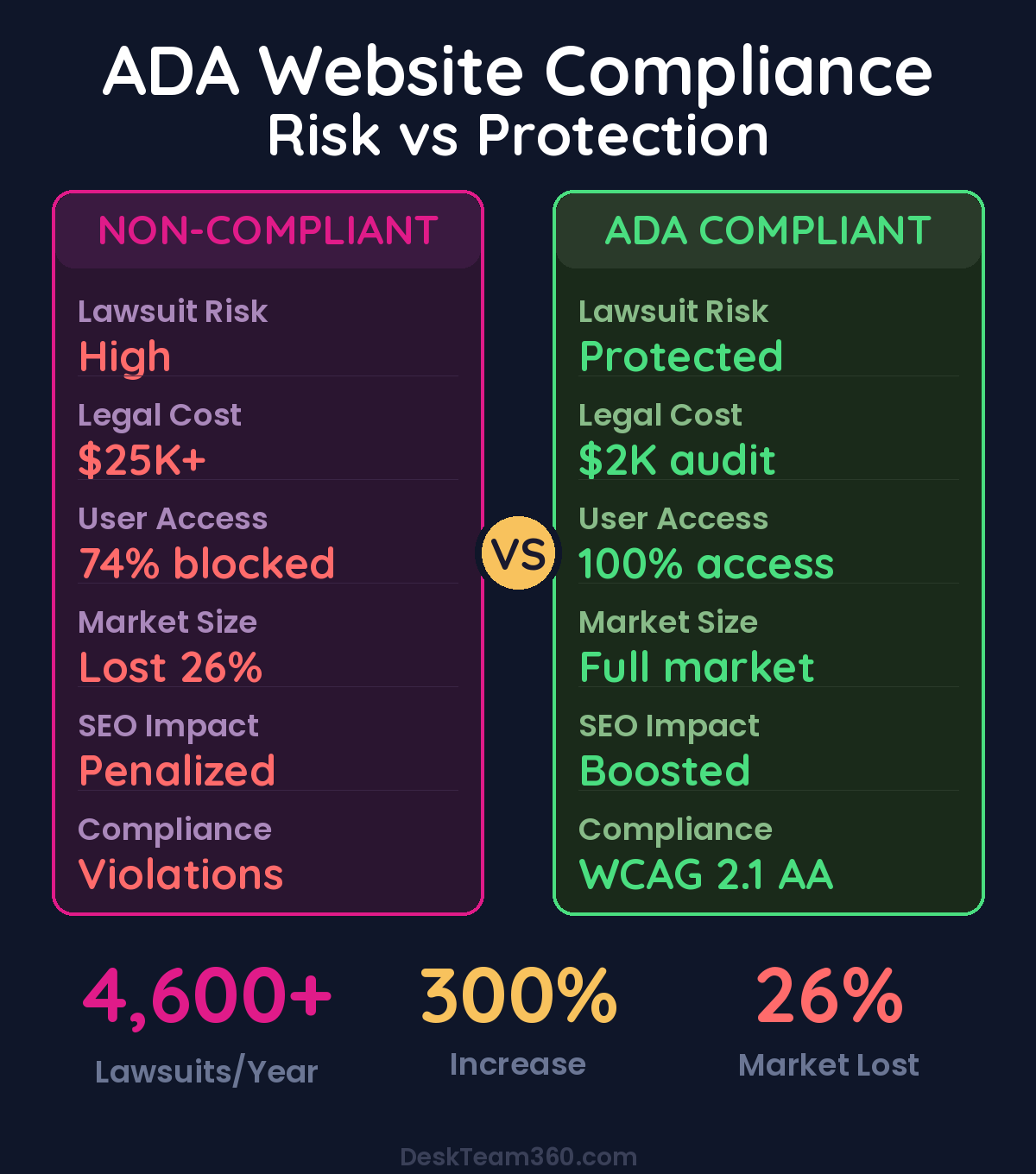
I need to tell you something that might keep you awake tonight. In 2023 alone, over 4,600 businesses got hit with ADA website compliance lawsuits. That’s not a typo. And it’s not just happening to Fortune 500 companies with deep pockets and legal teams.
Small e-commerce stores, local restaurants, mom-and-pop service businesses, they’re all getting demand letters asking for settlements between $5,000 and $25,000. The calculation is brutal and simple: it’s cheaper to pay than to fight, so most businesses just write the check.
I’ve been building and managing websites for over 12 years, and this shift has been dramatic. Five years ago, nobody asked about ADA compliance. Now it’s one of the first questions clients bring up, usually after they’ve already been served papers or received a threatening letter.
The worst part? Most of these lawsuits are completely preventable. The accessibility issues that trigger them are predictable, well-documented, and fixable. You just need to know what you’re looking for and how to address it before a plaintiff’s attorney finds your website.
What ADA Website Compliance Actually Means
The Americans with Disabilities Act was passed in 1990 to eliminate discrimination against people with disabilities. It originally focused on physical spaces like wheelchair ramps and accessible bathrooms, but courts have increasingly ruled that websites are “places of public accommodation” too.
Here’s what that means in practice. If you operate any kind of business that serves the public, your website needs to be accessible to people with disabilities. That includes people who use screen readers because they’re blind, people who navigate with keyboards because they can’t use a mouse, people with low vision who need high color contrast, and dozens of other disability types.
The technical standard everyone points to is called WCAG, the Web Content Accessibility Guidelines. Version 2.1 Level AA is what you need to hit. It’s what the Department of Justice references, what courts expect, and what will protect you from legal risk.
The Four Principles That Matter
WCAG organizes everything around four principles called POUR. Every accessibility requirement falls under one of these, and understanding them helps you think about compliance systematically.
Perceivable means users must be able to perceive your content. That’s alt text for images, captions for videos, and sufficient color contrast between text and backgrounds.
Operable means users must be able to interact with your website. Keyboard navigation has to work, no seizure-triggering animations, and users get enough time to complete forms and tasks.
Understandable means your content and interface make sense. Clear language, consistent navigation, helpful error messages when something goes wrong.
Robust means your content works with assistive technologies now and in the future. Proper HTML structure, ARIA labels where needed, standards-compliant code that screen readers can interpret.
Free 5-Minute Video
See How DeskTeam360 Works in Under 5 Minutes
Watch the short video and see exactly how we handle design, development, and marketing implementation — so you don't have to.
Watch the Video →
The Accessibility Failures That Trigger Lawsuits
Let me be specific about what actually gets businesses sued, because these are the issues accessibility attorneys look for first.
Missing alt text on images is the number one violation. Every image needs descriptive alt text that tells screen reader users what they’re looking at. Decorative images get empty alt tags so screen readers skip them. This is basic stuff, but I see it missing on 80% of websites we audit.
Poor color contrast comes next. Your text needs a 4.5:1 contrast ratio against its background. That light gray text on white backgrounds that looks so clean in your design mockups? It’s illegible for users with low vision, and it’s an easy lawsuit target.
Form labels are constantly botched. Every input field needs a visible label AND a programmatic label that assistive technology can find. Using placeholder text alone doesn’t count, even though half the web thinks it does.
Watch out: Accessibility overlay widgets like AccessiBe promise one-click compliance but they don’t deliver. Screen reader users report these overlays make sites harder to use, and companies get sued despite having them installed. They create false confidence while solving none of the real problems.
Keyboard navigation failures happen when developers forget that some users can’t use a mouse. Every link, button, and form field must be reachable with the Tab key and operable with Enter or Space. If your dropdown menus or modal windows trap keyboard users, you’re creating a barrier.
Heading structure problems break navigation for screen reader users. They jump between headings to understand page layout, so you need logical hierarchy. H1 for the main title, H2 for major sections, H3 for subsections. Skipping levels or using headings for visual styling only confuses assistive technology.
Auto-playing media is disruptive and potentially dangerous. Videos or audio that start automatically can disorient screen reader users and distress people with cognitive disabilities. Always give users control over when media plays.
The Legal Reality You Can’t Ignore
The lawsuit statistics are sobering, and they’re accelerating. 2023 saw 4,600+ cases filed, which is a 300% increase from five years ago. The average settlement ranges from $5,000 to $75,000, depending on the size of your business and how many violations they find.
If you decide to fight instead of settle, litigation costs run $50,000 to $350,000 or more. Most small businesses don’t have that kind of budget, which is exactly what plaintiff attorneys are counting on.
Serial plaintiffs and law firms have turned this into a business model. They use automated scanning tools to identify websites with accessibility violations, file lawsuits in bulk, and count on most defendants settling rather than fighting. It’s efficient and profitable for them, devastating for unprepared businesses.
The Department of Justice has made their position clear. Websites are covered by the ADA, period. In 2024, they finalized rules requiring government websites to meet WCAG 2.1 AA, and similar requirements for private businesses are expected to follow.
Companies that proactively address accessibility see 65% fewer legal complaints compared to those that wait until they’re sued.
How to Audit Your Website Before Lawyers Do
Start with automated testing tools, but understand their limitations. Tools like WAVE, axe DevTools, and Google Lighthouse catch obvious issues like missing alt text and color contrast problems, but they only identify 25-35% of real accessibility barriers.
The rest requires manual testing. Unplug your mouse and try to navigate your entire website using only the keyboard. Download NVDA screen reader software and attempt to complete a purchase or fill out your contact form. Zoom your browser to 200% and see if the layout breaks or becomes unusable.
For comprehensive coverage, hire an accessibility specialist to conduct a professional audit. They’ll test with real assistive technologies, document every WCAG violation, and provide a prioritized remediation plan. This runs $2,000 to $10,000+ depending on your site‘s complexity, but it’s a fraction of what you’ll pay if you get sued.
What Professional Audits Actually Find
I’ve seen the reports from dozens of accessibility audits, and the patterns are consistent. Most websites have 15-50 distinct violations affecting hundreds or thousands of elements. The good news is that fixing the top 10 violation types usually addresses 80% of the accessibility barriers.
The audit will categorize issues by severity and WCAG conformance level. Critical violations block access entirely, major violations create significant barriers, and minor violations affect usability but don’t prevent access.
You’ll also get a remediation timeline. Some fixes take hours, like adding alt text to images. Others take weeks, like restructuring your heading hierarchy across all pages. The biggest projects, like making complex interactive widgets fully accessible, can take months.
Your Accessibility Remediation Roadmap
Quick Wins That Take Days, Not Months
Start with the violations that have maximum impact for minimum effort. Add alt text to every image on your website, starting with your most visited pages. Fix color contrast issues by darkening text or lightening backgrounds to meet the 4.5:1 ratio requirement. Add proper labels to all form fields, not just placeholder text.
Create a “skip to main content” link at the top of each page so keyboard users can bypass navigation menus. Make sure all your link text is descriptive, replacing generic “click here” and “read more” text with specific descriptions of where the link goes.
Add the language attribute to your HTML tag so screen readers know what language to expect. These fixes are straightforward and immediately improve accessibility for real users.
Medium-Effort Improvements
Fixing heading structure requires more planning but isn’t technically complex. Audit every page for proper H1-H6 hierarchy and restructure as needed. This affects your content management workflow, so train your team on proper heading use.
Making interactive elements keyboard accessible often means rebuilding custom components. Dropdown menus, image carousels, accordion widgets, modal dialogs, they all need keyboard event handlers and proper ARIA attributes.
Video content needs captions or transcripts. If you have educational videos, product demos, or testimonial content, adding accurate captions helps deaf and hard-of-hearing users while also improving SEO.
Pro tip: Build accessibility into your content creation workflow from the start. Train your content team to write good alt text, use headings properly, and create accessible links. This prevents new violations from accumulating while you fix existing ones.
For industry research and benchmarks, check out Google’s web.dev.
Major Projects That Require Professional Help
Some accessibility barriers require significant development work. PDF documents are notorious accessibility problems, they need to be tagged PDFs with proper reading order and form field labels, or you need to provide accessible HTML alternatives.
Complex single-page applications often need architectural changes to handle focus management and route announcements properly. E-commerce checkout flows frequently need complete rebuilds to be fully accessible to keyboard and screen reader users.
If your website needs major remediation work, this becomes a serious WordPress development project that’s better handled by professionals who understand both accessibility standards and legal requirements.
The Business Case Beyond Legal Protection
Accessibility isn’t just about avoiding lawsuits, it makes business sense. Twenty-six percent of US adults have some form of disability. That’s a massive market you’re potentially excluding with an inaccessible website.
Accessible websites also perform better in search engines. Alt text, proper heading structure, descriptive links, and semantic HTML are all SEO best practices too. The technical improvements that help screen reader users also help Google understand and rank your content.
User experience improves for everyone, not just people with disabilities. Captions help people watching videos in noisy environments. Keyboard navigation helps power users move through interfaces quickly. Clear headings help everyone scan and understand content faster.
Building Accessibility Into Your Process
The most cost-effective approach is building accessibility into new projects from the beginning. Retrofitting accessibility costs 10x more than designing it in from the start.
If you’re planning a website redesign, make WCAG 2.1 AA compliance a requirement in your project specifications. Your design and development team should be testing for accessibility throughout the build process, not discovering issues after launch.
For ongoing content creation, train your team on accessibility basics. They need to understand how to write meaningful alt text, use heading hierarchy properly, create descriptive link text, and maintain color contrast requirements.
Conduct regular accessibility maintenance. Run automated scans monthly to catch obvious issues like missing alt text on new content. Schedule annual manual audits to identify more complex barriers that automated tools miss.
Why This Matters More Than You Think
ADA website compliance isn’t some edge case regulatory burden. It’s mainstream legal risk that’s growing every year, affecting businesses of all sizes across every industry.
But here’s what most business owners miss: accessibility improvements make websites better for everyone. The technical standards that help screen reader users also improve SEO rankings. The design principles that help people with cognitive disabilities also improve conversion rates for typical users.
The businesses that get ahead of this trend, instead of waiting for demand letters, save money, reach larger markets, and build better digital experiences. The businesses that ignore it until they’re forced to care pay premium prices for emergency remediation while dealing with legal stress and potential reputation damage.
Start with an accessibility audit to understand where you stand. Fix the quick wins immediately, create a remediation plan for bigger issues, and build accessibility into your ongoing content and development processes. This isn’t optional anymore.
The good news is that accessibility compliance is achievable for businesses of any size. You don’t need a massive budget or technical expertise to get started. You just need to understand what’s required and create a plan to address it systematically.
Don’t be the business owner who learns about ADA compliance from a lawsuit. Take action now, while you can still control the timeline and costs. Your customers and your legal team will thank you.
Getting Professional Help
DeskTeam360 handles accessibility audits, compliance remediation, and ongoing website maintenance to keep your site accessible and legally protected. We understand both the technical requirements and the legal landscape, so you can focus on running your business instead of worrying about compliance risks.
Free Template
The Ultimate Task Delegation Template
Stop guessing what to hand off. This template shows you exactly what to delegate, how to brief it, and how to QA the results.
Get the Free Template →