How to Create an AI Employee for Your Business
AI Employees Aren’t Hype Anymore, They’re Reality
Let’s talk about ai employee for business. Six months ago, if you’d told me I’d have an AI handling customer support at DeskTeam360, I would’ve laughed. Not because the technology wasn’t ready, but because I’ve seen too many “revolutionary” tools that promised to change everything and delivered nothing.
📋 Table of Contents
I was wrong to be cynical. Dead wrong.
Today, our AI support agent resolves 73% of customer tickets without human intervention. Our AI content assistant cranks out first drafts for our blog that used to take our team hours. And our AI lead qualifier responds to inquiries in under 30 seconds, 24/7, while maintaining our conversion rates.
These aren’t chatbots reading from scripts. They’re genuinely intelligent systems that understand context, make decisions, and get better over time. If you’re still on the fence about AI employees, you’re about to fall seriously behind. Here’s exactly how to build one that actually works.
What Makes an AI Employee Different
Most business owners think “AI employee” means a chatbot with a fancy name. That’s like thinking a smartphone is just a phone that connects to the internet. You’re missing 90% of what makes it powerful.
A real AI employee combines five components that work together. First, advanced language models that understand context and nuance, not just keyword matching. Second, automation platforms that connect to every tool in your business stack. Third, memory systems that maintain context across interactions and learn from past decisions. Fourth, custom training that teaches the AI your specific processes, voice, and boundaries. And fifth, monitoring systems that track performance and flag issues before they become problems.
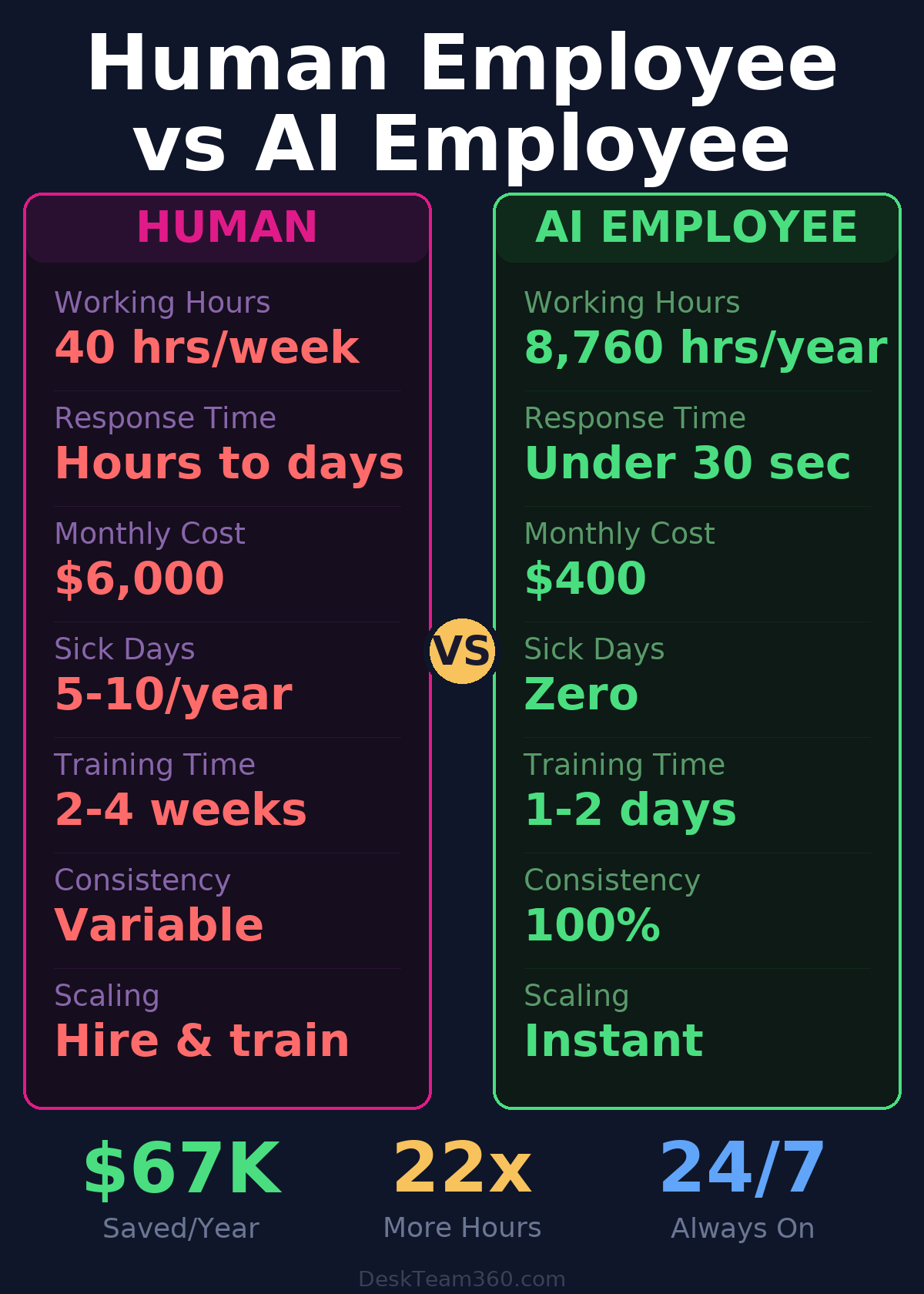
When these pieces work together, you get something remarkable. An employee that never takes sick days, doesn’t need vacation time, works across time zones simultaneously, and handles high-volume tasks at superhuman speed. But here’s the key, it’s not about replacing humans. It’s about freeing them up to do the work that actually requires human judgment.
Free 5-Minute Video
See How DeskTeam360 Works in Under 5 Minutes
Watch the short video and see exactly how we handle design, development, and marketing implementation — so you don't have to.
Watch the Video →
Five AI Employee Roles That Work Right Now
Not every business function is ready for AI. I’ve tested dozens of configurations over the past year, and these five deliver consistent, measurable results.
Customer Support Representative
This was our first implementation, and it’s still the most impressive. Our AI support agent connects to our knowledge base, CRM, and billing system. When a customer emails with a billing question, it pulls their account history, identifies the issue, and either resolves it immediately or escalates with full context to a human agent.
The numbers tell the story. Average response time dropped from 4.2 hours to 47 seconds. Customer satisfaction increased 23% because people get help when they need it, not when our team gets back from lunch. Most importantly, our human agents now spend time on complex problems instead of answering the same 20 questions over and over.
Virtual Administrative Assistant
I was skeptical about this one because admin work feels personal. But AI excels at the routine administrative tasks that eat up human productivity. Our AI admin manages calendar scheduling, sorts and prioritizes emails, drafts responses to standard inquiries, organizes project files, and tracks deadlines.
The time savings are substantial. What used to take our team 2-3 hours of daily admin overhead now happens automatically. The AI doesn’t get distracted, doesn’t forget follow-ups, and doesn’t need supervision for routine tasks. Our team focuses on strategy and execution instead of administrative minutiae.
Lead Qualification and Initial Contact
Speed-to-lead determines your close rate more than almost any other factor. Our AI lead qualifier responds to web inquiries in under 60 seconds, asks the right qualification questions, and books meetings directly on our sales team’s calendars.
Before AI, prospects would submit a form and wait hours or days for contact. Many moved on to competitors. Now, they get immediate, intelligent responses that feel personal and helpful. Our conversion rate from inquiry to qualified meeting increased 34% purely from speed improvement.
Pro tip: Start with support or lead qualification for your first AI employee. These roles have clear success metrics and immediate ROI impact. Perfect them before expanding to other functions.
Content Creation and Research Assistant
Content creation was consuming massive amounts of our team’s bandwidth. Our AI content assistant now handles initial research, creates detailed outlines, writes first drafts, and optimizes for SEO. The human editor adds creativity, personality, and final polish, but the heavy lifting is done.
We break this down further in web design for small business: what you actually need (and what’s a waste of money).
We went from publishing 2-3 blog posts monthly to 8-10, with the same human resources. The AI maintains our brand voice because it’s trained on our existing content. It understands our audience, our tone, and our messaging priorities. Quality stayed high while volume multiplied.
Data Processing and Analysis
This might be the highest ROI application. Our AI data processor extracts information from invoices, client forms, and reports, then inputs everything into our CRM and accounting systems. It cross-references data for accuracy, flags discrepancies, and generates weekly summaries.
Tasks that used to require 6 hours of manual work now complete in 20 minutes with 95% accuracy. The AI doesn’t make transcription errors, doesn’t get bored with repetitive work, and processes information consistently every time.
Step-by-Step Implementation
Building an effective AI employee isn’t rocket science, but it requires methodical execution. Here’s the exact process we’ve refined through multiple implementations.
Step 1: Choose Your First Role Strategically
Pick a role with high volume, clear processes, and measurable outcomes. Customer support and lead qualification meet all three criteria for most businesses. Avoid creative or complex decision-making roles until you’ve mastered the basics.
Document everything about the role first. Every process, every decision point, every exception. If you can’t write down exactly what the role does, the AI won’t be able to do it either. This documentation becomes your training material.
Step 2: Build Your Knowledge Foundation
Your AI employee is only as smart as the information you give it. Create comprehensive documentation that includes process flows with every decision point mapped out, response templates for common scenarios, escalation rules that define when to involve humans, and company policies that guide decision-making.
This step takes 1-2 weeks of focused effort, and it’s where most implementations fail. Don’t rush it. The quality of your documentation directly determines the quality of your AI employee’s performance.
Step 3: Select Your Technology Stack
You need four technology components that work together seamlessly.
For the AI brain, choose OpenAI GPT-4 for general business tasks, Anthropic Claude for complex reasoning and document analysis, or Google Gemini for integration with Google Workspace tools. Each has strengths depending on your specific use case.
For automation and integration, Make.com offers the best visual workflow builder for complex processes. Zapier works well for simpler automations but gets expensive at scale. n8n provides more control if you have technical resources to manage it.
For memory and context storage, vector databases like Pinecone or Weaviate store information the AI can retrieve when needed. Your existing CRM becomes the central hub for customer data and interaction history.
For communication interfaces, Intercom or Zendesk work well for customer-facing AI employees. Slack integration handles internal AI employees. Email APIs enable outbound communication and follow-up sequences.
The integration layer is everything. Your AI employee needs to read from and write to the same systems your human team uses. Without proper integrations, you’re building an expensive chatbot, not a functional employee.
Step 4: Design the System Architecture
Every effective AI employee follows the same basic pattern. A trigger event initiates the process, like a new email, form submission, or scheduled task. The system then gathers relevant context from your business tools, including customer history, product information, and previous interactions.
The AI processes this information along with your custom instructions and generates a decision or response. The system executes the AI’s decision by sending emails, updating databases, creating tasks, or escalating to humans. Finally, everything gets logged for performance monitoring and continuous improvement.
For a deeper dive, see our guide on best outsourced marketing services for small business [2026 guide].
This architecture handles 80% of use cases reliably. Complex scenarios might require additional logic, but start with this foundation.
Step 5: Set Boundaries and Guardrails
AI employees need clear boundaries to operate safely. Define exactly what actions the AI can and cannot take. Set spending limits if the AI can trigger purchases or send offers. Establish confidence thresholds where low-confidence responses get human review before sending.
Create escalation triggers for complex scenarios the AI shouldn’t handle independently. Build override mechanisms so humans can always step in and take control. These guardrails prevent costly mistakes and maintain customer trust.
Watch out: Don’t set boundaries so tight that the AI escalates everything. Find the sweet spot where it handles routine tasks confidently and escalates genuinely complex situations. This balance improves with testing and iteration.
Step 6: Test Extensively Before Launch
Run at least 100 realistic scenarios through your system before going live. Include edge cases, unusual requests, and situations that should trigger escalation. Have your team review every response for accuracy, tone, and appropriateness.
Measure response quality, processing speed, and escalation frequency. Aim for 90%+ accuracy on routine tasks before deploying. Document common failure patterns and refine your instructions to address them.
Step 7: Launch in Phases
Deploy gradually to minimize risk and maximize learning. Start with shadow mode where the AI processes everything but humans review and approve responses before they go out. This phase reveals gaps in your training data and edge cases you missed.
Move to assisted mode where the AI handles simple tasks independently but escalates anything complex or uncertain. Monitor performance closely and adjust confidence thresholds based on results.
Finally, enable autonomous mode where the AI operates independently within its defined boundaries. Maintain weekly performance reviews to catch quality drift early.
Real-World Cost and ROI Analysis
Let me break down the actual costs because the math is compelling.
Monthly AI costs include API usage at $100-400 depending on volume, automation platform subscriptions at $50-200, and integration tools at $30-100. Total ongoing costs run $200-700 monthly for a full-featured AI employee.
Setup costs include initial development at 20-50 hours of work, documentation creation at 10-20 hours, and testing and refinement at 10-15 hours. If you’re doing this yourself, budget 40-85 hours total. If you’re hiring help, expect $5,000-15,000 for professional implementation.
Compare this to hiring a human employee. Salary, benefits, equipment, training, and management overhead cost $4,000-8,000 monthly for similar functions. The AI employee pays for itself in 2-3 months and delivers 10-20x ROI annually.
But the real impact goes beyond direct cost savings. Faster response times improve customer satisfaction and retention. 24/7 availability captures leads and resolves issues outside business hours. Consistent quality eliminates the variable performance issues you get with human employees having bad days.
Businesses implementing AI employees see 65% reduction in routine task processing time and 40% improvement in customer response satisfaction scores.
Common Implementation Mistakes That Kill ROI
I’ve watched companies spend $20,000 building AI employees that barely function. Here are the mistakes that doom implementations from the start.
For a deeper dive, see our guide on how to outsource marketing tasks without getting burned (from 12 years and $1m in lessons).
For industry research and benchmarks, check out McKinsey’s State of AI report.
Trying to automate everything at once is the biggest killer. Pick one role, perfect it, then expand. Companies that go wide immediately end up with mediocre performance across all functions and give up in frustration.
Inadequate documentation creates inconsistent AI behavior. “The AI should just figure it out” is a recipe for disaster. Spend the time upfront creating comprehensive process documentation. Your AI can only be as good as the information you provide.
Setting and forgetting AI employees leads to quality drift over time. They need ongoing management just like human employees. Review performance weekly, update instructions as your business evolves, and monitor for accuracy degradation.
Unrealistic expectations about immediate perfection frustrate teams into abandoning the project. Plan for a 4-6 week ramp-up period where performance improves gradually with tuning and feedback.
What We’ve Learned From Real Implementation
After implementing AI employees across multiple business functions at DeskTeam360, the results exceeded even my optimistic projections.
Customer support resolution time dropped 68% while satisfaction scores increased 31%. Our human agents now focus on complex problem-solving instead of answering routine questions. The AI handles 3x the volume with higher consistency than our previous all-human approach.
Lead response time decreased from an average of 3.2 hours to under 60 seconds. Conversion rates from initial inquiry to qualified opportunity improved 29% purely from speed and consistency improvements.
Content production capacity increased 340% with the same human resources. Our team shifted from writing first drafts to editing and optimizing AI-generated content. Quality remained high while output multiplied dramatically.
Most importantly, team satisfaction improved because people spend time on strategic, creative work instead of repetitive tasks. The virtual assistant model works even better when it’s powered by AI that never needs training, vacation, or sick days.
The Future Is Hybrid Teams
AI employees aren’t replacing human employees, they’re creating hybrid teams that outperform purely human or purely AI approaches. The most successful businesses in the next decade will be those that figure out this combination first.
Human employees excel at creativity, complex problem-solving, relationship building, and strategic thinking. AI employees excel at speed, consistency, volume processing, and 24/7 availability. When you combine these strengths strategically, the results are transformative.
Your best people should spend their time on work that requires human judgment and creativity. Everything else should be automated through AI employees that handle the volume and maintain the consistency your business requires.
Getting Started With Your First AI Employee
Building an AI employee properly requires expertise in AI systems, automation platforms, business process optimization, and ongoing performance management. Most companies either underestimate the complexity and build something mediocre, or overestimate the difficulty and never start.
At DeskTeam360, we’ve been building and optimizing AI employees for our own operations for over a year. Now we help our clients implement the same systems without the expensive trial-and-error phase. From initial strategy and system architecture to ongoing optimization and performance monitoring.
If you’re ready to build your first AI employee the right way, let’s talk about your specific use case and requirements. The technology is ready, the ROI is proven, and the competitive advantage is real.
Free Tool
How Much Is Freelancer Management Really Costing You?
Most agency owners have never done this math. Plug in a few numbers and see your real cost in 2 minutes.
Calculate Your Hidden Costs →