
Best Unlimited Video Editing Services in 2025 (Compared)
Looking for the best unlimited video editing services? You’re in the right place.
📋 Table of Contents
Why Everyone’s Jumping on Video Editing Subscriptions
It’s Wednesday afternoon. You’re scrolling through your competitor’s Instagram and they’re posting professional-looking video content every single day. Meanwhile, your last video post was three weeks ago and looks like it was edited on a smartphone in 2018.
This scenario plays out constantly, and it’s killing businesses that can’t keep up with the video content demand.
I’m not talking about hiring a $65,000-a-year video editor to sit around waiting for work. That’s financial suicide for most companies. I’m talking about unlimited video editing subscriptions, where you pay a flat monthly rate and submit as many projects as you need. Professional editors handle everything while you focus on running your business.
I’ve been watching this space evolve for 12+ years, and the subscription model has gone from experimental to essential. Video content drives engagement, converts leads, and builds brands. The businesses that can produce it consistently win. Those that can’t get left behind.
But here’s the problem: not all video editing services deliver the same results. Some produce broadcast-quality content that converts viewers into customers. Others deliver basic cuts that look like they were made by someone’s cousin who “knows Premiere.”
Let me break down the best unlimited video editing services right now, what to actually look for, and how to pick the one that’ll transform your content game.
What “Unlimited” Really Means (And What It Doesn’t)
Let’s kill the biggest misconception right up front. “Unlimited” video editing doesn’t mean you upload 47 videos on Monday and get them all back Tuesday. That’s not how any of these services work, and anyone promising that is lying to you.
Unlimited means you can submit as many requests as you want during your subscription, but they’re handled sequentially. One project gets completed, then the next one starts. Think of it like a deli counter, you can order as many sandwiches as you want, but they make them one at a time.
The real value is predictable pricing. No $800 surprise invoices because your video ran 30 seconds longer than estimated. No “complexity fees” because you wanted motion graphics. You pay the same amount every month whether you submit two videos or twenty.
This model works because most businesses have consistent video needs. Three YouTube videos per week, daily social clips, monthly ad creative. The subscription covers your baseline demand, and the queue system ensures quality doesn’t suffer from rushed deadlines.
If best unlimited video editing services is on your radar, this guide is for you. Finding the best unlimited video editing services takes research. Pro tip: Calculate how much you’d spend on freelance video editing over three months, then compare that to subscription pricing. For most businesses producing 4+ videos monthly, subscriptions cost 40-60% less than hiring project-based editors.
Free 5-Minute Video
See How DeskTeam360 Works in Under 5 Minutes
Watch the short video and see exactly how we handle design, development, and marketing implementation — so you don't have to.
Watch the Video →
The Five Things That Separate Good Services from Mediocre Ones
Before diving into specific companies, you need to understand what actually matters when evaluating video editing subscriptions. I’ve tested most of these services, and the differences aren’t always obvious from their marketing pages.
Scope of Services
Not every service handles every type of video editing. Some specialize in long-form YouTube content but can’t produce effective 15-second ad creative. Others excel at social media clips but struggle with complex motion graphics or multi-camera podcast editing.
You need to match the service to your actual content needs. Do you need YouTube video editing with cuts, transitions, and thumbnails? Social media content with captions and trending formats? Podcast editing with multi-camera syncing? Corporate videos with brand guidelines? Motion graphics with custom animations? Ad creative designed to convert cold traffic?
This isn’t a small detail. I’ve seen businesses sign up for services that looked perfect, only to discover they couldn’t handle half their actual video needs.
Turnaround Time Reality Check
Every service promises fast turnaround, but the reality varies wildly. Some consistently hit 24-48 hour turnaround for standard edits. Others stretch “2-3 business days” into a full week when they’re busy.
Here’s what I’ve learned: services that give specific timeframes (like “48 hours for videos under 10 minutes”) usually hit them. Services that say things like “fast turnaround” or “ASAP” usually don’t. Ask for specific examples of recent turnaround times for projects similar to yours.
Quality Control Systems
The best services have quality control built into their process. Before your video gets delivered, someone else reviews it for technical issues, brand consistency, and overall quality. This catches problems before they reach you and reduces revision rounds.
Services without quality control deliver whatever the editor thinks looks good. Sometimes that’s great. Sometimes you get a video with audio sync issues and your logo in the wrong color. The inconsistency will drive you crazy.
Revision Policies That Actually Work
“Unlimited revisions” sounds amazing until you realize some services treat every minor adjustment as a new project that goes to the back of the queue. You ask them to adjust the timing on one transition, and it takes another three days.
The best services allow reasonable revisions within the same project cycle. You get your first draft, provide feedback on multiple elements at once, and get the revised version without starting over. This is how professional video production actually works.
Communication and Project Management
You need clear ways to submit projects, provide feedback, and track progress. Services that rely on email threads and Slack messages become chaotic fast. The good ones have dedicated platforms where you can upload footage, write briefs, track project status, and provide structured feedback.
The Top Video Editing Subscription Services Compared
I’ve tested these services personally or worked with businesses that use them. Here’s what each one actually delivers.
Vidchops
Vidchops has built their entire business around YouTubers and content creators. They understand the YouTube algorithm, know what keeps viewers watching, and deliver editing that actually drives engagement metrics.
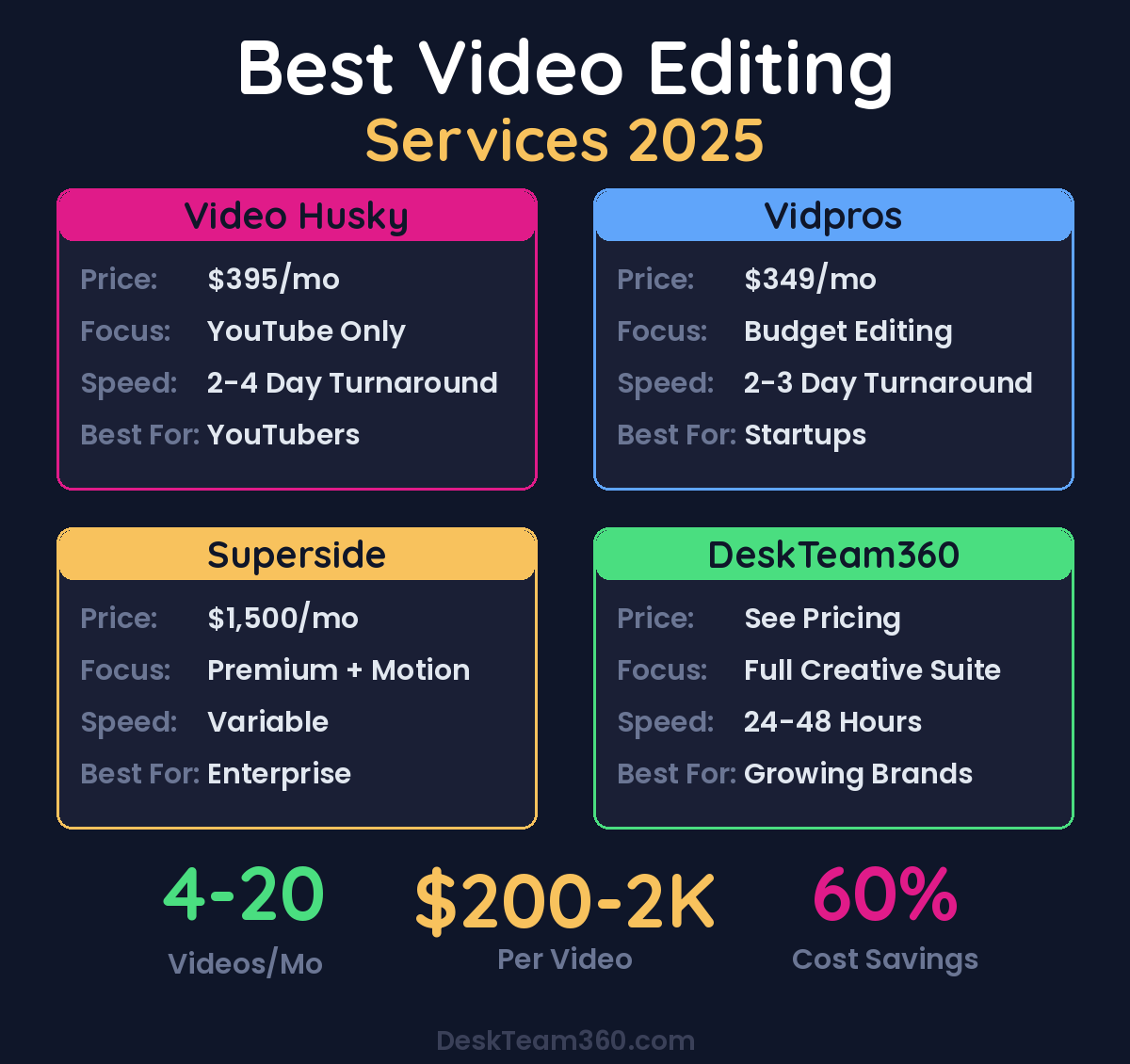
Starting around $395 per month, you get professional YouTube video editing including cuts, transitions, color correction, audio enhancement, and basic motion graphics. Turnaround typically runs 2-4 business days, and they include thumbnail design which most services don’t.
The limitation is focus. They’re built for YouTube long-form content, period. If you need ad creative for Facebook, podcast editing, or corporate videos, look elsewhere. But if YouTube is your primary content platform, they deliver results that justify the investment.
Video Husky
Video Husky positions itself as the budget-friendly option for content creators, starting around $349 monthly. You get a dedicated editor who learns your style over time, unlimited revisions, and basic motion graphics included.
The dedicated editor model works well for consistency, but it also means your turnaround depends entirely on that person’s workload and availability. If they’re swamped or take vacation, your projects wait. The lower pricing also means less complex editing, fewer motion graphics, and simpler deliverables.
It’s a solid choice for creators who prioritize cost over speed and don’t need advanced editing techniques. Just understand you’re trading some capabilities for the lower price point.
Belay (Formerly Vidpros)
Belay operates more like a staffing agency than a traditional subscription service. They match you with a dedicated video editor who works exclusively for you, essentially functioning as a remote employee.
At around $1,500 monthly, it’s significantly more expensive, but you get dedicated capacity and the flexibility to adjust scope as needed. Your editor learns your brand deeply, understands your content goals, and can handle more complex projects than typical subscription services.
The trade-off is cost and the relationship dependency. If your assigned editor leaves or doesn’t work out, you’re starting the onboarding process again. It makes sense for businesses with substantial video needs who want dedicated talent without the overhead of a full-time hire.
Penji Video Add-On
Penji built their reputation in graphic design subscriptions and added video editing as an additional service. At around $499 monthly, you get both graphic design and basic video editing under one subscription.
This makes sense if you already need graphic design work. Instead of subscribing to separate services, you get both under one roof. The video editing capabilities are more limited than dedicated video services, but the convenience factor and cost savings can be significant.
The downside is that video editing isn’t their primary expertise. Complex projects, advanced motion graphics, and specialized editing techniques often require additional fees or aren’t available.
DeskTeam360 (That’s Us)
Full transparency: DeskTeam360 is our service, but here’s why it fits differently than video-only subscriptions.
We’re not just a video editing service. We’re a full creative and development team that includes video editing, graphic design, web design, web development, landing pages, presentations, and more. One subscription, one team, everything you need for marketing and creative projects.
This approach works if you’re already outsourcing multiple creative functions or planning to. Instead of managing separate subscriptions for video editing, graphic design, and web development, you get integrated service delivery. Your video editor works directly with your graphic designer to ensure brand consistency across all content.
The trade-off is that we’re not as specialized in video-only work as services like Vidchops. If video editing is your only outsourcing need, a dedicated video service might be more focused. But if you need video editing plus other creative services, consolidating saves money and simplifies project management.
You can check our current pricing and service details on our pricing page.
Choosing between specialized and full-service subscriptions depends on your broader creative needs. If video is everything, go specialized. If video is part of a larger creative strategy, full-service makes more sense.
We break this down further in ai marketing tools: the complete guide for 2026.
How to Actually Get Professional Results
The quality of output from any video editing service depends heavily on the quality of your input. I’ve seen businesses blame their editing service for poor results when the real problem was terrible project briefs and disorganized footage.
Write Briefs Like a Pro
Don’t submit raw footage with instructions like “make this into a good video.” That’s not a brief, that’s a prayer. Your editors need specific direction on style, pacing, messaging, and deliverables.
Include reference videos that show the exact style you want. Provide brand guidelines with colors, fonts, and logo files. Specify the tone and target audience. Note any required music or audio preferences. Define the deliverable specifications including aspect ratio, duration, and intended platform.
The more specific your brief, the fewer revision rounds you’ll need and the better your final results will be. Our guide on how to write a creative brief covers the framework that actually works.
Organize Your Raw Materials
Upload organized, properly labeled files. Not a messy folder of 47 clips named “IMG_4392.mov” and “Video1_final_FINAL_v3.mp4.” Label your files descriptively, separate main footage from b-roll, include timestamps for key moments, and provide any necessary context about what was happening during filming.
Professional editors can work with imperfect footage, but they can’t read your mind about which clips matter and which ones were mistakes. Organization upfront saves time and produces better results.
Give Feedback That Actually Helps
“I don’t like it” isn’t feedback your editor can act on. “The pacing feels too slow in the first 30 seconds, can we tighten the cuts and add more b-roll to maintain energy?” That’s actionable feedback that leads to better revisions.
Be specific about what needs to change and why. Reference timestamps when possible. Explain the business context behind your feedback requests. This helps editors understand not just what to change, but the reasoning behind it.
Watch out: Trying to micromanage every single cut and transition usually makes videos worse, not better. Trust your editors’ technical expertise while providing clear strategic direction about goals and messaging.
Related reading: How to Create Email Marketing Templates That Actually Convert.
For industry research and benchmarks, check out HubSpot Email Guide.
For industry benchmarks and research, see Litmus Blog.
Subscription vs. Freelancer vs. Full-Time Editor
Understanding the alternatives helps you make the right choice for your specific situation and budget.
Freelance Video Editors
Freelancers typically charge $30-100+ per hour or $200-2,000+ per finished video depending on complexity and their experience level. You can find specialized talent for specific project types and only pay for work when you need it.
The downsides are inconsistent availability, variable quality between different freelancers, and project-based pricing that adds up quickly. You’ll also spend time finding, vetting, and managing different editors for different projects.
Full-Time Video Editor
A dedicated employee costs $45,000-75,000 annually in salary plus benefits, equipment, and software licenses. You get someone who learns your brand deeply, is always available when needed, and becomes integrated into your team culture.
The challenge is utilization. Unless you have daily video editing needs, a full-time editor will be underutilized and expensive. Plus you deal with vacation coverage, sick days, and potential turnover.
Subscription Services
Monthly subscriptions typically run $300-2,000 depending on the service level and included features. You get professional quality at predictable costs with the ability to scale usage up or down as needed.
The limitations are queue-based delivery, less direct control over who works on your projects, and some learning curve as editors get familiar with your brand and preferences.
For most businesses producing 4+ videos monthly, subscriptions hit the sweet spot of professional quality, predictable costs, and scalable capacity. We covered these trade-offs in more detail in our in-house vs. agency vs. subscription comparison.
The Questions That Reveal Service Quality
Before committing to any video editing subscription, ask these specific questions and pay attention to how they respond.
What types of video editing do you handle, and what projects do you typically refer elsewhere? The best services are honest about their limitations rather than promising everything.
What’s your actual average turnaround time for projects similar to mine? Generic answers like “fast turnaround” are red flags. Specific timeframes based on project complexity show they understand their own capacity.
Do I work with a dedicated editor or rotating team? Neither is inherently better, but you need to know what you’re getting. Dedicated editors provide consistency but may have capacity limitations. Team models offer faster turnaround but less continuity.
How do revisions work, and what constitutes a “reasonable” revision request? Services with clear revision policies avoid conflicts later. Vague answers usually lead to frustrated expectations.
Can I see recent examples of work you’ve done for businesses similar to mine? Portfolio examples should match your industry and content needs, not just show their best work from completely different verticals.
What’s your cancellation policy and how much notice do you need? Month-to-month flexibility usually indicates confidence in service quality. Long-term contracts often hide service issues.
Businesses that ask detailed questions upfront report 85% higher satisfaction with their chosen service compared to those that sign up based on marketing materials alone.
Start Producing Video Content That Actually Converts
The businesses dominating their markets right now aren’t the ones with the biggest video production budgets. They’re the ones producing consistently high-quality content that their competitors can’t match. Weekly YouTube videos that establish expertise. Daily social clips that drive engagement. Monthly ad creative that converts cold traffic. Quarterly brand videos that tell their story.
Video editing subscriptions make that production cadence sustainable without breaking your budget or overwhelming your team. Pick a service that matches your content needs, provide clear creative direction, and let professional editors handle the technical execution while you focus on strategy and business growth.
Whether you choose a specialized video editing service or a full-service creative subscription like ours, the key is getting started and maintaining consistency. Your audience expects professional video content. Your competitors are already delivering it.
The question isn’t whether you need professional video editing. The question is which solution gets you there fastest. We covered the decision framework for outsourcing video editing if you want to dive deeper into the evaluation process.
Free Template
The Ultimate Task Delegation Template
Stop guessing what to hand off. This template shows you exactly what to delegate, how to brief it, and how to QA the results.
Get the Free Template →