How to Outsource Vehicle Wrap and Graphics Design
When you outsource vehicle wrap design, you free up your team to focus on what moves the needle.
📋 Table of Contents
Why Your Vehicle Wrap Looks Like Amateur Hour
Your company van looks like a 1990s NASCAR sponsorship threw up on it. I see it all the time. Business owners get excited about vehicle wraps (and they should be – 30,000 to 70,000 daily impressions for pennies per view), rush to the nearest print shop, and end up with something that screams “we couldn’t afford a real designer.”
Here’s the brutal truth: most vehicle wraps fail before they leave the parking lot because the design process was wrong from day one. After 12 years in the design outsourcing business, I’ve seen every mistake you can make with vehicle graphics. I’ve also seen what works.
The good news? Getting a professional result doesn’t require spending double or finding some unicorn designer in your city. It requires understanding what makes vehicle wrap design different from every other type of graphic design and outsourcing to people who actually specialize in this stuff.
Let me walk you through the whole process, from specs to installation, so your fleet doesn’t look like everyone else’s afterthought.
Vehicle Wrap Design Isn’t Regular Graphic Design
Your web designer can’t design your vehicle wrap. Your print shop’s “designer” probably shouldn’t either. Vehicle wrap design is a specialized skill that requires understanding three-dimensional surfaces, viewing distances, and print production requirements.
If outsource vehicle wrap design is on your radar, this guide is for you. When you outsource vehicle wrap design, you’re making a strategic move. Watch out: A designer who’s brilliant at logos or websites can create a disaster on vehicle vinyl. The design rules are completely different. Ask for vehicle-specific portfolio examples before hiring anyone.
Think about it. Your website gets viewed on a 13-inch laptop screen from 18 inches away. Your vehicle wrap gets viewed from 50 feet away while both you and the viewer are moving at 35 mph. Small text becomes invisible. Subtle colors blend into gray. Complex graphics turn into visual noise.
Why Most Wraps Look Terrible
They try to put too much information on the vehicle. Company name, tagline, phone number, website, email, five different services, a map to the office, social media handles, and a QR code. Nobody can process that much information in three seconds of driving past.
The vehicle isn’t flat. Doors have handles. Bodies have curves. Windows break up the design space. A great wrap designer uses these features instead of fighting them. They’ll position your logo on a flat panel, flow graphics around wheel wells, and make sure important text avoids door seams.
Print requirements matter. Vehicle vinyl uses CMYK color printing. Your bright RGB blue will print as muddy purple unless the designer plans for it. Resolution needs to be perfect at actual size – most general designers have never worked with files this large.
Free Template
The Ultimate Task Delegation Template
Stop guessing what to hand off. This template shows you exactly what to delegate, how to brief it, and how to QA the results.
Get the Free Template →
The Technical Specs Your Designer Must Understand
If your designer asks for these specifications, they know what they’re doing. If they don’t ask, find someone else.
File Requirements
Adobe Illustrator files with outlined fonts. PDF works if it’s high-resolution with all fonts converted to outlines. Never send a Canva export, PNG, or JPEG for vehicle wrap production. Print shops can’t work with them.
CMYK color mode only. RGB colors will shift during printing. I’ve seen white vehicles turn beige because someone designed in RGB mode.
Minimum 150 DPI at actual print size. For text and logos, 300 DPI is safer. A 12-foot vehicle side panel at 300 DPI creates a massive file – consumer design tools can’t handle it.
Vehicle Templates Are Non-Negotiable
Your designer needs the exact template for your vehicle’s make, model, and year. Templates show precise dimensions, panel breaks, door locations, and body curves. Designing without a template is like building a house without blueprints.
Your print shop should provide templates. If they don’t have them, Pro Vehicle Outlines is the industry standard source. Some installers create their own templates by physically measuring vehicles – those are the most accurate.
Pro tip: Get your vehicle template before you start the design process. Share it with your designer during the project brief. This prevents weeks of revisions when you discover the design doesn’t fit your actual vehicle.
For more on this, check out our guide on outsource course creation and design: the complete production guide.
How to Brief a Vehicle Wrap Project
Your brief determines everything. A good brief gets you a great result in 2-3 revisions. A bad brief leads to endless back-and-forth and mediocre output.
Information Your Designer Actually Needs
Vehicle details: make, model, year, color, body style. Photos from all six sides if possible. If you have multiple vehicles, specify which one the design is for first.
Brand assets in the right formats. Vector logos (AI or EPS files), CMYK color codes for brand colors, approved fonts, brand guidelines if they exist.
What type of wrap you want: full wrap covers the entire vehicle surface, partial wrap covers specific panels (usually sides and rear), spot graphics means individual decals and lettering only.
Required information to include: company name, phone number, website, primary services (maximum three), tagline if you have one, any required certifications or licensing badges.
Design direction with examples. Don’t describe what you want – show examples of wraps you think look professional. Include examples of wraps you think look terrible.
Your print shop’s contact information. Different shops have different file requirements. Your designer needs to know where these files are going.
The Four Types of Vehicle Graphics
Full Wrap
Complete coverage of the vehicle surface except glass. Maximum visual impact, highest cost, longest production time. Best for service vehicles where the vehicle itself is a primary marketing tool.
Design complexity is highest because you’re designing every surface – hood, roof, sides, rear, bumpers. The design must flow coherently across panel breaks and body lines. Most businesses think they want a full wrap but actually need a partial wrap.
Partial Wrap
Strategic coverage of high-visibility panels, typically sides and rear. Original vehicle paint shows through on unwrapped areas. This requires more design skill, not less – the transition between wrapped and unwrapped areas must look intentional.
Best for most businesses. You get 80% of the visual impact at 60% of the cost. The vehicle’s original color becomes part of the design.
Fleet Graphics
Consistent branding across multiple vehicles. This is where outsourcing design really pays off because you design once and apply the template to your entire fleet. The per-vehicle design cost drops dramatically as your fleet grows.
Design must work across different vehicle types while maintaining brand consistency. Your van, pickup truck, and company car should clearly belong to the same business.
Spot Graphics and Lettering
Individual decals, logos, and text applied to specific areas. Simplest option but still requires professional design for proper typography, sizing, and contrast against the vehicle’s paint color.
Even “just putting our logo on the doors” needs design work. Logo sizing, placement, color contrast, and supporting text all require decisions.
Design Principles That Actually Work
Readability Above Everything Else
If someone driving past at 35 mph can’t read your company name from 50 feet away, your wrap failed. Phone numbers need to be readable from 20-30 feet. Website URLs should be visible from 15-20 feet.
Use maximum two font families. High contrast between text and background – if you have to squint to read it on your computer screen, it’s invisible on a moving vehicle.
No paragraphs of text. Nobody reads an essay on a van. Company name, what you do (in five words or less), phone number, website. That’s it.
Design for Movement
Your wrap will be seen while moving. Simple shapes and bold colors work. Intricate details and gradients turn into mush at highway speeds.
The most effective wraps use large, simple graphic elements that complement the vehicle’s shape. Think swooping lines that follow body curves, logos positioned on flat panels, colors that contrast with common road backgrounds.
Less Information, More Impact
The worst wraps try to include everything: pricing, full service lists, maps, testimonials, social media handles, QR codes (nobody scans a QR code on a moving vehicle), hours of operation, certifications, awards.
The result is visual chaos that communicates nothing clearly.
Working With Print Shops Remotely
When you outsource design, your designer and print shop are usually different companies in different cities. This requires coordination but isn’t complicated if you plan for it.
Choose Your Print Shop First
Before design begins, select your print and installation shop. They’ll have specific file format requirements, preferred resolution settings, and material recommendations that affect the design.
Get the vehicle template from your print shop if possible. Ask them what file formats they accept and any special requirements for color management or bleeds.
The Design Review Process
Your designer should provide initial concepts as mockups – renderings showing the design applied to your actual vehicle. Never approve a flat design without seeing it rendered on your vehicle model.
Allow 2-3 revision rounds for refinements. Once you approve the final design, the designer delivers production-ready files directly to your print shop.
Your print shop does a pre-flight check on the files before printing. If there are technical issues, they’ll contact the designer directly for corrections.
Material and Installation Coordination
Ask your print shop about material options: gloss, matte, or satin vinyl finishes. Each creates a different look and feel.
Lamination adds UV protection and extends wrap life from 3-5 years to 5-7 years. It costs extra but pays for itself in durability.
Request a printed color proof before the full production run. Colors on screen versus printed on vinyl can differ significantly.
Installation takes 1-3 days depending on wrap complexity. Your vehicle will be unavailable during this time – plan accordingly.
The Real Economics of Vehicle Wrap ROI
Let’s do the math because this is where the business case gets compelling.
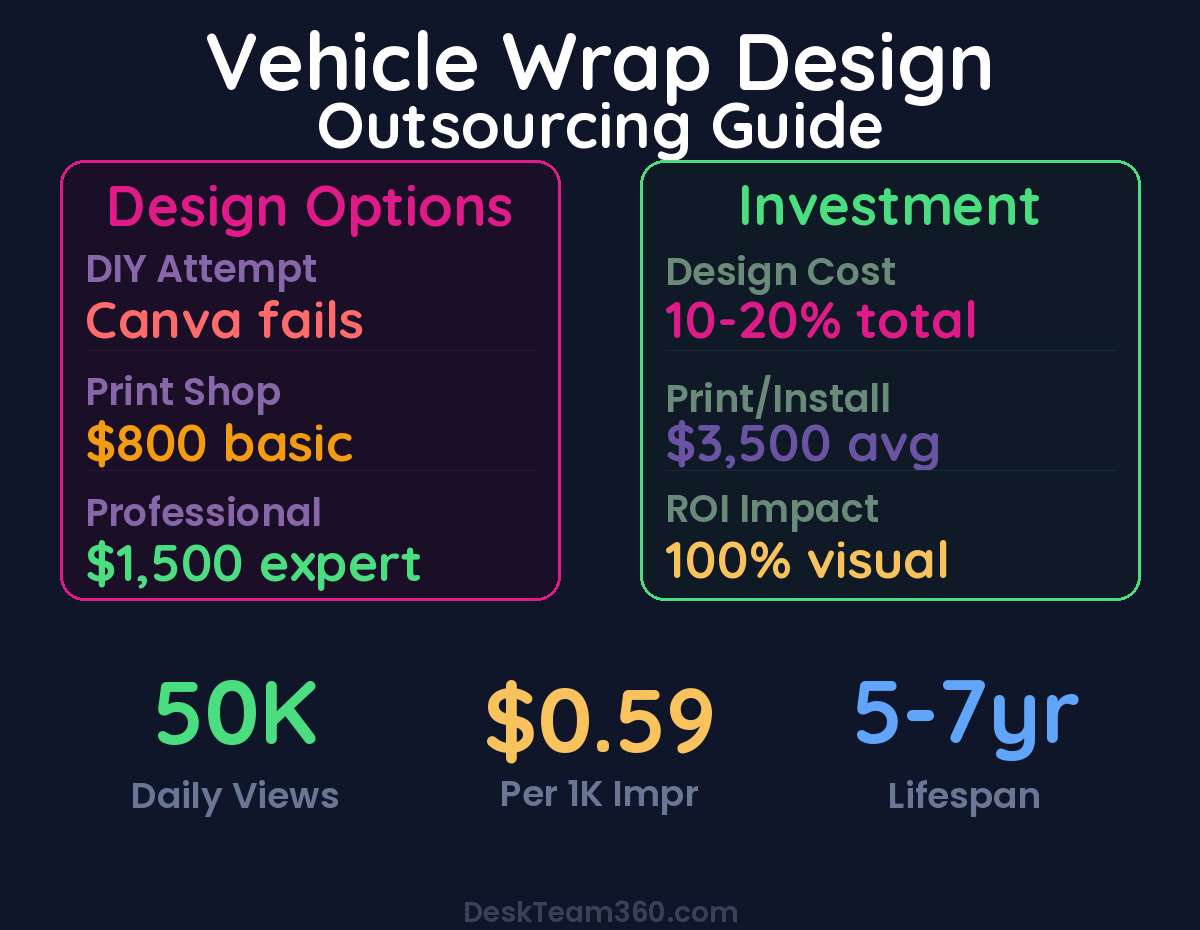
A properly designed and installed vehicle wrap generates 30,000-70,000 daily impressions according to the Outdoor Advertising Association. At the conservative end, that’s 30,000 per day × 365 days = 10.95 million annual impressions.
Total investment: $500-1,500 for design, $2,500-5,000 for printing and installation. Call it $6,500 total for a full wrap on a service van.
Cost per thousand impressions: $6,500 ÷ 10,950 thousand impressions = $0.59 per thousand. Digital advertising averages $2-8 per thousand impressions depending on the platform.
Vehicle wraps deliver advertising impressions at 10x lower cost than digital channels over their 5-7 year lifespan.
For industry benchmarks and research, see Clutch.co.
The ROI gets better with fleet vehicles. Design once, apply to multiple vehicles. A fleet of five service vans with professional wraps can generate 50+ million annual impressions for roughly the same design investment.
Common Mistakes That Waste Money
Hiring Based on Price Instead of Portfolio
The cheapest designer usually costs the most because you end up redoing everything. A $300 design on a $4,000 print job can waste the entire investment if the files are wrong or the design is unreadable.
Ask for vehicle-specific portfolio examples. A designer who’s great at business cards might be terrible at large-format vehicle graphics.
Skipping the Mockup Phase
Never approve a flat design without seeing it rendered on your vehicle. What looks great as a flat graphic can look terrible when wrapped around curves and body lines.
Good designers provide photorealistic mockups showing the design applied to your exact vehicle model from multiple angles.
Designing Without Print Shop Input
Different print shops have different file requirements and capabilities. Some accept only Adobe Illustrator files. Others work with high-resolution PDFs. Some have specific requirements for color management.
Get these specifications before design begins, not after you’ve already approved everything.
Forgetting About Fleet Consistency
If you plan to wrap multiple vehicles, design for scalability. The design should work across different vehicle sizes while maintaining brand recognition.
A design that looks great on a compact van might be completely wrong for a pickup truck or service trailer. Plan for your entire fleet, not just the first vehicle.
DIY vs. Professional: The Honest Cost Comparison
DIY Vehicle Wrap Design
Don’t. Consumer design tools like Canva can’t produce the file formats, color modes, or resolution needed for vehicle wrap production. You’ll waste the entire print budget on files your print shop can’t use.
This isn’t a “learn as you go” project. Vehicle wrap design requires specific software, fonts, and technical knowledge that takes years to develop.
Print Shop’s In-House Designer
Many print shops offer design services as part of their package. This can work for simple text and logo applications but usually produces uninspired results for more complex projects.
Print shop designers understand the technical requirements but may lack creative skills. You’ll get something that prints correctly but doesn’t stand out from other vehicles on the road.
Professional Vehicle Wrap Designer
Specialized vehicle wrap designers deliver both creative excellence and technical accuracy. They understand viewing distances, vehicle proportions, and print production requirements.
Outsourcing to a team that specializes in vehicle graphics means you get professional results without the trial-and-error learning curve.
The design cost is typically 10-20% of your total vehicle wrap investment. It determines 100% of the visual impact. This isn’t the place to save money.
Fleet Graphics: Where Outsourcing Really Pays Off
Fleet vehicles multiply the impact of good design because you design once and apply the template across multiple vehicles. The per-vehicle design cost drops with every additional unit.
Professional fleet graphics also ensure brand consistency. Your vehicles should look like they belong to the same company when they’re parked next to each other or seen separately around town.
Fleet planning considerations include vehicle turnover (cars get replaced every few years), different vehicle types (vans, trucks, trailers), and maintaining brand recognition across different sizes and shapes.
Make sure you own the design files and can adapt them for new vehicle models. A good designer delivers organized, editable source files that any print shop can work with.
For businesses managing multiple visual assets across different channels, having clear guidelines ensures everything from vehicle wraps to website graphics maintains consistent brand identity.
Ready to Turn Your Fleet Into a Marketing Asset?
At DeskTeam360, vehicle wrap design is part of our flat-rate graphic design service. Submit your brief with vehicle specifications and brand assets, and our team delivers production-ready files your print shop can use immediately.
We handle the technical specifications, file formatting, and design revisions so you get professional results without managing the details. Your vehicles become your best-performing marketing channel instead of rolling embarrassments.
Check out our unlimited design plans and stop settling for amateur-hour graphics on your company vehicles.
Free 5-Minute Video
See How DeskTeam360 Works in Under 5 Minutes
Watch the short video and see exactly how we handle design, development, and marketing implementation — so you don't have to.
Watch the Video →